
May 15, 2026 · codesystia-portalsiemensplc-programmingindustrial-automationiec-61131-3
The IDE looks familiar enough at first. The project tree does not mean what a TIA habit expects it to mean. Here is the orientation pass I wish I had read before clicking through my first project on my own.
What this article is, and what it is not
This is the second article in the Studying Codesys series. The first one set the table — who CODESYS GmbH is, the IDE-and-runtime split, the cost story, where Codesys actually shows up in the field. This one steps inside the IDE.
The series is for industrial control engineers broadly — PLC programmers, system integrators, panel builders, OEM machine builders, and anyone working in or adjacent to the IEC 61131-3 world. The point of view is mine: TIA Portal as the home platform, Codesys as the study target, and the comparisons running between them throughout. If you have TIA Portal background the mapping will land directly; if your home platform is Allen-Bradley, B&R, Beckhoff, Schneider, Wago, Eaton, ABB, or another IEC 61131-3 environment, most of the structural points hold — you will just translate the TIA-side anecdotes into your own equivalent.
I am not going to teach you how to write IEC 61131-3 code here. There are entire books and courses for that, including the Pratt textbook I flagged in Article 1. What I am going to do is walk through what a Codesys project looks like from the outside in — the file on disk, the tree on the left, the editors, the things that have direct TIA equivalents and the things that do not.
The same honesty rule from Article 1 applies through every paragraph. When I write about TIA, it is from inside years of customer-project work. When I write about Codesys, it is from inside the docs and the hands-on work on my own workstation — not from having commissioned a Codesys panel for a paying customer. Both voices are present in this article. Both are honest.

The version on disk in May 2026
The IDE you download from store.codesys.com is CODESYS Development System V3.5. The cosmetic V3.5 label has been on the box for more than a decade — what actually moves is the service pack underneath it. The current major release as of writing is V3.5 SP22, shipped in March 2026.
There is no Automation Licence Manager. No 21-day trial timer on the IDE itself. You create a Codesys account, you download the installer, you run it. From there you have a working engineering tool. The runtime side has its own licensing story, which I covered in Article 1 and will return to when the series gets to runtime targets.
One detail that has surprised me coming from TIA. Codesys runs a package model — the Codesys Installer lets you have multiple SPs installed side by side, switch the active one, and add or drop optional components (CFC editor, SFC editor, SoftMotion, Communication Manager, Git plugin, and many more) without reinstalling the IDE. The TIA habit of “open the right TIA version for this project” maps loosely. The Codesys habit is “open the right SP with the right packages active.” I have not yet worn this in deeply enough to have an opinion on which is less painful in practice, but the mechanism is different and worth knowing about up front.
The project file on disk
A Codesys project is one file. The extension is .project. In its classic form it is a single proprietary binary blob — opaque to external tooling, awkward in git, the same friction anyone who has worked with TIA’s .ap20 archives before VCI will recognise.
There is a newer form called File-Based Storage, which explodes a project into a folder of per-POU .st text files plus metadata. It tracks cleanly in git and exposes the source to external editors. As of writing it is still flagged as a preview product and ships with the Codesys Pro Developer Edition and Codesys Git 2.0. For Article 2 I am assuming the classic .project form because that is what a fresh installation produces by default, and that is what readers will see when they first open the IDE.
This will get its own article later in the series. The round-trip story matters disproportionately for anyone who wants to use AI tooling alongside a PLC project, which I will get into when the series reaches source-control and automation.
Two parallel project trees, not one
If a TIA engineer takes one structural point from this article, this is the one I would pick.
Codesys’s left-hand workspace has two parallel views, not one. The IDE calls them the Devices view and the POUs view. TIA Portal has the same two ideas — device-attached code and a project-wide reusable container — but folds the reusable side into a sidebar task card rather than promoting it to a co-equal tree.
The Devices view is the tree of target hardware and the application that runs on it. It is the structural part — the device, the fieldbus masters, the I/O modules, the task configuration, and the per-application program code.
The POUs view is a separate, parallel tree that holds POUs and DUTs intended to be reusable across applications and devices. The official Codesys phrasing is direct: “The POUs view includes objects that can be used throughout the project. Programming objects that are intended for a specific application must be inserted below the application object in the Devices view.”
Coming from TIA Portal, the closest map is this: think of the POUs view as the project’s internal library — the equivalent of the Project Library you see in the TIA Portal sidebar above each device’s Program Blocks folder. Then think of the Devices view as the device-specific Program Blocks folder, the place where code actually gets executed.
The first habit to unlearn here is the TIA reflex of writing everything under the device and reaching for the Project Library rarely if at all. In Codesys, code that is meant to be reused across multiple applications or devices lives in the POUs view by intent. Code that belongs to exactly one application on one device lives under that application in the Devices view. The dividing line is reuse scope, declared up front by where you put the file. The TIA mechanism exists for the same purpose; Codesys just makes it impossible to ignore. Engineers coming from Allen-Bradley’s Add-On Instructions, B&R’s library projects, or Beckhoff’s TwinCAT libraries will recognise the idea — Codesys is just unusually explicit about it at the project-tree level.
I do not want to overclaim about how this feels in long-term use. I have only worked through Codesys on my own workstation, on demo projects of my own making. Whether the split scales gracefully in a large multi-device project, or whether it becomes a source of “where did I put that POU again” friction, is something I will only be able to comment on honestly after more hands-on time. The structural argument for the split is clean. Whether it lives up to that argument in production is something I will revisit once I have logged more hours.
Walking the device tree
The standard project drops you into the Devices view with the following hierarchy.
Project root
└── Device (e.g. "CODESYS Control Win V3 x64")
    ├── PLC Logic
    │   └── Application
    │       ├── Library Manager
    │       ├── PLC_PRG (PRG)
    │       ├── Task Configuration
    │       │   └── MainTask
    │       │       └── PLC_PRG (assigned)
    │       └── (GVLs, DUTs, more POUs as you add them)
    ├── Fieldbus master(s)
    │   └── Slave devices, I/O modules
    └── Other device-tree children
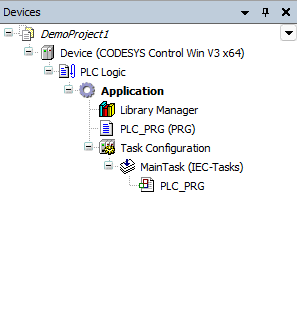
A few things in this tree do not have one-to-one TIA equivalents, and they are worth naming.
Application is the unit that runs on a device. A device can host more than one application in principle, though most projects have exactly one. There is no TIA equivalent — TIA has the Program blocks folder under a CPU, and that folder is implicitly the application for that CPU. Codesys exposes the application as a named, separable thing. If you have a project with multiple devices, each device gets its own Application node.
PLC Logic is an organisational node that sits between the device and the application. You do not put code here. Applications live directly under it. Through a TIA lens it looks like a redundant layer at first, but it is where Codesys hangs PLC-wide settings that are not device-hardware and not application-code.
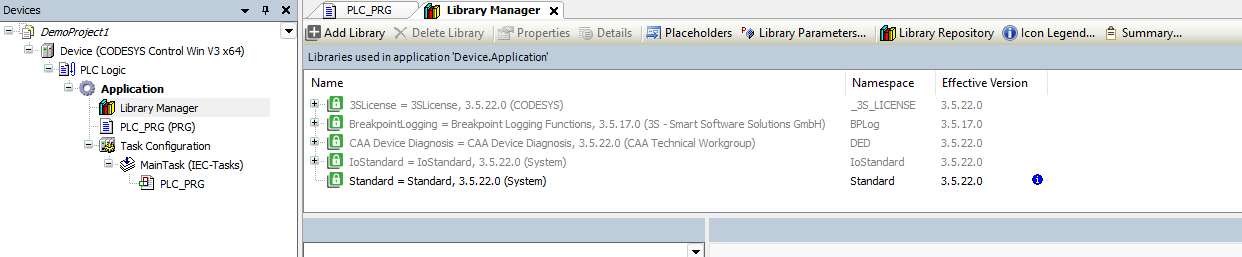
Library Manager is one per application. It is the place where you see and pin the libraries the application uses. The closest TIA equivalent is the Library window — but here the attachment is per-application, not project-global. A fresh Standard Project ships with five libraries pre-pinned from four different publishers (Codesys, 3S, CAA Technical Workgroup, System) — a denser default than the TIA equivalent. One of those five is pinned to an older SP than the rest, which is the kind of version-pinning detail a later library article will pick up. For now, the orientation point is that libraries are attached to applications, not to projects.
Task Configuration is where execution scheduling lives. Codesys does not have a fixed catalogue of OBs the way TIA does. You declare tasks explicitly, and you assign POUs (typically PRGs) to them. Default project state is one cyclic MainTask at priority 1, period 20 ms, with PLC_PRG assigned. That is the closest analogue to TIA’s OB1 default.
If you need the equivalent of a TIA cyclic interrupt OB35 firing at 10 ms, you do not look for OB35 — there is no OB35. You create a second cyclic task with a 10 ms period, set its priority above MainTask, and assign the POU you want to run there. The task model is its own article later in the series; the structural point for Article 2 is that the task list is yours to define rather than yours to choose from.
POU types — same vocabulary, slightly different shape
Codesys, in proper IEC 61131-3 vocabulary, calls every unit of code a POU — Program Organization Unit. There are three primary kinds.
| Kind | Codesys label | TIA equivalent | Behaviour |
|---|---|---|---|
| Function | FUNCTION (FUN) | FC | Stateless. Returns one typed value. Same inputs always give the same output. |
| Function block | FUNCTION_BLOCK (FB) | FB | Stateful. Each instance has its own memory. |
| Program | PROGRAM (PRG) | OB-equivalent or PRG | Single-instance. Intended to be assigned to a task and run cyclically. |
PLC_PRG is the default PRG the standard project ships with, pre-assigned to MainTask. It is the cleanest analogue to TIA’s OB1: the entry point you fill in on day one to get a program running.
A few subtle differences between the platforms, worth naming because they are where habit misfires.
A TIA FB carries an Instance DB as a separate first-class object in the project tree. You can right-click it, look at its current values, snapshot it. A Codesys FUNCTION_BLOCK does not. Its instance is declared as a VAR in some surrounding scope — typically inside a PRG or another FB. From the IDE you still get online monitoring of the instance’s variables, but there is no separate “instance DB” object next to the FB in the tree. The instance lives where it was declared.
This is the same design choice I described in an earlier AX series article on TIA’s data block model — except in the opposite direction. TIA puts data into first-class browseable objects in the tree. SIMATIC AX and Codesys fold it into language declarations. Neither approach is wrong. The TIA approach gives you clear commissioning surfaces and an obvious place to monitor state. The Codesys approach gives you fewer objects to manage and tighter scoping rules. I prefer the TIA model for commissioning a large machine, where being able to point at an instance DB in the tree saves explanation time. I prefer the Codesys model for tight, library-style code where instance lifecycle is internal to the FB that owns it. Both reflect real engineering tradeoffs.
A few more POU-adjacent objects are worth naming. Some map cleanly onto TIA, others do not.
DUT — Data Unit Type. Direct match to TIA’s UDT. Same role, same idea. The Codesys vocabulary is just different.
Action. A named sub-routine that lives inside a POU — typically an FB or PRG — and can be called by name from elsewhere in that POU. TIA does not have a clean equivalent. The closest SCL pattern is disciplined region naming inside a long FB; Codesys makes the same idea a first-class object you can call.
Method and Property (V3 only). These are the OOP surface — methods are functions attached to an FB, properties are getter/setter pairs. They look closer to SIMATIC AX’s OOP surface than to classic SCL. The full OOP story is a later article in this series.
The editor surface
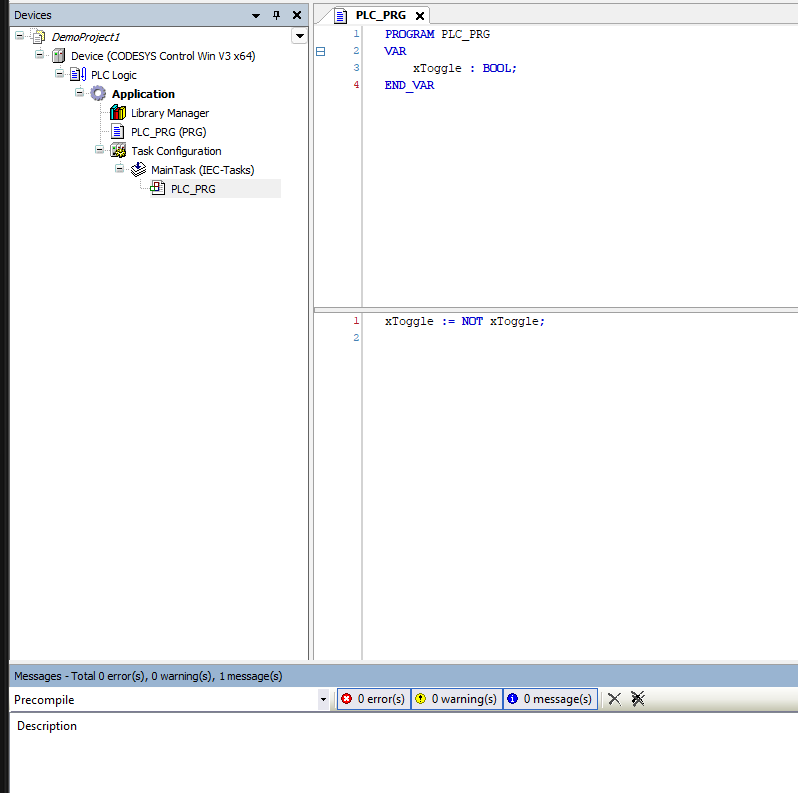
A POU in Codesys opens into a split editor. The top pane is the variable declaration — your VAR, VAR_INPUT, VAR_OUTPUT, VAR_IN_OUT, VAR_TEMP blocks. The bottom pane is the implementation — the code. Both panes are visible at the same time on the same screen.
TIA’s SCL editor splits these into two tabs — the interface table is one tab, the code window is another. The Codesys layout is closer to what SIMATIC AX does in VS Code, where the declaration and implementation sit in the same .st file with the declarations at the top. Whichever side of that you prefer is a matter of taste. I have found the Codesys split useful for short POUs where the variables fit on one screen and I can see what each name refers to without flipping tabs. For long FBs where the variable list dwarfs the screen, I prefer TIA’s tabbed model. Neither is strictly better.
Codesys ships six programming language editors. Five are IEC 61131-3 standard, one is a Codesys extension.
- ST (Structured Text) — IEC 61131-3, equivalent to TIA’s SCL. The bulk of any modern application code.
- LD (Ladder Diagram) — IEC 61131-3, equivalent to TIA’s LAD.
- FBD (Function Block Diagram) — IEC 61131-3, equivalent to TIA’s FBD.
- SFC (Sequential Function Chart) — IEC 61131-3, equivalent to TIA’s GRAPH.
- IL (Instruction List) — IEC 61131-3, deprecated in the 2013 revision of the standard. Best avoided for new projects.
- CFC (Continuous Function Chart) — a Codesys extension, not part of IEC 61131-3. Free-placement function-block diagram with feedback paths and online value display. There is no clean TIA equivalent. CFC is one of the reasons process and motion engineers reach for Codesys for free-form control diagrams.
A useful thing about Codesys editors is that the debug surface is uniform across them. Breakpoints, watches, force values, online value display, step-into and step-over all work in ST, LD, FBD, SFC, and CFC. IL is the outlier with reduced debug support, which is another reason it has aged out.
What I tried first, and what I found
I did the smallest possible build the day after I installed the IDE on my workstation. New Project, Standard Project, CODESYS Control Win V3 x64 device, ST as the language. The Devices view opened with Device → PLC Logic → Application → Library Manager, PLC_PRG, Task Configuration already laid out. I double-clicked PLC_PRG, declared an iCounter : INT; in the declaration pane, typed iCounter := iCounter + 1; in the implementation pane, pressed F11 to build, then F8 to download into Simulation mode, then F5 to run. The counter ticked.
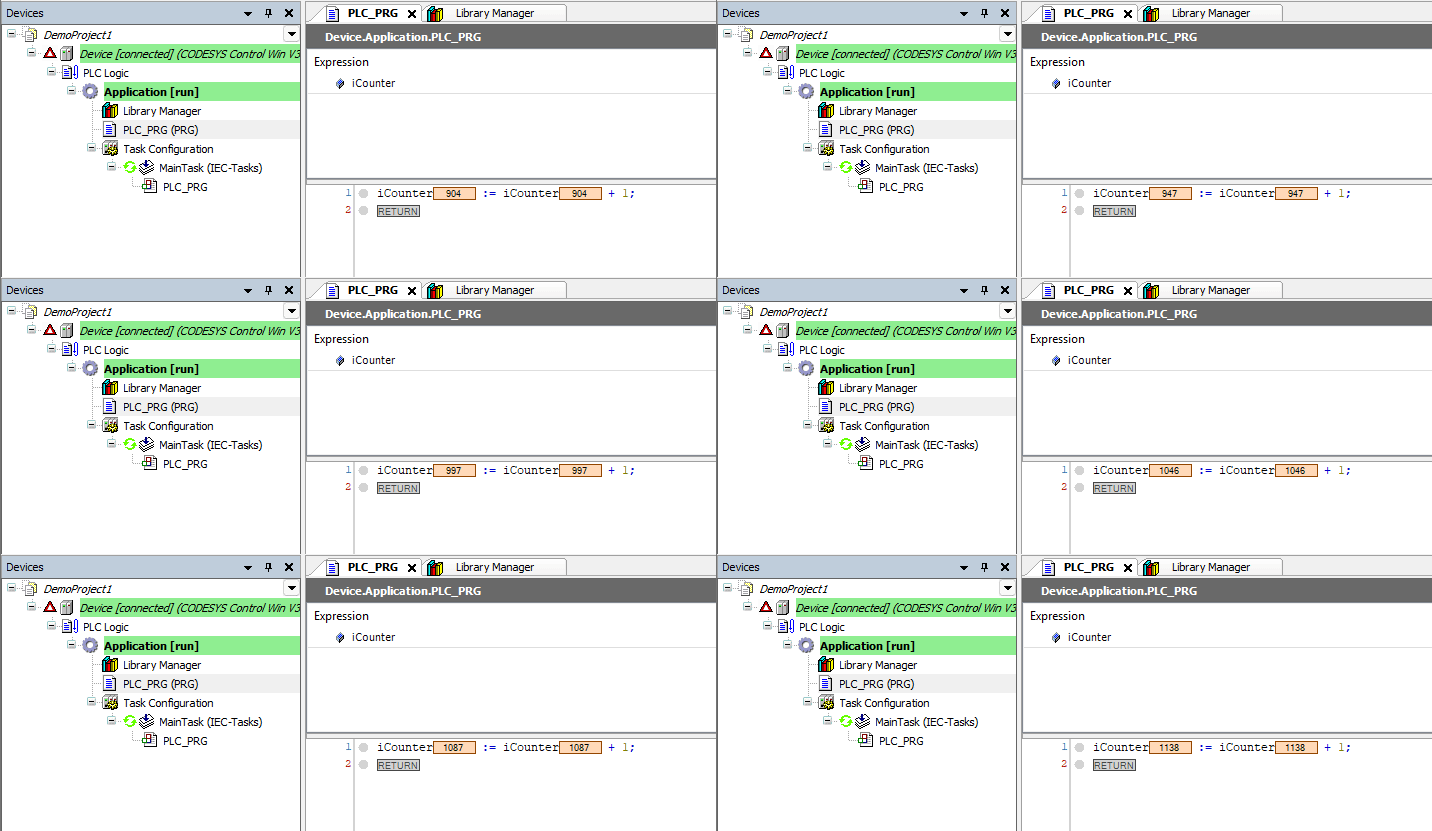
From open-the-IDE to first-running-program took roughly 15 minutes on a workstation that already had the IDE installed. That part of the Codesys experience is genuinely fast. I will not pretend this proves anything about long-term productivity on a real machine build — that is what the next year of this series is going to find out — but the time-to-first-program is worth knowing about when sizing the investment of learning Codesys at home.
The first thing that felt off was deciding where to put my next POU. In TIA the answer is automatic — under Program Blocks, under the CPU. In Codesys the choice between “under the application” and “in the POUs view” took me a beat to think through. For a single-application demo project the answer is always “under the application.” For anything I would want to reuse across two applications in the same project, the rule I settled on is to put it in the POUs view from the start. The mental cost of that decision is small once the rule is clear; the cost of getting it wrong only shows up later when you find yourself copy-pasting a POU between applications.
What this means for someone studying both platforms
The orientation difference between TIA and Codesys is real but small. The same vocabulary works in both — POUs, FBs, FCs, instances, global variables, cyclic execution. The structural differences are in:
- One project tree versus two parallel views — the Devices/POUs split.
- Application as a named object instead of an implicit Program Blocks folder.
- A task list you declare instead of an OB catalogue you pick from.
- Per-application library attachment instead of project-global library access.
- Instance lifetime tied to declaration scope instead of a separate instance DB object.
- A six-language editor with uniform debug, including CFC, which TIA does not match.
None of these is a reason to leave one platform for the other. They are reasons to know the new shape before you start writing code in it, so the first week of work does not get spent fighting the IDE.
The honest version is that the IDE is the easiest part of Codesys to pick up — especially with TIA Portal background, and broadly approachable for anyone with an IEC 61131-3 environment behind them. The hard parts come later: the language details where ST and SCL diverge, the runtime targets, the library model, the source round-trip story, the OPC UA stack, the HMI variants. The IDE is the doorway. Once you are through it, the work begins.
A real invitation to push back, again
Same standing offer as Article 1. If you write Codesys for a living, and something in this article reads wrong to you, I want it in the comments. I am writing my way through the platform in public on purpose — the fastest way the series becomes useful is engineers who actually deploy Codesys correcting the TIA engineer who is figuring it out.
The next article goes inside the language — Structured Text in Codesys, where it diverges from SCL, and the first details that surprise anyone writing the same algorithm in both dialects.
Working on something similar?
I am Yuriy Mosiyenko — I design and program industrial control systems, mostly Siemens, as a one-person practice based in Bedford, Nova Scotia, working with customers across Canada. If you have a controls project you cannot staff internally, tell me what you are building.
