
May 29, 2026 · codesystia-portalplc-programmingruntimesoft-plcindustrial-automationiec-61131-3
Three articles in, I know the ecosystem, the project tree, and the language. Now comes the question every PLC engineer eventually asks: where does it actually run — and what does it cost to run it there?
What this article is, and what it is not
This is the fourth article in the Studying Codesys series. The first set the table. The second walked the IDE. The third went inside the language. This one steps outside the IDE entirely and looks at the runtime side of the equation — what actually executes a Codesys application when you hit F8.
The series is for industrial control engineers broadly — PLC programmers, system integrators, panel builders, OEM machine builders, and anyone who lives in or adjacent to the IEC 61131-3 world. The point of view is mine: TIA Portal as the home platform, Codesys as the study target.
The honesty rule applies through every paragraph. TIA-side claims come from years of customer-project work. Codesys-side claims come from docs reading and hands-on time on my own workstation against the demo runtime. I have studied the runtime catalog thoroughly, but I have not deployed Codesys on a paying customer site.
The structural shift: software separate from hardware
In TIA Portal, “the runtime” is not something you think about separately. When you buy an S7-1200 or S7-1500 CPU, the firmware that executes your SCL code is on that CPU. Siemens designed the hardware, the firmware, the scan cycle, the diagnostic buffer, and the IDE toolchain as one integrated product. The CPU is the runtime. You do not install a separate runtime package, you do not choose which runtime to license, and you do not decide which hardware vendor it runs on. The hardware and the execution engine are the same purchase.
Codesys inverts this. The IDE (CODESYS Development System) and the runtime (CODESYS Control) are separate products from the start. Your compiled application is a bytecode package. The runtime is the layer that executes that bytecode on a given piece of hardware. The same compiled bytecode can run on a Windows laptop, a Raspberry Pi, a Wago PFC200, a Schneider M251, or a Beckhoff IPC — as long as a CODESYS Control runtime is running on that hardware and the device description in the IDE matches the target.
This separation is the defining property of the platform, and it is the model CODESYS GmbH describes for device manufacturers. For a TIA engineer picking up Codesys, the adjustment is not syntactic — it is structural. When you start a Codesys project, you choose a runtime target first, and that choice determines what hardware you will be writing for, what device descriptions are available, and what field bus masters and I/O modules the IDE will recognize.
Coming from TIA Portal, this feels like you have been handed a choice you did not know you had to make.
The runtime catalog — what CODESYS GmbH ships directly
CODESYS GmbH ships several runtime products of its own, independent of any hardware manufacturer. These are the runtimes you get when you study vanilla Codesys.
CODESYS Control Win SL — the Windows SoftPLC
This is the entry point. CODESYS Control Win SL turns a Windows PC into an IEC 61131-3 soft PLC. It runs as a process under Windows, and with it installed, the same machine running the IDE also becomes a target you can download to — as the Control Win SL product page describes it.
Without a licence, it runs in demo mode: two hours of full-function operation, then a manual restart is required. No features are removed in demo mode — you get the complete runtime, the full communication stack, online monitoring, forced values, breakpoints. The only limit is the timer, and the CODESYS Store product page states it directly: without a license the software runs in demo mode for two hours, after which a manual restart is required.
For learning and prototyping, the two-hour cycle is not a real barrier. You restart the runtime, not the IDE or the project. The application state resets — watch that if your demo project relies on retentive values — but the code is already compiled and the IDE is still connected to the project. From open-IDE to restarted runtime to back-in-session is about 30 seconds once you know the routine.
One clarification worth making: earlier notes in my own research log referenced a “30-minute restart cycle” for CODESYS Control Win. The Codesys Store page, verified against the current version in May 2026, explicitly states two hours. The two-hour figure is the authoritative number for the current SKU. The 30-minute figure may have applied to an older service pack or a different product variant — treat it as superseded.
The current version as of writing is 3.5.22.20 (released 20 May 2026), requiring at minimum CODESYS Development System V3.5 SP19 Patch 1, with V3.5 SP20 or higher recommended — the Control Win SL listing gives version 3.5.22.20 under article number 2302000003-SW.
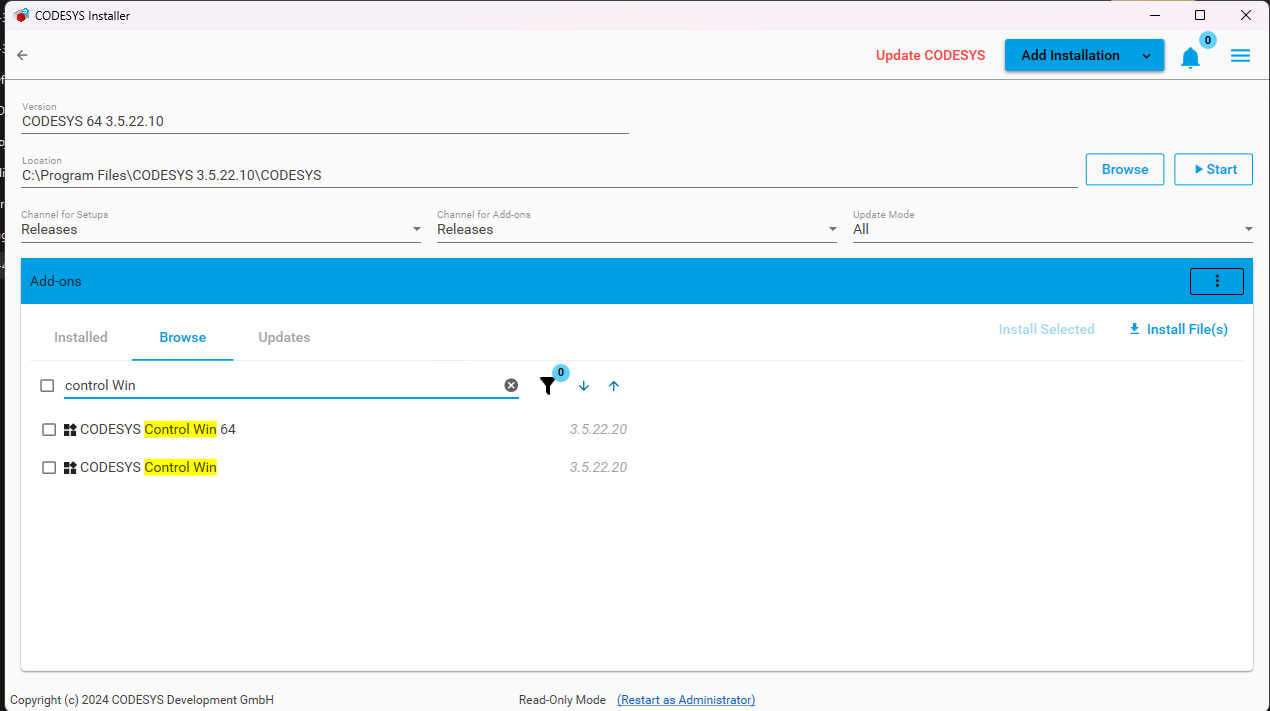
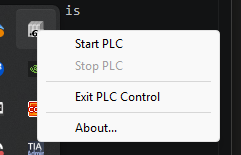
The install path is through the CODESYS Installer — the package manager that ships with the IDE. You open it from inside the IDE, find CODESYS Control Win (or CODESYS Control Win 64 for the 64-bit build) in the package list, and add it. After the install completes, a tray icon appears for runtime control: start, stop, restart, view log. The IDE’s New Project dialog now shows “CODESYS Control Win V3 x64” (and x86) as selectable device targets.
One name, three labels depending on where you are looking: the Codesys Store sells it as “CODESYS Control Win SL” (SL = Single License — the licence stored on a single target device, as the CODESYS Store FAQ puts it in Section 17, “For products with the suffix ‘SL’ for Single License”), the Installer lists the add-on as “CODESYS Control Win” / “CODESYS Control Win 64”, and the project device target reads “CODESYS Control Win V3 x64”. If that feels like the kind of docs-vs-UI friction this series keeps running into — it is.

The real-time story is worth naming clearly. CODESYS Control Win SL is soft real-time — it runs as a regular Windows process and shares the CPU scheduler with every other Windows process running at the time. Cycle jitter from antivirus scans, Windows Update background activity, and OS interrupts is real. For learning, demo work, and slow-loop process control, this is irrelevant. For closed-loop motion control or anything requiring cycle times under about 10 ms without jitter, it matters. That is what the RTE variant is for.
The closest Siemens equivalent is PLCSIM Advanced — a Windows-hosted simulated S7-1500 that lets you test without real hardware. But PLCSIM Advanced is a paid product tied to a TIA Portal version, with its own installer and activation. CODESYS Control Win SL is free to demo indefinitely with no expiry and no version binding. The gap between those two experiences — especially at the start of studying a new platform — is noticeable.
CODESYS Control for Raspberry Pi SL — the low-cost hardware path
This is the runtime with no real equivalent in the Siemens catalog.
CODESYS Control for Raspberry Pi SL is an adapted Codesys runtime for the Raspberry Pi family, sold directly from the Codesys Store at €55.00 plus VAT, as the Raspberry Pi runtime page lists it.
The page is explicit about the intended use: this runtime is for non-commercial use — private use, test, and teaching. For commercial projects you need a different licensing path. The Raspberry Pi SL listing states that the combination of Raspberry Pi and a CODESYS Runtime is for private use, test and teaching purposes, and that commercial use is not permitted.
In demo mode (no licence), it runs for the same two hours before shutting down, identical to the Win SL behaviour — the product page notes that if no valid full license can be found, CODESYS Control runs for two hours without functional limitations before shut down. With the €55 licence it runs continuously.
Supported hardware: all Raspberry Pi models, including the Compute Module. Pi 5 support was added in version 4.11.0.0, per the Raspberry Pi runtime page.
The install path is through the IDE itself. The CODESYS Deploy Tool — included by default — connects to the Pi over the network, pushes the runtime to the Pi’s Linux file system, configures it as a service, and starts it. After each Pi restart, the runtime comes up automatically. From the IDE, the Pi then appears as a target through the network gateway, exactly the same as a Win SL target — same download button, same online monitoring, same breakpoints.
The I/O story is native: GPIO, SPI, I²C, and 1-wire interfaces are accessible through standard Codesys device descriptions. EtherCAT, CANopen, and Modbus TCP/RTU are available as add-ons.
For a TIA engineer, this is genuinely new territory. The closest Siemens product in spirit is the LOGO! — an entry-level controller with its own closed tool chain — but the Codesys-on-Pi combination is a full-featured IEC 61131-3 environment on sub-USD-100 hardware. Siemens does not sell a sub-USD-100 entry into S7-1500-class programming. The Pi runtime exists in a completely different cost bracket.
For engineers who want real I/O without buying a Siemens rack — or any rack — this is the path. A Pi 4 or Pi 5, a €55 licence, and you have a continuously-running IEC 61131-3 controller with native GPIO, SPI, and I²C on sub-USD-100 hardware. For private study, teaching rigs, and low-cost prototypes, that is a genuinely compelling combination. Whether it makes sense before you have a concrete reason to move off the Windows runtime is a separate question — the Windows runtime handles everything that matters in the early stages of learning: language, project structure, task model, visualization, debug workflow. The Pi becomes the right next step when you have a reason to test against real I/O or need a continuously-running target without the two-hour restart.
CODESYS Control RTE SL — Windows with a real-time kernel
Where Win SL is soft real-time, CODESYS Control RTE SL adds its own real-time kernel on Windows for deterministic, hard real-time execution. Cycle times in the low-millisecond range with minimal jitter — the Control RTE SL page states that it has its own real-time kernel and provides deterministic execution of IEC 61131-3 control applications.
Like Win SL, the RTE runs in demo mode for two hours without a licence, per the same Control RTE SL page. Licensed use is the normal deployment scenario for serious test stands, machine builders who need closed-loop motor control on Windows hardware, or applications where the predictability of an embedded PLC is required on a PC platform.
The fieldbus catalog is broad: EtherCAT, PROFINET, EtherNet/IP, CANopen, Modbus, Sercos III. OPC UA server and client, MQTT, SNMP are included. SoftMotion for motion control is an optional add-on.
The TIA equivalent — the closest historical analogue — was WinAC RTX, Siemens’s real-time Windows PLC product. WinAC RTX was retired, and Siemens has not replaced it with something structurally similar. CODESYS Control RTE fills a space Siemens has largely stepped back from.
For the learning path this series is following, Control RTE is out of scope until there is a real deterministic-control use case to test it against. I am noting it here for completeness, not because it is the next step.
The wider runtime ecosystem
These three runtimes cover what CODESYS GmbH ships as standalone products for direct purchase. The Codesys runtime picture is actually much wider — understanding it requires stepping back and looking at how the platform spreads.
Embedded in OEM hardware — where Codesys actually lives in the field
The largest slice of Codesys deployments in the field is not Win SL on laptops or Pi-based test rigs. It is vendor PLCs, drives, IPCs, and safety controllers that ship a licensed CODESYS Control kernel as their primary firmware.
CODESYS GmbH licences the runtime kernel to hardware manufacturers. The OEM builds their hardware, integrates the runtime, develops device descriptions and vendor-specific libraries, and ships the device as a complete product. The engineer who buys a Wago PFC200, a Schneider M251, a Lenze c520, an ifm CR1102, or a Bosch Rexroth ctrlX PLC is buying hardware that happens to run a CODESYS Control kernel underneath — which is exactly the relationship CODESYS’s device-manufacturer overview sets out.
From the programmer’s point of view, connecting to any of these devices from the CODESYS IDE looks essentially the same. You install the vendor-supplied device description package, the device shows up in the hardware catalog, you set the device target in your project, and you use the same download/online-monitor/debug workflow you use with Win SL. The IEC 61131-3 application code is portable across all of them. What changes per vendor is the I/O library, the hardware diagnostic objects, and whatever the vendor has layered on top of the base runtime.
This is the structural difference from TIA Portal with no real parallel. Siemens does not licence its runtime kernel to Wago or Schneider or Eaton. The S7-1500 runtime runs on S7-1500 CPUs, full stop. Codesys’s runtime portability is exactly why the IDE is free — the commercial return is in the OEM runtime licences, not in per-engineer seat fees.
For the engineer studying vanilla Codesys, this means: the skills you build on Control Win SL and Control for Raspberry Pi SL transfer directly to any of the OEM hardware targets. The project structure, the language surface, the task model, the GVL namespace, the persistence keywords, the debug workflow — all of it carries across. What you add per target is a vendor device description and familiarity with the vendor’s specific I/O library. The foundation is reusable.
CODESYS Edge Gateway
A bridge component that exposes a running Codesys controller’s data services to the Codesys Automation Server and external clients over a defined port. Available for both Windows and Linux. This is relevant for fleet management — deploying and monitoring many distributed controllers from a central dashboard — and for connecting a controller into a cloud or edge data pipeline, as the Edge Gateway product page describes.
Not relevant to the learning path today, but I note it here because it will come up when the series turns toward the Codesys Automation Server topic.
CODESYS SoftMotion
A runtime extension that turns a Codesys SoftPLC into a motion controller — CNC path planning, robotics kinematics, and multi-axis coordinated motion. The application-level libraries (SM3_Basic, SM3_Drive, SM3_CNC, SM3_Robotics) ship with the IDE; the SoftMotion licence activates on the runtime target, as set out on the SoftMotion bundle page.
The TIA equivalent in mission is Siemens’s Technology Objects for motion on S7-1500T, paired with Startdrive for SINAMICS drives — different architecture, similar purpose. Codesys SoftMotion is IEC 61131-3-native and fieldbus-agnostic; the Siemens motion stack is tightly coupled to PROFINET and the Siemens drive ecosystem.
SoftMotion is not part of my current learning path. I note it because it shows up in the Codesys ecosystem context, particularly in OEM machinery and the mobile-equipment segment where Codesys has a strong position.
CODESYS Control Virtual
A newer SKU (post-2023) that containerizes the Codesys runtime for Docker or virtual machine environments — aimed at cloud-edge and virtualized infrastructure scenarios. Less mature than the bare-metal runtimes and the supported orchestration story is still evolving. I have not verified the current SP-level availability in detail, and I would not commit to specific feature claims for it without checking the current Codesys Store page first. Note it as existing; verify before promising it to anyone.
Vanilla Codesys vs. the vendor flavours — an important line
Throughout this series, the study target is vanilla Codesys — the CODESYS GmbH IDE plus Codesys Control Win SL or Control for Raspberry Pi SL. Vendor flavours deserve a clear description because you will run into them.
When a hardware manufacturer licences the Codesys kernel and builds a product around it, they often deliver a customized or rebranded IDE alongside the hardware. Wago has e!COCKPIT. Schneider has EcoStruxure Machine Expert. Eaton has XSoft-CoDeSys. Bosch Rexroth has ctrlX Works. Festo has Automation Suite. Lenze has PLC Designer. ABB has Automation Builder. Each of these tools layers the vendor’s own look-and-feel, pre-installed device and I/O libraries, and sometimes locked-down hardware target selection on top of the upstream Codesys platform.
The IEC 61131-3 layer is the same in all of them — the language, the POU types, the task model, the GVL namespace all look familiar. The vendor-specific parts — hardware diagnostics, drive integration, motion libraries, communication stacks for the vendor’s own fieldbuses — differ per environment.
The reason for starting with vanilla Codesys and not jumping directly into one of the vendor tools is this: studying the upstream platform first makes the vendor differences visible. When you already know what vanilla Codesys looks like, you can tell immediately which parts of e!COCKPIT or EcoStruxure Machine Expert are vendor-specific and which parts are the portable IEC 61131-3 and Codesys core. If you start on a vendor tool, those two layers blur together, and you end up thinking Schneider-specific behaviours are Codesys behaviours, or vice versa. The foundation matters.
The decision matrix — which runtime for which job
To make the runtime catalog concrete, here is how I am thinking about which target for which kind of work. Framed for the learning path, not as a general deployment guide.
| Goal | Runtime | Notes |
|---|---|---|
| First exposure — write Codesys ST today | Control Win SL, demo mode (2-hour cycle) | Free, runs on the machine you already have. Same machine as the IDE. Restart every 2 hours. |
| Develop and demo without buying hardware | Control Win SL + Codesys Visualization | Browser-served HMI on the same laptop. Effective for demos to colleagues. |
| Prototype with real I/O on a tight budget | Control for Raspberry Pi SL + Pi 4 or Pi 5 | €55 licence, sub-USD-100 hardware, GPIO / SPI / I²C native. Non-commercial use. |
| Deterministic cycle times for closed-loop control | Control RTE SL on a qualified Windows IPC | Hard real-time. Required for motion control on Windows. Paid product. |
| Demo portability to a customer running Wago / Schneider | Same .project, retarget to customer hardware via device catalog | The portability is the demo. Requires the vendor’s device description package in the IDE. |
| OEM project on licensed Codesys-runtime hardware | The OEM’s hardware (e.g. Wago PFC200, Schneider M251) | The OEM ships the runtime; you buy the device. |
| Motion / CNC / robotics | Control SL + SoftMotion on appropriately sized hardware | SoftMotion adds the motion runtime kernel. Application uses SM3_* libraries. |
My own next step stays on the Windows runtime. The runtime catalog article is the last of the surface-level foundation pieces — IDE, building blocks, language, where it runs. Everything coming up in the series runs on Control Win SL. No additional hardware purchase, no paid licence, no expiry. The free Windows runtime is the home base for the work ahead.
What the licensing model means in practice
The broad pattern for Codesys licensing is: the IDE is free, the runtime is the licensed product — the same model spelled out on both the Control Win SL page and the Raspberry Pi SL page.
For learning and personal use, “demo mode with a two-hour restart” covers most of what you need before you have a paying reason to run continuously. For non-commercial Pi-based work, €55 gets you a fully licensed runtime on a hardware target that fits in your hand.
The application-based licensing model is the current standard for the newer SKUs. The licence scope is defined by what your application actually uses — the I/O channel count, the communication protocols, the add-on modules. The older single-device model (one licence per physical controller) still exists for backward compatibility. This is different from TIA Portal’s per-engineer-seat model, which charges for the engineering tool rather than for the deployed application. Different cost shape, different point in the value chain.
One honest note: for OEM-licensed Codesys hardware (Wago, Schneider, ifm, and others), the runtime licence cost is built into the device purchase price. The engineer buying and programming a Wago PFC200 has effectively already paid for the Codesys runtime through the device cost. That is the model that funds CODESYS GmbH at scale — OEM royalties, not per-engineer IDE fees.
My opinion on the runtime story — take it for what it is
One engineer’s view, from inside both ecosystems.
The structural argument for the Codesys runtime model is strong. Free IDE, demo-mode runtime that costs nothing until you need to run continuously, a hardware target at €55 for serious learning and prototyping — that is a genuinely low barrier to entry. The TIA Portal path to the same outcome requires either a Siemens trial licence that expires in 21 days, a PLCSIM Advanced subscription for virtual simulation, or actual Siemens hardware. None of those is €55.
The trade-off is real too. TIA Portal’s tight integration between the IDE, the firmware, the diagnostic buffer, and the hardware tooling — Startdrive for drives, TIA for the CPU, same interface for both — is the payoff for the hardware lock-in. When commissioning a large machine with 20 axes and a complex safety system, the integration is worth something. I have seen it save hours on a marine cargo-handling project that would have been much harder to debug on a more loosely integrated stack.
The Codesys runtime model is the right call for someone studying, prototyping, or building OEM machines in a hardware-agnostic context. The TIA model is the right call for someone who already lives inside the Siemens ecosystem and whose customers run Siemens hardware. As study platforms go, Codesys is more accessible at the start. Whether that translates into better productivity on a real customer site, I will know more after the practical phase of this series.
I might be wrong about how the maths work out at scale — that is a judgment that needs real deployment data I do not yet have. But from where I sit, the runtime model Codesys built is unusually fair to the engineer doing the learning.
A real invitation to push back, again
Same standing offer as the first three articles. If you have run Codesys on real hardware — Win SL, Raspberry Pi, or an OEM target — and something here reads wrong, I want it in the comments. The practical runtime experience is exactly what this article is missing, and correction from engineers who have it is how the series sharpens.
The next article is about source round-trip — working with a Codesys project’s source code outside the IDE, exporting it to individual text files, editing in an external editor, and tracking it in version control. TIA Portal engineers will recognize the question: can you manage this project like source code, or are you stuck with an opaque archive? That is what the next article takes on.
Working on something similar?
I am Yuriy Mosiyenko — I design and program industrial control systems, mostly Siemens, as a one-person practice based in Bedford, Nova Scotia, working with customers across Canada. If you have a controls project you cannot staff internally, tell me what you are building.
