
May 21, 2026 · codesystia-portalsiemensplc-programmingindustrial-automationiec-61131-3
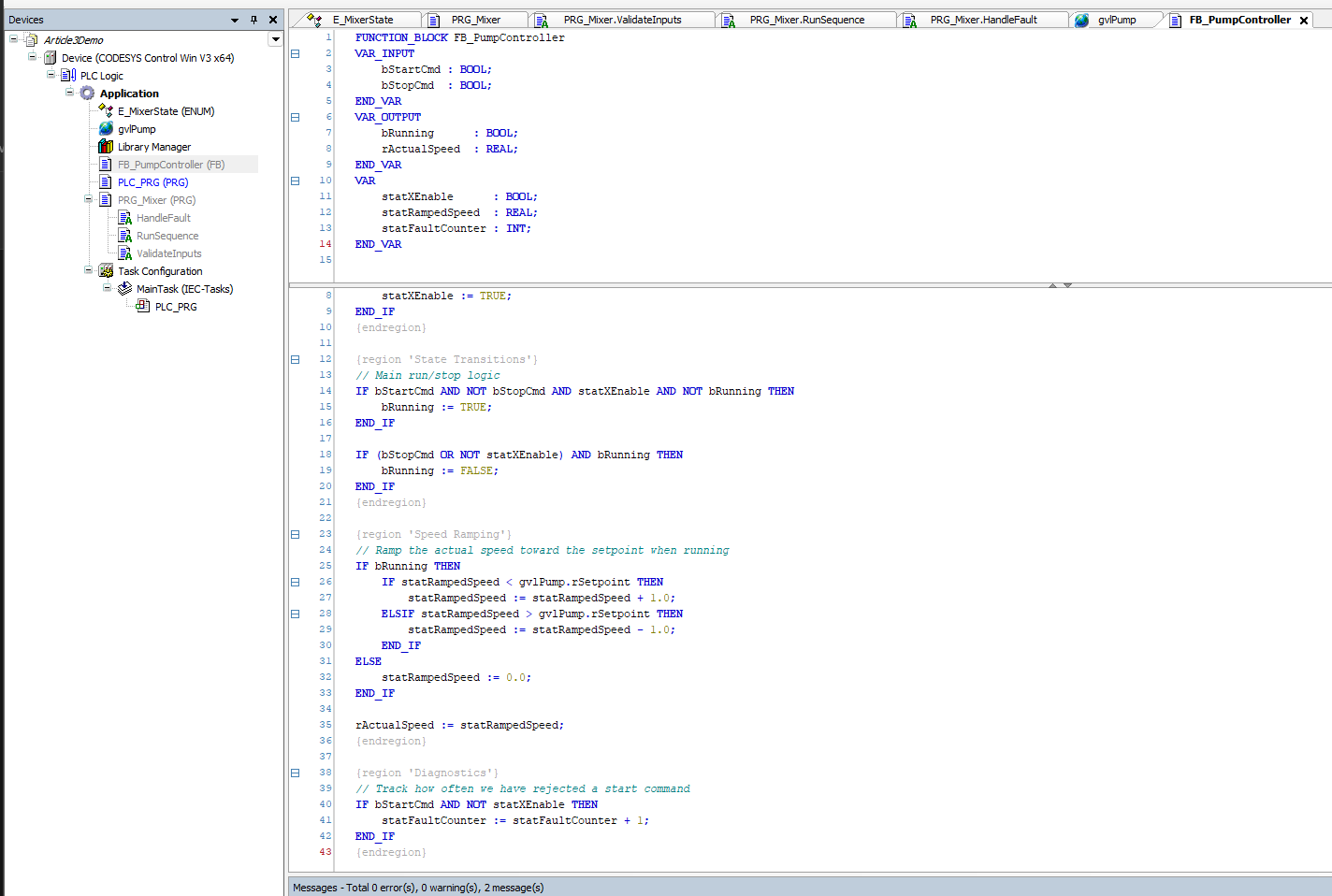
The code mostly reads. The places it does not read are concentrated in a few specific corners — declarations, scope marks, the OOP surface, and the pragma surface — and those corners are where a TIA SCL habit misfires. Here is the orientation pass.
What this article is, and what it is not
This is the third article in the Studying Codesys series, and the last one in the Foundations stretch before the series turns toward runtime targets. Article 1 set the table. Article 2 walked the project tree. This one steps inside the language.
The series is for industrial control engineers broadly — PLC programmers, system integrators, panel builders, OEM machine builders, and anyone who lives in or adjacent to the IEC 61131-3 world. The point of view is mine: TIA Portal as the home platform, Codesys as the study target, and the language comparison running between SCL and ST throughout. If your background is Allen-Bradley, B&R, Beckhoff, Schneider, Wago, Eaton, ABB, or another IEC 61131-3 environment, the structural points still land — translate the SCL-side anecdotes into your own dialect as you go.
I am not going to teach IEC 61131-3 from scratch. The Pratt textbook flagged in Article 1 does that job. What I am going to do is walk through the language surface in Codesys ST the way I read it as someone coming from TIA SCL — what looks identical, what looks identical but is not, and what does not exist on one side of the line at all.
The honesty rule from Articles 1 and 2 applies through every paragraph. TIA-side claims come from years of customer-project work. Codesys-side claims come from docs reading and hands-on time on my own workstation, against the free demo runtime — not from having commissioned a Codesys panel for a paying customer. Two voices, both present, both honest.

The big picture, before the differences
Most of Codesys ST and most of TIA SCL read identically. Both are IEC 61131-3 structured text. Same IF/THEN/ELSE/END_IF, CASE, FOR, WHILE, REPEAT. Same control-flow keywords (EXIT, RETURN, CONTINUE). Same numeric and time literals (INT#42, REAL#3.14, T#5s). The IEC core data types (BOOL, the integer family up to 64-bit signed and unsigned, REAL, LREAL, TIME, LTIME, DATE, DT, TOD) carry across. Both have strict typing, explicit casts, and a cyclic execution model.
A FOR i := 0 TO 9 DO arr[i] := i * 2; END_FOR loop in Codesys reads the same way it does in TIA SCL. The friction is concentrated in a handful of places — declarations, scope marks, the OOP surface, the pragma surface, the persistence model. Those are the corners worth walking through.
Local variables and scope visibility — # in SCL, naming convention everywhere
TIA SCL uses a # prefix on local variable references inside a POU body — #iCounter := #iCounter + 1;. The # is a scope marker baked into the language: it tells the reader and the compiler that iCounter is a local variable rather than a tag, a DB reference, or an input from elsewhere. Codesys ST does not use the # prefix at all. A local variable is referenced by its bare name: iCounter := iCounter + 1;.
What I have been leaning on for years is not the language # — it is a naming convention I apply in every TIA project. Static variables inside an FB get a stat prefix. The discipline is not part of any IEC standard, but it is documented in the Siemens TIA Portal Programming Style Guide — the Cheat Sheet lists stat as the default prefix for FB static variables, with statState as one of the examples Siemens themselves use. I have applied the same pattern across every TIA project for years. Here is what it looks like in a deployed class — a towing-winch main FB from a marine project:
statState                     : USInt;       // State Machine Step number
statNumberOfStates            : USInt := 8;
statReadyForState             : Array[0..9] of Bool;
statXEnable                   : Bool;
statXFaultReset               : Bool;
statHydraulicControlInterface : "typeWinchHydraulicControlInterface";
The prefix carries the scope at a glance, with or without a # from the language. TIA gives me both — the language # on a reference and the stat prefix in the declaration. Codesys gives me only the prefix. The convention transfers in unchanged, and on a Codesys read the stat prefix is doing the work the # used to share.
The first week of writing Codesys ST after a long stretch in TIA SCL is a process of un-typing the # your fingers want to put down. The naming convention is what stays.
Semicolons on control-structure terminators are a smaller version of the same kind of difference. TIA requires END_IF;, END_FOR;, END_WHILE;, END_CASE;. Codesys accepts both END_IF and END_IF; — the semicolon is optional and most modern Codesys code omits it. Either form compiles. Mixing within one project reads as careless.
Where variables get declared — the same VAR shape, in a familiar two-pane editor
The structural shape of an FB’s interface is recognisable across both platforms. Same input/output/in-out/static/temp/constant idea.
In TIA SCL, the FB’s interface — Input, Output, InOut, Static, Temp, Constant — lives in a separate interface editor inside the GUI. You click through tabs in the upper pane. The VAR ... END_VAR syntax does not appear in the body. Interface and implementation are conceptually two surfaces.
In Codesys ST, the declarations and the implementation live in the same source file — but the IDE still presents them in two separated panes inside the POU editor: declarations in the top pane, the code body in the bottom pane. The top pane stays anchored while you scroll the body, so the inputs and outputs remain in view regardless of how long the implementation gets. The day-to-day editing experience is closer to TIA than the single-file storage might suggest.
The declarations themselves are written in VAR ... END_VAR blocks, with the variant name spelling out the role:
FUNCTION_BLOCK FB_Conveyor
VAR_INPUT
    bStartCmd     : BOOL;
    bStopCmd      : BOOL;
    rSetSpeed_mpm : REAL;
END_VAR
VAR_OUTPUT
    bRunning      : BOOL;
    rActualSpeed_mpm : REAL;
END_VAR
VAR_IN_OUT
    sFaultMessage : STRING;
END_VAR
VAR
    rRampedSpeed_mpm : REAL;
END_VAR
VAR_TEMP
    rDelta : REAL;
END_VAR
VAR_CONSTANT
    rRampRate_mpm_per_s : REAL := 5.0;
END_VAR
The mapping into TIA SCL vocabulary is direct: VAR_INPUT is Input, VAR_OUTPUT is Output, VAR_IN_OUT is InOut, VAR is Static, VAR_TEMP is Temp, VAR_CONSTANT is Constant. Same roles, different syntactic surface — both follow the IEC 61131-3 declaration vocabulary.
The top pane also offers a tabular view of the same declarations — one row per variable, with Scope, Name, Address, Data type, Initialization, Comment, and Attributes columns. Switching the top pane into the table view brings the editor very close to the TIA Portal interface editor. The underlying source file is unchanged; only the editor representation switches between ST text and table.
The benefit of the Codesys form is that the whole POU — interface and body — is one block of text on disk, which diffs cleanly in git when the project is stored in File-Based Storage form. SIMATIC AX, which I have been studying in parallel, uses the same in-file declaration model. So does Beckhoff TwinCAT 3 and most other modern IEC 61131-3 environments. TIA’s tabular-interface-only approach is the outlier on disk; on screen, the Codesys two-pane editor (text or table) sits much closer to TIA than the file format suggests.
One extra without a clean TIA analogue: VAR_GLOBAL, used inside GVL objects. I covered GVLs structurally in Article 2 — they are the closest Codesys equivalent to a Global DB. The body of a GVL is a VAR_GLOBAL ... END_VAR block, edited as text. Cross-references from application code use dot-notation (gvlPump.rSetpoint) rather than the quoted-DB syntax ("Pump_DB".rSetpoint) you would type in SCL.
The VS Code question — and where Codesys differs from SIMATIC AX
Codesys has its own IDE — the Codesys Development System — and that IDE is where compilation, simulation, library management, task configuration, fieldbus setup, and download to the controller all live. VS Code is not an officially supported main IDE for Codesys.
What has changed recently is CODESYS File-Based Storage, a feature that re-stores the project as a folder of text files (ST POUs as plain ST, other graphical languages as XML) instead of the legacy binary .project archive. It is not a free standalone add-on — access is bundled with the CODESYS Professional Developer Edition subscription. With it installed, source files are readable on disk, diff cleanly in git, and open in VS Code with a community Structured Text syntax-highlighting extension. What VS Code does not do is compile, simulate, or download — for that you return to the Codesys IDE. The Codesys docs explicitly steer against editing the stored files outside the IDE even with File-Based Storage in place, because library and dependency consistency are still IDE-managed.
The closest TIA Portal analogue is the Version Control Interface (VCI): TIA exports blocks as XML for git, but the IDE remains the workplace. Codesys File-Based Storage plays the same structural role on the Codesys side — make the project text-friendly for git, keep the work inside the IDE — paired with a separate CODESYS Git add-on that runs the version-control workflow from inside the Codesys IDE itself.
The contrast worth naming is with SIMATIC AX, which I have been studying in parallel. AX is genuinely VS Code-first: the apax CLI, the AX Code extension, and the code-elements libraries are all designed to live in VS Code, and the workflow is git-native from day one. Codesys’s VS Code story is bolt-on; AX’s is the default. Two different generations of how a vendor builds out a code-based PLC platform. The deep dive on Codesys version control, File-Based Storage, and third-party tooling (Copia) is a planned later article in this series; this is the orientation pass.
Data types — almost the same set, with three sharp deltas
Both platforms cover the IEC core data types. The deltas, in both directions, are worth naming up front because they are the things you bump into when porting code one way or the other.
Things Codesys has that vanilla TIA SCL does not have cleanly:
WSTRING— wide-character (Unicode) string type. Useful when text from the controller has to render into a non-ASCII HMI or a UTF-8 web page.POINTER TOandREFERENCE TO— explicit pointer and reference types, used heavily in library code and in the OOP surface. TIA has its own pointer mechanics (POINTER,ANYin the Siemens flavour), but the syntax and semantics differ enough that pointer-heavy code does not port directly. I will get into this in the OOP article later in the series; for orientation, just know the keywords exist and look different.
Things TIA has that vanilla Codesys does not:
S5TIME— Siemens’s legacy 16-bit time format from the S5 era. No Codesys equivalent. Anything that crosses needs to be converted toTIMEfirst.Variant— Siemens’s dynamic-type container, the closest thing TIA has to an “any” type. Codesys does not have a direct analogue. Code that usesVariantto handle multiple types in one parameter typically gets rewritten in Codesys with aPOINTER TOplus a discriminator field, or with an interface. The rewrite is mechanical but not zero-effort.- Some of the Siemens system FBs and FCs — the
SFCandSFBfamily (READ_SYS_T,RD_LOC_T,WRT_DIAG, and friends) — have no portable Codesys equivalent. Each runtime exposes its own system libraries.
LREAL exists on both, but with caveats worth knowing on each side. On the TIA side, it is available on S7-1500, more limited on S7-1200. On the Codesys side, the docs note that LREAL may be converted to REAL during compilation depending on the target system — so 64-bit floating-point precision is not guaranteed on every runtime; it depends on what the target supports.
The comments syntax has one small Codesys-side extra. Both platforms accept // line comment and (* block comment *). Codesys additionally accepts C-style /* block comment */, which TIA SCL rejects. The practical upside is for copy-paste from C reference code — comment blocks come across without reformatting.
The OOP surface — closer to AX than to classic SCL
This is the section where the two languages stop reading similarly and start reading like different generations of the same family.
Codesys V3 exposes a first-class object-oriented surface on function blocks. The keywords are the ones you would expect if you came from any C-family language with single inheritance — EXTENDS, IMPLEMENTS, INTERFACE, METHOD, PROPERTY, ABSTRACT, FINAL, THIS, SUPER.
The smallest worked example that shows all the pieces:
INTERFACE I_Resettable
METHOD Reset
END_METHOD
END_INTERFACE

FUNCTION_BLOCK ABSTRACT FB_Driver
METHOD ABSTRACT Start : BOOL
END_METHOD

FUNCTION_BLOCK FB_VFD EXTENDS FB_Driver IMPLEMENTS I_Resettable
VAR
    rActualSpeedHz : REAL;
END_VAR
METHOD Start : BOOL
    Start := TRUE;
END_METHOD
METHOD Reset
    rActualSpeedHz := 0.0;
END_METHOD
This is closer to SIMATIC AX’s language model than to classic SCL. The Siemens object-oriented surface introduced for S7-1500 in TIA V13+ exposes some of these patterns, but the Codesys layer is broader and more consistent — TIA’s OOP feels narrower and slightly grafted on by comparison.
A note worth being plain about: object-oriented programming is genuinely new territory for me. I come from the world of standard industrial control programming, where OOP was the alien story — FBs and FCs, UDTs for data, and the job got done without an inheritance tree in sight. Inheritance, interfaces, abstract methods — those are habits I am learning, not habits I bring to the table. The deeper Codesys OOP articles in this series will land as I work through it on real code on my own runtime, not before. If you write code in the IT world and you see something I have wrong about the OOP fundamentals, I want it in the comments — that is exactly the kind of correction this series needs.
I am deliberately keeping this section short, because the OOP story has its own dedicated article later in the series. The structural point for orientation: the keywords exist, inheritance is single (one base FB) and interface implementation is multiple (one FB can implement many interfaces), THIS and SUPER are pointer-style references that need the ^ dereference operator (THIS^.iCounter := 0;), and the whole surface is rich enough that anyone who has used FB-extension on S7-1500 will find Codesys’s version recognisable but broader.
What I will not pretend yet — because I have not built a Codesys project for a real customer — is whether all this OOP machinery actually gets used in normal Codesys projects, or whether most engineers stay procedural and reach for inheritance only when they are building libraries. Mobile-equipment firmware looks like it leans on OOP heavily, from what the docs and forum threads suggest. Packaging-machine firmware can be more procedural. I will know more after the OOP deep-dive article and after writing some real Codesys code against a runtime. For now, take the OOP surface as something to be aware of, not something to lean on.
Actions — a small first-class object with no clean TIA equivalent
Worth flagging because it is the kind of feature you read past once and then need.
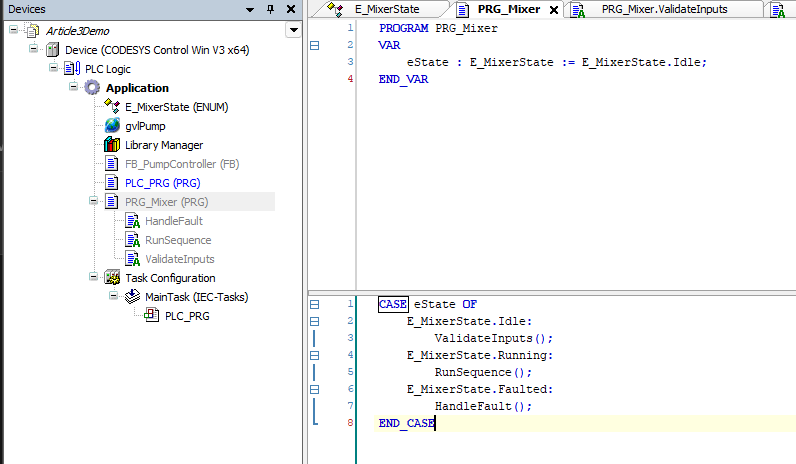
A Codesys Action is a named sub-routine attached to a POU — typically an FB or PRG — that you call by name from elsewhere inside the same POU. The Action has access to the POU’s variables. It is not callable from outside the parent POU. The point of an Action is to break a long body into named, addressable pieces without making each piece into a free-standing FUNCTION or FUNCTION_BLOCK.
PROGRAM PRG_Mixer
VAR
    eState : E_MixerState := E_MixerState.Idle;
END_VAR

CASE eState OF
    E_MixerState.Idle:
        ValidateInputs();
    E_MixerState.Running:
        RunSequence();
    E_MixerState.Faulted:
        HandleFault();
END_CASE
Where ValidateInputs, RunSequence, and HandleFault are Actions defined under PRG_Mixer. From the body they are called as if they were methods on the program.
One mechanical detail worth naming here, since the example above only shows the calls: Actions are not declared inline in the parent POU’s source body. They are created as child objects of the POU in the project tree — PRG_Mixer ends up with ValidateInputs, RunSequence, and HandleFault as named children, each with its own implementation body that you edit on its own tab. The parent calls them by bare name as the example shows; the IDE resolves the call against the children. Each Action can be written in its own language editor (ST, SFC, LD, FBD, CFC), independent of the parent POU’s language — more on that in the editor section further down. The deeper mechanics of Actions, including their lifecycle behaviour and the differences from METHOD, belong to a later article.
The closest non-callable equivalent in either platform is the region — REGION Validate ... END_REGION in TIA SCL, {region 'Validate'} ... {endregion} in Codesys (more on the Codesys pragma form in the section below). Same readability intent: named, foldable blocks that organise a long body into sections. The structural difference with an Action is that an Action is callable from elsewhere in the parent POU’s body; a region is purely visual organisation.
I find Actions cleaner than long inline regions for the cases where the same chunk of logic gets invoked from two places inside one POU. For one-off blocks of code that just happen to be long, an Action is overkill — a region works fine.
Persistence — RETAIN, PERSISTENT, and the surface TIA does not have
TIA Portal has the Retain checkbox on DB tags. A tag marked retentive survives a controlled power cycle. The mechanism is straightforward, and the habit goes deep on the first cargo-handling or batch project where setpoints have to survive an overnight shutdown.
Codesys has the same idea, but with a richer surface. The persistence keywords go directly on the variable declaration:
VAR_GLOBAL
    rTankLevel    : REAL;             // not retained
    rSetpointA    : REAL := 50.0;     // not retained
END_VAR

VAR_GLOBAL RETAIN
    rRampedSetpoint : REAL;           // survives power cycle
END_VAR

VAR_GLOBAL PERSISTENT
    rCalibrationOffset : REAL := 0.0; // survives power cycle AND survives program download
END_VAR
The RETAIN modifier is the direct analogue of TIA’s Retain checkbox. The variable’s value survives a controlled power cycle of the runtime.
Where the TIA Retain implementation has bitten me on real projects — and bitten every TIA engineer I have worked alongside — is around program downloads. Modify a function block (add a static variable, change a type, restructure the interface) and on the next download to the controller, TIA resets the instance DB of that function block to its start values. The retain values you spent the project building up are gone. The same problem hits regular DBs: modify the DB structure, add a variable, and the existing values reset to start values even when every tag is marked retain. The discipline you learn the hard way is to be very careful with any production-version update that touches retentive data — take a snapshot of the live values first, plan the swap, and sometimes patch values back in by hand after the download. TIA Portal has reduced the sharpness of this in recent versions, but the basic shape of the problem is still there: structural changes to a DB or an FB interface still put your retentive data at risk, and the engineer is still the one carrying the discipline. That is exactly the gap the next Codesys keyword — PERSISTENT — is built to close.
The PERSISTENT modifier is the one with no clean TIA analogue. A PERSISTENT variable survives not just a power cycle but a program download — when you push a new application version to the runtime, the persistent variables keep their values. The runtime stores them separately from the normal retain memory, on a per-runtime-target file or memory region.
The use case is obvious once you see it. Calibration offsets for a sensor. Recipe tables that the operator built up over a year. Trim values for a flow meter or a position encoder. Anything that ought to outlive the program version that wrote it. In TIA, the working pattern for preserving values across a download is the snapshot workflow: with the DB online in monitor mode, the engineer takes a snapshot of the current actual values, promotes that snapshot to the new start values, and then downloads. The next download initializes with the captured values instead of the defaults that were typed at design time. It works, but it is a manual, planned operation — the engineer carries the discipline of remembering to snapshot before every maintenance download. Codesys folds the same idea into a language keyword that handles it automatically, every download, by design.
My opinion on this one, take it for what it is — one engineer’s view from inside both ecosystems. The PERSISTENT keyword is one of the genuinely better design calls in modern Codesys, and TIA would benefit from a directly comparable surface. The TIA snapshot workflow works on a single planned download — but the recurring discipline across dozens of projects, every maintenance update, every time an engineer has to remember to snapshot before downloading, adds up. A keyword that does the same job at the language level, automatically, cuts that out. The structural payoff is bigger than the keyword: someone learning the platform sees the persistence semantic in the declaration, in plain sight, instead of having to know about the snapshot workflow and remember to invoke it. I might be wrong about how often the Siemens community would use this if Siemens shipped it — that is genuinely a Siemens design call, not mine — but from where I sit, persistence in the declaration is the cleaner surface.
One caveat worth flagging that I have read about but not yet hit on my own workstation: on some runtime targets, the order of PERSISTENT variables in the declaration block affects the persistence storage layout. Reordering or inserting in the middle can invalidate the saved values on the next startup. The recommended pattern from the docs is to append new persistent variables at the end of the block. I will verify this hands-on against the demo runtime before writing about it more confidently.
Pragmas and attributes — the control surface TIA does not expose
Pragmas in Codesys are compiler directives embedded in the source. They influence how a variable or POU is compiled, monitored, displayed, or analysed. The surface is wide; a dedicated article later in the series will get into the long tail. The orientation point belongs here.
Codesys recognises four pragma classes.
- Message pragmas —
{warning 'TODO: review this branch'}injects compiler messages. - Attribute pragmas — change how a variable or POU is treated:
{attribute 'qualified_only'},{attribute 'hide'},{attribute 'monitoring' := 'variable'}, and many more. - Conditional pragmas —
{IF ...}{ELSE}{ENDIF}for compile-time conditional inclusion of code. The Codesys equivalent of C’s#ifdef. - Region pragmas —
{region 'Step 1'} ... {endregion}for cosmetic block grouping in the editor, with nesting support.
The most useful one to know up front is {attribute 'qualified_only'} on a GVL. The GVL itself is a project-tree object — its name comes from the node in the tree, not from anything inside the source. Inside that object, the source body is just a VAR_GLOBAL block with the pragma on top:
// Source body of a GVL named, for this example, 'gvlPump'.
// The name 'gvlPump' lives at the project-tree node, not in this source.
{attribute 'qualified_only'}
VAR_GLOBAL
    rSetpoint : REAL;
    bEnable   : BOOL;
END_VAR
With the attribute in place, the compiler refuses bare variable names. Application code must reference members as gvlPump.rSetpoint and gvlPump.bEnable. A bare rSetpoint := 50.0; in any POU body becomes a compile error. The attribute enforces namespace discipline and shuts the door on a class of name-collision bugs that show up when two GVLs accidentally export the same identifier.
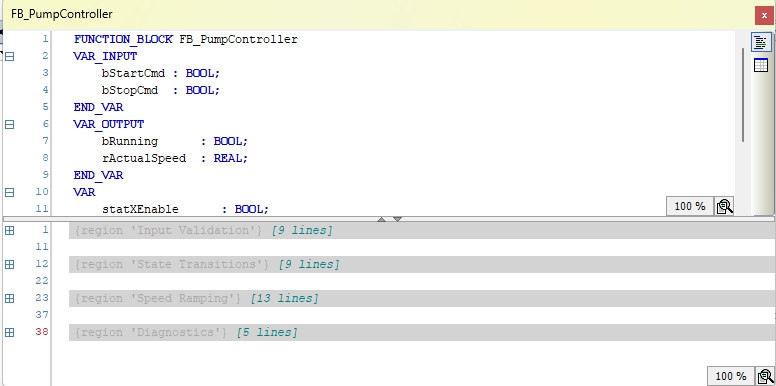
Region pragmas ({region 'name'} ... {endregion}) map directly onto TIA SCL’s REGION ... END_REGION — same intent, just pragma syntax. The IDE renders them as named, collapsible blocks; fold the body down and the region names act as a quick table of contents over a long FB or PRG, the same way TIA SCL regions do. Codesys regions can be nested, and the pragma works in the ST editor and in every declaration editor — including, for example, the declaration block of a long GVL or UDT. There is also a Collapse All Folds command in the IDE for snapping a whole body shut at once. Conditional pragmas ({IF defined(X) THEN}) let you maintain one source tree that compiles into different variants for different runtime targets or machine configurations — TIA’s equivalent is essentially manual, with two project files or runtime flags. Codesys folds the same idea into the compile step.
The structural point is that Codesys exposes a wide compile-time control surface that TIA simply does not have. Where you use it carefully, it earns its keep. Where you use it carelessly, it hides bugs from the next engineer reading the code. Same trade-off as any other language feature, just unfamiliar from the TIA side.
Six language editors, uniform debug
I covered the editor count in Article 2 — ST, LD, FBD, SFC, IL, and CFC, with CFC being the Codesys extension that has no clean TIA equivalent. The language-side point worth adding: Codesys lets you mix language editors within one POU at the Action level. A PRG written primarily in ST can have an Action in SFC for a sequencer step, another in CFC for a free-form control diagram, and another in LD for a piece of safety interlock the maintenance team reads more easily in ladder.
TIA Portal has a partial version of this, with caveats worth naming. If you create an FB in Ladder (or FBD), you can insert individual networks written in SCL — so a primarily-Ladder FB can carry SCL networks alongside LAD ones, and you can even build a Ladder-shaped FB where every network happens to be SCL if that fits the team’s reading habits. The asymmetry is that an FB created in SCL does not let you drop Ladder networks into it. The Codesys per-Action language choice goes a step further: any Action under a POU can be in any of the six editors regardless of the parent POU’s language, and the language boundary is the Action rather than the network. Process and motion engineers reaching for Codesys are likely to use CFC Actions inside ST programs as a normal pattern.
Debug behaviour is uniform across all six editors except IL — breakpoints, watches, force values, online value display, and step-into / step-over all work the same way regardless of the editor. IL is the outlier with reduced debug support, which is one reason it has aged out of new projects.
Where the SCL habit transfers and where it does not
The bulk of Codesys ST reads fluently coming from SCL. The friction concentrates in a small number of places:
- The
#prefix is gone. Local variable references are bare names. A naming convention (staton static FB variables) carries the scope cue across either way. - Declarations live in the source file, but the IDE still shows them in a separated top pane — ST text or tabular view — that stays anchored while the body scrolls.
- GVLs replace global DBs, with dot-notation access rather than quoted DB names.
- A handful of data types differ in both directions (
WSTRING,POINTER TO,REFERENCE TOon the Codesys side;S5TIME,Variant, Siemens-specific system blocks on the TIA side). - The OOP surface is richer —
EXTENDS,IMPLEMENTS,INTERFACE,METHOD,PROPERTY,THIS,SUPER. - Actions exist as a first-class callable sub-routine inside a POU, with no clean TIA analogue.
- Persistence has its own keyword surface —
RETAIN,PERSISTENT— including a survives-program-download semantic that TIA does not match directly. - Pragmas and attributes expose a compile-time control surface TIA does not have.
- Per-Action language choice lets you mix editors inside one POU.
None of these is a reason to leave TIA Portal or to adopt Codesys. They are the things to know before sitting down to write Codesys code with a TIA habit in your fingers, so the first week is not spent translating syntax you could have read past.
The structural shape of the language — POUs, FBs, FCs, GVLs, cyclic execution, IEC 61131-3 type discipline — transfers cleanly. The surface details are the work.
A real invitation to push back, again
Same standing offer as Articles 1 and 2. If you write Codesys for a living, and something in this article reads wrong, I want it in the comments. I am writing through the platform in public on purpose — the fastest way the series becomes useful is engineers who actually deploy Codesys correcting the work as it goes.
The next article steps out of the language and into the runtime — Codesys Control Win SL, the Raspberry Pi runtime, and what running an IEC 61131-3 application on something that is not a vendor PLC actually looks like.
Working on something similar?
I am Yuriy Mosiyenko — I design and program industrial control systems, mostly Siemens, as a one-person practice based in Bedford, Nova Scotia, working with customers across Canada. If you have a controls project you cannot staff internally, tell me what you are building.
