
March 17, 2026 · simatic-axtia-portalplc-programmingsiemensiec-61131-3namespaces
In TIA Portal, every block name must be unique across the entire project. In SIMATIC AX, you can have the same name in different namespaces and they never collide. This is a concept that software developers have used for decades, but for PLC engineers coming from TIA Portal, it is completely new.
This article explains namespaces from the ground up — what they are, how they work, why TIA Portal does not have them, and the common mistakes you will make if you approach them with TIA Portal logic. All code examples come from real Otomakeit projects and Siemens AX libraries.
Who this is for: PLC programmers and automation engineers who work in TIA Portal and are learning SIMATIC AX. No prior AX namespace experience needed — but you should be comfortable with basic TIA Portal project structure (OBs, FBs, FCs, DBs).
This is the fourth post in my SIMATIC AX series. Previous posts: You Don’t Need AX Code IDE, Two Types of SIMATIC AX Projects, and SIMATIC AX Project Structure Explained.
The TIA Portal Starting Point
In TIA Portal, every block you create — FB1, FC5, DB10, “MyMotorController” — lives in one big flat list. You can organize blocks into groups and folders in the project tree, but that is just visual organization. The PLC does not know about those folders. Every block name must be unique across the entire project.
This means:
- You can not have two blocks called
TemperatureController— even if one is for Zone 1 logic and the other is for a reusable library - If you import a library and it has a block called
Timer, and your project also has a block calledTimer— collision. Someone has to rename - When projects get large (200+ blocks), the flat list becomes hard to navigate, and you start inventing naming conventions like
Z1_TempCtrl,LIB_Timer,SAFE_Interlockto avoid collisions
This is the problem namespaces solve.
What Is a Namespace?
A namespace is a named container for your code. Think of it like a folder — but one that the compiler actually understands and enforces.
Here is the simplest example:
NAMESPACE MyCompany.HeatingSystem

    FUNCTION_BLOCK TemperatureController
        VAR_INPUT
            i_rSetpoint : REAL;
        END_VAR
        // ... control logic
    END_FUNCTION_BLOCK

END_NAMESPACE
The full name of this function block is not just TemperatureController — it is MyCompany.HeatingSystem.TemperatureController. The namespace gives it a unique address, like a street address gives your house a unique location even if 50 other houses in the country are also called “The White House.”
Why This Does Not Exist in TIA Portal
TIA Portal follows the traditional PLC model: the PLC has a flat memory with numbered blocks. FB1 is FB1. There is no hierarchy, no scoping, no packages. Everything is global.
This worked fine for decades because:
- PLC projects were relatively small (50-100 blocks)
- One engineer worked on one PLC
- Code reuse happened by copy-pasting blocks between projects
- Libraries were rare and came from one vendor (Siemens)
SIMATIC AX changes the game because it brings software engineering practices to PLC programming. When you have package management (apax), version control (git), unit testing (AxUnit), and multiple teams working on the same codebase — you need namespaces. Without them, every library you install could break your project with name collisions.
The Closest TIA Portal Analogy
The closest thing TIA Portal has is library types. When you create a library in TIA Portal and it contains a block called PID_Controller, TIA Portal internally tracks it as belonging to that library. But this only works within the library system — inside your actual project, the name is still globally flat.
In AX, the namespace IS the organizational system. It is not a visual convenience — it is a core language feature.
How Namespaces Work — Step by Step
1. Declaring a Namespace
Every function block, function, class, type, or interface you write goes inside a NAMESPACE ... END_NAMESPACE block:
NAMESPACE Otomakeit.Rpsc.OvenControl

    FUNCTION_BLOCK ZoneController
        // ...
    END_FUNCTION_BLOCK

END_NAMESPACE
The dot notation (Otomakeit.Rpsc.OvenControl) creates a hierarchy, like a folder path. It is just a naming convention — there are not actual nested containers. Otomakeit.Rpsc.OvenControl is the full namespace name.
2. Using Code from Another Namespace
When you need to use a function block from a different namespace, you have two options.
Option A — USING statement (preferred):
USING Otomakeit.Rpsc.OvenControl;

NAMESPACE Otomakeit.Rpsc.Safety

    FUNCTION_BLOCK SafetyManager
        VAR
            _zone : ZoneController;    // Found via USING
        END_VAR
    END_FUNCTION_BLOCK

END_NAMESPACE
The USING statement at the top of the file says: “I want to use types from this namespace without writing the full name every time.” It is like using in C# or import in Python.
Important rule: USING goes above the NAMESPACE declaration, at the very top of the file.
Option B — Fully qualified name (when clarity is needed):
NAMESPACE Otomakeit.Rpsc.Safety

    FUNCTION_BLOCK SafetyManager
        VAR
            _zone : Otomakeit.Rpsc.OvenControl.ZoneController;
        END_VAR
    END_FUNCTION_BLOCK

END_NAMESPACE
No USING needed — you write the full path. This is useful when two namespaces have types with the same name, and you need to be explicit about which one you mean.
3. What Does NOT Go Inside a Namespace
This is a critical rule: CONFIGURATION and PROGRAM are global — they never go inside a namespace.
USING Otomakeit.Rpsc.OvenControl;

CONFIGURATION MyConfig
    TASK Main(Priority := 1);
    PROGRAM P1 WITH Main: MainProgram;
    VAR_GLOBAL
        zone1 : ZoneController;    // Type found via USING
    END_VAR
END_CONFIGURATION
Why? Because CONFIGURATION defines the PLC itself — it is the top-level container. It does not belong to any namespace, it uses types FROM namespaces. Same with PROGRAM.
Think of it this way: the CONFIGURATION is like the main project in TIA Portal. You do not put TIA Portal itself inside a library — the project USES libraries.
4. Multiple Files, Same Namespace
This is important: multiple .st files can declare the same namespace. The compiler merges them:
src/
  ZoneController.st      <- NAMESPACE Otomakeit.Rpsc.OvenControl
  ZoneInterface.st       <- NAMESPACE Otomakeit.Rpsc.OvenControl  (same!)
  SafetyManager.st       <- NAMESPACE Otomakeit.Rpsc.Safety
  configuration.st       <- No namespace (global)
ZoneController.st and ZoneInterface.st both declare NAMESPACE Otomakeit.Rpsc.OvenControl. The compiler treats them as part of the same namespace — all types from both files are accessible together. This is how you keep one type per file (clean, easy to find) while still grouping related types under one namespace.
How Siemens Uses Namespaces in Their Own Libraries
When you install a Siemens AX library package (like @ax/system-timer), the types inside it are in the Simatic.Ax namespace hierarchy:
USING Simatic.Ax.Timers;

NAMESPACE Otomakeit.Rpsc.OvenControl

    FUNCTION_BLOCK ZoneController
        VAR
            _heaterDelay : OnDelay;    // Siemens type from their namespace
        END_VAR
    END_FUNCTION_BLOCK

END_NAMESPACE
Notice the pattern:
- Siemens uses
Simatic.Ax.*for their libraries - We use
Otomakeit.*for ours - They never collide
Other Siemens namespace examples:
Simatic.Ax.Timers— OnDelay, OffDelay, PulseTimerSimatic.Ax.StateFramework— state machine patternsSimatic.Ax.IO.Output— output modulesSimatic.Ax.Dynamics— signal processing
Each of these comes from a separate apax package that you install via apax.yml. The namespace is how the compiler knows which type comes from where.
Namespaces and Packages — How They Relate
This is a point that can be confusing: the apax package name and the namespace are separate things. They do not have to match, but they usually relate:
| apax package (apax.yml) | Namespace in code |
|---|---|
@ax/system-timer | Simatic.Ax.Timers |
@otomakeit/temperature-control | Otomakeit.Library.TemperatureControl |
The package name (with @scope/name) is for the package manager — it is how apax downloads and manages dependencies. The namespace is for the compiler — it is how the ST code organizes types.
In practice, one package can contain types in multiple namespaces (though usually it is one main namespace). And you can not “install” a namespace — you install a package, and the namespace comes with it.
Real Example — From Our Demo Project
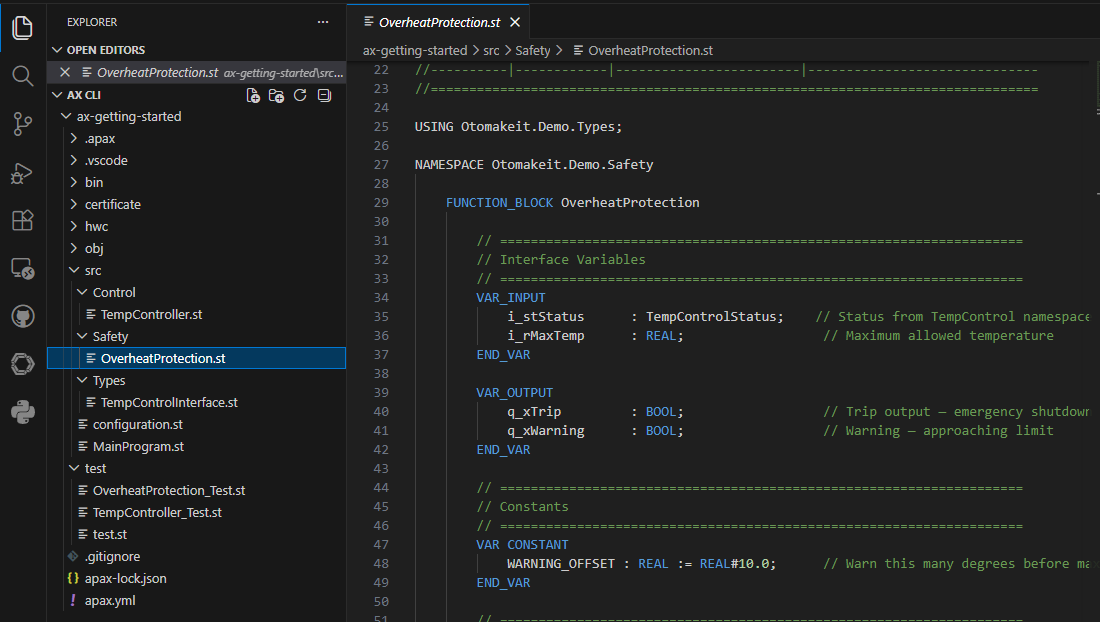
Here is how it all connects in the ax-getting-started demo project. We started with a single namespace and then extended it to three namespaces that reference each other — exactly how a real project would grow.
The project has three namespaces:
Otomakeit.Demo.TempControl— the temperature controller FBOtomakeit.Demo.Types— a shared status struct used by multiple namespacesOtomakeit.Demo.Safety— overheat protection that reads the shared status
Here is the folder structure:
src/
  configuration.st              <- Global (no namespace)
  MainProgram.st                <- Global (USING all three namespaces)
  Control/
    TempController.st           <- NAMESPACE Otomakeit.Demo.TempControl
  Types/
    TempControlInterface.st     <- NAMESPACE Otomakeit.Demo.Types
  Safety/
    OverheatProtection.st       <- NAMESPACE Otomakeit.Demo.Safety
Types/TempControlInterface.st — a shared type in its own namespace:
NAMESPACE Otomakeit.Demo.Types

    TYPE TempControlStatus : STRUCT
        xHeating    : BOOL;
        xFault      : BOOL;
        rActualTemp : REAL;
        rError      : REAL;
    END_STRUCT;
    END_TYPE

END_NAMESPACE
This struct is used by Safety, and populated by MainProgram from Control outputs. The Types namespace has no dependencies on other namespaces — it is the foundation.
Control/TempController.st — the controller FB in its own namespace:
NAMESPACE Otomakeit.Demo.TempControl

    FUNCTION_BLOCK TempController
        VAR_INPUT
            i_rActualTemp  : REAL;
            i_rSetpoint    : REAL;
            i_rHysteresis  : REAL;
            i_xEnable      : BOOL;
        END_VAR
        VAR_OUTPUT
            q_xHeating     : BOOL;
            q_xFault       : BOOL;
            q_rError       : REAL;
        END_VAR
        // ... control logic
    END_FUNCTION_BLOCK

END_NAMESPACE
Safety/OverheatProtection.st — uses the shared type from Types namespace:
USING Otomakeit.Demo.Types;

NAMESPACE Otomakeit.Demo.Safety

    FUNCTION_BLOCK OverheatProtection
        VAR_INPUT
            i_stStatus : TempControlStatus;    // From Types namespace
            i_rMaxTemp : REAL;
        END_VAR
        VAR_OUTPUT
            q_xTrip    : BOOL;
            q_xWarning : BOOL;
        END_VAR

        q_xWarning := i_stStatus.rActualTemp > (i_rMaxTemp - REAL#10.0);
        q_xTrip    := i_stStatus.rActualTemp > i_rMaxTemp OR i_stStatus.xFault;

    END_FUNCTION_BLOCK

END_NAMESPACE
Notice the USING Otomakeit.Demo.Types; at the top — this is how OverheatProtection can use TempControlStatus without writing the full path every time.
configuration.st — the global CONFIGURATION that USES two namespaces:
USING Otomakeit.Demo.TempControl;
USING Otomakeit.Demo.Safety;

CONFIGURATION MyConfiguration
    TASK Main(Priority := 1);
    PROGRAM P1 WITH Main: MainProgram;
    VAR_GLOBAL
        gTempController    : TempController;
        gOverheatProtect   : OverheatProtection;
    END_VAR
END_CONFIGURATION
MainProgram.st — the program that bridges all three namespaces:
USING Otomakeit.Demo.TempControl;
USING Otomakeit.Demo.Types;
USING Otomakeit.Demo.Safety;

PROGRAM MainProgram
    VAR_EXTERNAL
        gTempController    : TempController;
        gOverheatProtect   : OverheatProtection;
    END_VAR

    VAR
        _stStatus : TempControlStatus;    // From Types namespace
    END_VAR

    // Run temperature controller
    gTempController(
        i_rActualTemp := _rActualTemp,
        i_rSetpoint   := _rSetpoint
    );

    // Build status struct from controller outputs
    _stStatus.xHeating    := gTempController.q_xHeating;
    _stStatus.xFault      := gTempController.q_xFault;
    _stStatus.rActualTemp := _rActualTemp;
    _stStatus.rError      := gTempController.q_rError;

    // Pass shared status to safety monitoring
    gOverheatProtect(
        i_stStatus := _stStatus,
        i_rMaxTemp := REAL#450.0
    );

END_PROGRAM
The flow: MainProgram uses all three namespaces. It runs the TempController, builds a TempControlStatus struct (from the Types namespace), and passes that struct to OverheatProtection (from the Safety namespace). Each namespace is independent — they connect through the shared type.
Folder Structure Should Mirror Namespaces
While not required by the compiler, it is good practice to organize your src/ folders to match your namespace structure:
src/
  configuration.st                  <- Global (no namespace)
  MainProgram.st                    <- Global (no namespace)
  Zones/
    ZoneController.st               <- NAMESPACE Otomakeit.Rpsc.OvenControl.Zones
    HeaterController.st             <- NAMESPACE Otomakeit.Rpsc.OvenControl.Zones
  Safety/
    SafetyManager.st                <- NAMESPACE Otomakeit.Rpsc.OvenControl.Safety
  Types/
    ZoneInterface.st                <- NAMESPACE Otomakeit.Rpsc.OvenControl.Types
  IO/
    IOMapping_Inputs.st             <- NAMESPACE Otomakeit.Rpsc.OvenControl.IO
    IOMapping_Outputs.st            <- NAMESPACE Otomakeit.Rpsc.OvenControl.IO
The compiler does not care about folder names — it only looks at the NAMESPACE declaration in each file. But matching folders to namespaces makes navigation obvious. When you see a Zones/ folder, you know every file inside declares the ...Zones namespace.
What Happens at Compile Time — No Block Numbers
In TIA Portal, every block gets a number: FB1, FC5, DB10. These numbers matter — the PLC uses them internally to reference blocks.
In AX, there are no block numbers. Namespaces are purely a source-code concept. The compiler takes your entire project — all namespaces, all files — and produces one binary. The S7-1500 CPU never sees namespace names. It just runs the compiled code.
This means namespaces have zero runtime cost. They do not slow down your PLC, they do not use extra memory, they do not change how the CPU processes your program. They are purely for organizing your source code and preventing name collisions at compile time.
Access Control — PUBLIC, PRIVATE, INTERNAL
Namespaces work together with access modifiers to control who can see what:
PUBLIC— visible to everyone (default for most declarations)PRIVATE— visible only inside the class or function blockPROTECTED— visible to the class and any class that extends itINTERNAL— visible within the same apax package, but hidden from consumers
INTERNAL is the interesting one for library authors. When you publish a library package, you might have helper function blocks that your library uses internally, but you do not want your customers to use directly. Mark them INTERNAL, and they are invisible to anyone who installs your package:
// This FB is usable by anyone who installs your package
FUNCTION_BLOCK PUBLIC PidController
    // ...
END_FUNCTION_BLOCK

// This helper is only visible inside your library package
FUNCTION_BLOCK INTERNAL AntiWindupHelper
    // ...
END_FUNCTION_BLOCK
In TIA Portal, there is no equivalent — every block in a library is visible to the consumer. You could add a “do not use” comment, but nothing stops anyone from using it.
Libraries Ship Without Source Code
This connects to a bigger picture: when you publish an AX library package, you ship the compiled binary — not the source code:
# In your library's apax.yml
files:
  - bin
The consuming project installs the package, gets the compiled code, and uses it through USING statements. They can see the public types and interfaces — but not your implementation code.
This is know-how protection built into the package system. In TIA Portal, you achieve this with know-how-protected blocks. In AX, it is the default behavior of the package system.
Common Mistakes (and How TIA Portal Thinking Causes Them)
1. Trying to put CONFIGURATION inside a namespace
TIA Portal thinking: “Everything belongs somewhere in the project tree”
// WRONG — will not compile
NAMESPACE Otomakeit.Rpsc.OvenControl
    CONFIGURATION MyConfig
    END_CONFIGURATION
END_NAMESPACE
AX reality: CONFIGURATION is the top-level container. It USES namespaces, it is not inside one.
2. Putting USING inside the NAMESPACE block
// WRONG position
NAMESPACE Otomakeit.Rpsc.OvenControl.Zones
    USING Otomakeit.Rpsc.OvenControl.Types;    // Must be ABOVE namespace
    FUNCTION_BLOCK ZoneController
    END_FUNCTION_BLOCK
END_NAMESPACE

// CORRECT
USING Otomakeit.Rpsc.OvenControl.Types;
NAMESPACE Otomakeit.Rpsc.OvenControl.Zones
    FUNCTION_BLOCK ZoneController
    END_FUNCTION_BLOCK
END_NAMESPACE
3. Skipping namespaces because “it is a small project”
TIA Portal thinking: “I only have 10 blocks, why bother?”
Even small projects should use namespaces because:
- The moment you install any library package, that library uses namespaces
- When you want to reuse your blocks in another project, namespaces prevent collisions
- It is a good habit that costs nothing — one extra line at top, one at bottom
4. Going too deep with nesting
// Too many levels — hard to read and type
NAMESPACE Otomakeit.Rpsc.OvenControl.Zones.Temperature.PidControl

// Better — keep it to 4 levels max
NAMESPACE Otomakeit.Rpsc.OvenControl.Zones
The Summary
| Aspect | TIA Portal | SIMATIC AX |
|---|---|---|
| Block naming | Flat — every name must be globally unique | Hierarchical — same name OK in different namespaces |
| Organization | Visual folders in project tree (PLC ignores them) | NAMESPACE in code (compiler enforces it) |
| Block numbers | FB1, FC5, DB10 — numbers matter to the CPU | No block numbers — namespaces are source-level only |
| Library conflicts | Possible — must rename blocks to avoid collisions | Impossible — each library has its own namespace |
| Importing code | Add library to project, blocks appear globally | USING statement imports specific namespace |
| Access control | Know-how-protected blocks (all-or-nothing) | PUBLIC, PRIVATE, PROTECTED, INTERNAL per type |
| Library source | Source visible unless know-how-protected | Ships compiled binary by default — source not included |
| Runtime cost | N/A | Zero — namespaces exist only at compile time |
| Closest analogy | (none — truly new concept for PLC engineers) | C# namespace/using, Java package/import, Python modules |
For us coming from TIA Portal, the mental shift is this: you are not just naming blocks anymore — you are giving them an address. TemperatureController is not enough. Otomakeit.Rpsc.OvenControl.Zones.TemperatureController — now there is only one of those in the entire world.
Working on something similar?
I am Yuriy Mosiyenko — I design and program industrial control systems, mostly Siemens, as a one-person practice based in Bedford, Nova Scotia, working with customers across Canada. If you have a controls project you cannot staff internally, tell me what you are building.
