
April 8, 2026 · simatic-axtia-portalplc-programmingsiemensoopfunction-blockclasss7-1500
In TIA Portal, there is one main building block for your control logic: the function block. You create it, you give it inputs and outputs, you call it from OB1. That is the pattern for everything.
SIMATIC AX has that same function block. But it also has something else — the CLASS.
If you have been following this series, you have already used both without realizing it. The TempController we built is a FUNCTION_BLOCK. The test fixture that tests it is a CLASS. They look similar. They are not the same thing.
This article explains the difference — what each one can do, what each one cannot do, and when to use which.
Who this is for: PLC programmers and automation engineers who work in TIA Portal and are exploring SIMATIC AX. You should already be comfortable with function blocks in TIA Portal SCL.
This is the ninth post in my SIMATIC AX series. Previous posts: You Don’t Need AX Code IDE, Two Types of SIMATIC AX Projects, SIMATIC AX Project Structure Explained, Namespaces in SIMATIC AX Explained, Unit Testing in SIMATIC AX Explained, How to Write Unit Tests in SIMATIC AX, and Simatic AX vs TIA Portal: What Is the Future?.
The Short Version
FUNCTION_BLOCK is the traditional PLC building block. It has inputs, outputs, and a code body that runs every scan cycle. If you are writing control logic — a motor starter, a PID loop, a valve sequence — use a FUNCTION_BLOCK. It works the way you expect from TIA Portal.
CLASS is the software engineering building block. It has no inputs or outputs. It has no code body. Everything it does happens through methods — named functions that you call explicitly. If you are building a reusable library component that needs inheritance, interfaces, or polymorphism — use a CLASS.
That is the one-sentence rule: FUNCTION_BLOCK for control logic. CLASS for library code.
Now let me show you why.
What a FUNCTION_BLOCK Looks Like in AX
You already know this from the unit testing articles, but let me put it side by side with what you know from TIA Portal:
NAMESPACE Otomakeit.Demo.TempControl

    FUNCTION_BLOCK TempController

        VAR_INPUT
            i_rActualTemp  : REAL;
            i_rSetpoint    : REAL;
            i_rHysteresis  : REAL;
            i_xEnable      : BOOL;
        END_VAR

        VAR_OUTPUT
            q_xHeating     : BOOL;
            q_xFault       : BOOL;
            q_rError       : REAL;
        END_VAR

        VAR
            _xHeatingState : BOOL;
        END_VAR

        // Control logic runs here — every scan cycle
        q_rError := i_rSetpoint - i_rActualTemp;

        IF i_xEnable AND NOT q_xFault THEN
            IF i_rActualTemp < (i_rSetpoint - i_rHysteresis) THEN
                _xHeatingState := TRUE;
            END_IF;
            IF i_rActualTemp > (i_rSetpoint + i_rHysteresis) THEN
                _xHeatingState := FALSE;
            END_IF;
            q_xHeating := _xHeatingState;
        ELSE
            _xHeatingState := FALSE;
            q_xHeating := FALSE;
        END_IF;

    END_FUNCTION_BLOCK

END_NAMESPACE
This is almost identical to TIA Portal SCL. The only differences: there is a NAMESPACE wrapper, and there is no BEGIN keyword before the code body. The code starts directly after the last VAR section.
You call it almost the same way — but there is one difference worth knowing.
In TIA Portal SCL, you typically list both inputs and outputs in the call:
// TIA Portal style — inputs and outputs together
_fb(
    i_rActualTemp  := REAL#94.0,
    i_rSetpoint    := REAL#100.0,
    i_rHysteresis  := REAL#5.0,
    i_xEnable      := TRUE,
    q_xHeating     => _xIsHeating,
    q_xFault       => _xHasFault
);
In SIMATIC AX, the idiomatic pattern is different. You pass inputs in the call, and read outputs afterward using dot notation:
// AX style — inputs in the call, outputs via dot notation
_fb(
    i_rActualTemp  := REAL#94.0,
    i_rSetpoint    := REAL#100.0,
    i_rHysteresis  := REAL#5.0,
    i_xEnable      := TRUE
);

// Read outputs from the instance directly
IF _fb.q_xFault THEN
    // handle fault
END_IF;

_xIsHeating := _fb.q_xHeating;
Both the := (input) and => (output) operators are valid in AX — it is IEC 61131-3 compliant. But dot notation is what you see consistently in official Siemens AX examples, the learning path, and community code. It is the AX way.
One call. All inputs go in, the code body executes, all outputs are available on the instance. The logic is the same as TIA Portal — only the way you read outputs is different.
What a CLASS Looks Like
Now here is a CLASS that does something similar — a valve controller:
NAMESPACE Otomakeit.Library.Actuators

    CLASS Valve

        VAR PUBLIC
            qOutput : IBinOutput;
        END_VAR

        VAR PRIVATE
            _state : ValveState;
        END_VAR

        METHOD PUBLIC Open : BOOL
            IF (qOutput <> NULL) THEN
                qOutput.SetOn();
                _state := ValveState#Open;
                Open := TRUE;
            END_IF;
        END_METHOD

        METHOD PUBLIC Close : BOOL
            IF (qOutput <> NULL) THEN
                qOutput.SetOff();
                _state := ValveState#Closed;
                Close := TRUE;
            END_IF;
        END_METHOD

        METHOD PUBLIC GetState : ValveState
            GetState := _state;
        END_METHOD

    END_CLASS

END_NAMESPACE
Notice what is different:
No VAR_INPUT. No VAR_OUTPUT. No code body. The CLASS has variables and methods — that is it. Nothing runs unless you call a method.
Instead of VAR_INPUT and VAR_OUTPUT, the CLASS uses access modifiers: VAR PUBLIC (anyone can access), VAR PRIVATE (only the class itself), VAR PROTECTED (the class and its children).
And you call it differently:
myValve.Open();
state := myValve.GetState();
No single call that does everything. You call individual methods, one at a time. The caller decides what happens and when.
The Five Key Differences
Let me lay out the structural differences that matter in practice.
1. Variable Sections
FUNCTION_BLOCK supports everything you know: VAR_INPUT, VAR_OUTPUT, VAR_IN_OUT, VAR, VAR_TEMP, VAR CONSTANT.
CLASS supports only: VAR PUBLIC, VAR PRIVATE, VAR PROTECTED, VAR CONSTANT.
No inputs. No outputs. No in-outs. No temps. This is the single biggest structural difference. If your block needs the traditional input/output wiring pattern — the one every PLC programmer understands — you need a FUNCTION_BLOCK.
2. Code Body vs Methods
A FUNCTION_BLOCK has a code body that runs automatically when the block is called. You write your logic after the last VAR section, and it executes.
A CLASS has no code body. Every behavior is inside a named METHOD. Nothing runs unless you explicitly call a method. This gives you more control over what executes when, but it also means the caller has more responsibility.
3. Hardware I/O Access
A FUNCTION_BLOCK can bind variables directly to hardware addresses:
VAR_INPUT
    i_xSensor AT %I0.0 : BOOL;
END_VAR
A CLASS cannot. This is a hard architectural constraint. The official Siemens simatic-ax/io library exists specifically because of this limitation. Their documentation says it directly: “In AX it is not possible to use variables pointing on the periphery (IOM) as references.”
The workaround: the io library provides interface types like IBinOutput and IBinInput. Your CLASS holds a reference to one of these interfaces. Your PROGRAM wires it to an actual I/O wrapper at runtime. It works, but it is an extra layer.
4. Inheritance and Interfaces
This is where CLASS pulls ahead.
A CLASS can EXTEND another CLASS — inherit all its variables and methods, override what needs to change:
CLASS MotorizedValve EXTENDS Valve
    VAR PRIVATE
        _positionFeedback : REAL;
    END_VAR

    METHOD PUBLIC GetPosition : REAL
        GetPosition := _positionFeedback;
    END_METHOD
END_CLASS
A CLASS can IMPLEMENT an interface — a contract that guarantees certain methods exist:
CLASS Valve IMPLEMENTS IActuator
    METHOD PUBLIC Open : BOOL
        // must implement this — the interface requires it
    END_METHOD
END_CLASS
A CLASS can be ABSTRACT — a base template that cannot be instantiated directly, only extended:
CLASS ABSTRACT Command
    METHOD PROTECTED ABSTRACT Execute
    END_METHOD

    METHOD PROTECTED InitState
        // shared logic that all commands use
    END_METHOD
END_CLASS
FUNCTION_BLOCK can also EXTEND another FUNCTION_BLOCK — this works. But ABSTRACT is a CLASS-only feature. And while FUNCTION_BLOCK can technically implement an interface, all official Siemens AX code uses CLASS for this. The community standard is clear: interfaces belong with CLASS.
One more thing — you cannot mix the two. A CLASS cannot extend a FUNCTION_BLOCK. A FUNCTION_BLOCK cannot extend a CLASS. They are separate hierarchies.
5. How They Work in Unit Tests
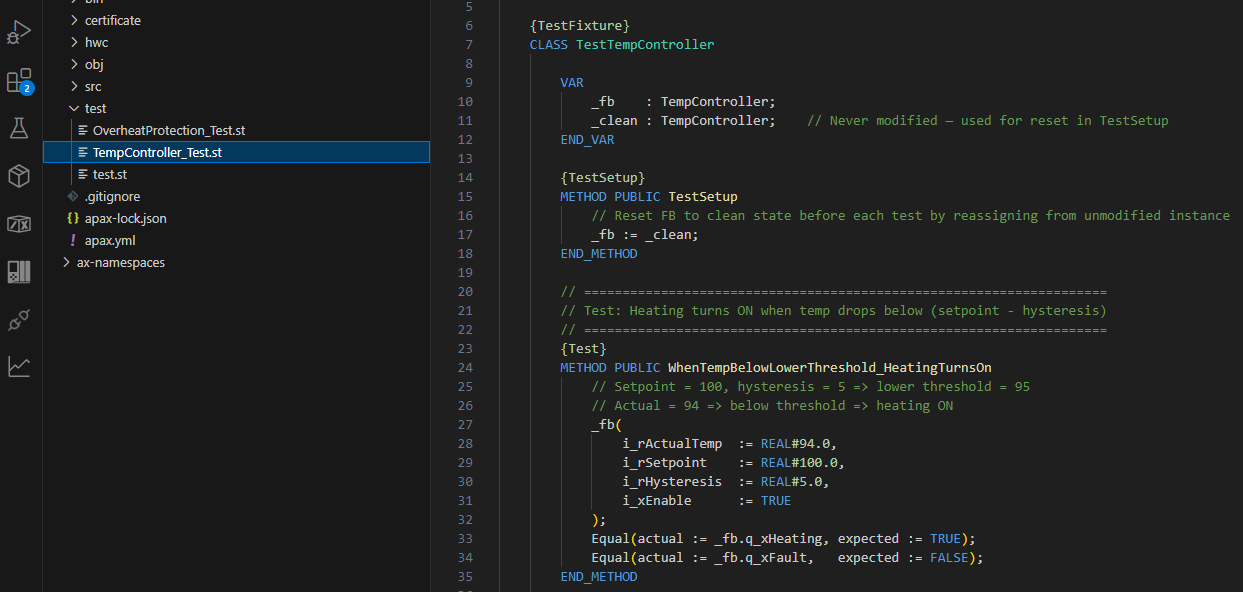
You have already seen this in the testing articles. The {TestFixture} pragma requires a CLASS:
{TestFixture}
CLASS TestTempController
    VAR
        _fb    : TempController;    // FB instance being tested
        _clean : TempController;
    END_VAR

    {Test}
    METHOD PUBLIC WhenDisabled_HeatingIsOff
        _fb(i_xEnable := FALSE);
        Equal(actual := _fb.q_xHeating, expected := FALSE);
    END_METHOD
END_CLASS
The test fixture is a CLASS. The thing being tested is a FUNCTION_BLOCK. This is the natural pairing — CLASS owns the test structure, FUNCTION_BLOCK contains the control logic being verified.
How They Fit Together in a Real Project
In practice, you do not choose one or the other for an entire project. You use both — at different layers.
Here is the typical architecture in a SIMATIC AX application:
PROGRAM (top level — called by the PLC runtime)
    └── FUNCTION_BLOCKs (your control logic — motors, valves, sequences)
            └── CLASS instances (library objects — reusable, swappable)
                    └── INTERFACE contracts (behavior guarantees)
The PROGRAM calls FUNCTION_BLOCKs every scan cycle. That is your application logic — the stuff specific to this machine, this process.
The FUNCTION_BLOCKs may own CLASS instances internally. These are library objects — a PID controller from a library package, an actuator abstraction, a communication handler. Things that are designed to be reused across many projects.
The CLASS instances implement INTERFACE contracts. This means you can swap one implementation for another without changing the code that uses it. A butterfly valve and a ball valve both implement IActuator — the code that opens and closes them does not care which one is connected.
The One-Minute Decision
When you sit down to create a new block in SIMATIC AX, ask yourself two questions:
Does it need VAR_INPUT and VAR_OUTPUT?
If yes — FUNCTION_BLOCK. This is your standard control logic block. Motors, valves, sequences, calculations, anything that needs the traditional input/output wiring pattern.
Will it be reused across projects with different implementations?
If yes — CLASS with INTERFACE. This is library code. Define the interface first (what methods must exist), then implement one or more CLASS versions. Package it, share it.
For your first AX projects, default to FUNCTION_BLOCK. It is the pattern you know. It works exactly like TIA Portal. Save CLASS for when you have a specific reason — multiple implementations, inheritance, or library packaging.
The advanced patterns (ABSTRACT base classes, PROTECTED variables, EXTENDS chains) are powerful tools. But they are tools for library authors, not for every-day control logic. Learn them when you need them. For now, knowing when to reach for each one is enough.
What Is Next
This is article nine in the SIMATIC AX for TIA Portal Engineers series. We have covered CLI workflow, project types, project structure, namespaces, unit testing (what and how), a correction, the AX vs TIA Portal positioning, and now CLASS vs FUNCTION_BLOCK.
Next up — I want to explore how AX libraries and packaging work. How you take a tested, proven CLASS and turn it into a reusable package that other projects can install with one command. That is where the software engineering side of AX really starts to pay off.
If you are experimenting with CLASS in your own projects — or if you have a use case where you are not sure which one to pick — connect with me on LinkedIn. I am still working through these decisions myself.
Working on something similar?
I am Yuriy Mosiyenko — I design and program industrial control systems, mostly Siemens, as a one-person practice based in Bedford, Nova Scotia, working with customers across Canada. If you have a controls project you cannot staff internally, tell me what you are building.
