
May 27, 2026 · simatic-axsiemensplc-programmingconfigurationtasksscan-cycleiec-61131-3industrial-automationcontrol-systems
In TIA Portal, the scan cycle is largely invisible.
OB1 runs. The PLC reads inputs, executes your program, writes outputs, and repeats. You can see the cycle time in diagnostics. You can add interrupt OBs — OB35 at 100 ms, OB30 at 1 second. But the actual scheduling machinery — which code runs when, what happens when an interrupt fires during a scan, how the runtime decides what to execute next — lives inside the PLC firmware and the TIA hardware configuration dialogs. You configure it through menus. You don’t see it as code.
In SIMATIC AX, all of that is text. The execution schedule is declared in a file called configuration.st. One text file that says: here are my tasks, here is the code bound to each task, here are the global variables shared between them.
This article is about that file — what the three keywords CONFIGURATION, TASK, and PROGRAM actually mean, how the runtime uses them to schedule work, how task priorities and interruption work in practice, and how to set up a two-task project when a single scan loop is not the right tool for the job.
Article 4 in this series introduced the CONFIGURATION / TASK / PROGRAM pattern as a one-line mapping to TIA concepts. Article 13 covered variable sections in detail — VAR_GLOBAL and VAR_EXTERNAL as the AX equivalents of Global DBs. This article goes deeper on the execution layer: the scan cycle itself, how multiple tasks are scheduled, and how data flows between them.
What CONFIGURATION Is
The CONFIGURATION block is the project’s top-level execution declaration. There is exactly one in every AX application project, and it lives in exactly one file: src/configuration.st.
The structure looks like this:
CONFIGURATION MyConfiguration

    TASK Main(Priority := 1);

    PROGRAM P1 WITH Main : MainProgram;

    VAR_GLOBAL
        gTempController  : TempController;
        gOverheatProtect : OverheatProtection;
    END_VAR

END_CONFIGURATION
Three things happen in this block. First, tasks are declared with their scheduling parameters. Second, program types are bound to tasks — this is the instruction that tells the runtime which code runs in which task. Third, global variables are declared — the shared data space that programs can access via VAR_EXTERNAL.
In TIA Portal terms, you are combining three separate concepts into one file:
| TIA Portal | AX CONFIGURATION |
|---|---|
| OB scheduling (configured in hardware settings) | TASK declarations |
| Code called inside OBs | PROGRAM bindings (PROGRAM P1 WITH Main : MainProgram;) |
| Global DBs | VAR_GLOBAL declarations |
One file. All three. Version-controlled as plain text.
One syntactic detail worth knowing: CONFIGURATION does not belong inside a NAMESPACE. Every other construct in AX code — FUNCTION_BLOCK, CLASS, FUNCTION, TYPE — should be wrapped in a NAMESPACE. The CONFIGURATION block is the single exception. It lives at the file level, outside the namespace system. Wrapping it in a NAMESPACE is a compile error.
This is consistent with the official Siemens ST programming learning path, which states that “everything is declared explicitly in text-based ST code, providing full transparency and version control compatibility” — and that constraint includes the fact that CONFIGURATION sits above the namespace hierarchy (simatic-ax/axlp_introduction_to_st).
What TASK Means — And What It Replaces
A TASK declaration tells the runtime how often to schedule a piece of work and at what priority relative to other tasks.
The two key parameters are Interval and Priority:
Interval— how often to run the task.Interval := T#100msmeans the task fires every 100 milliseconds.Priority— lower number means higher priority.Priority := 1is the highest priority;Priority := 2is lower.
TIA Portal engineers already know this model from interrupt OBs. OB35 runs at 100 ms by default at priority 12. OB30 runs at 1 second at priority 10. You set those numbers in the hardware properties dialog. In AX, you write them:
TASK Fast(Interval := T#100ms, Priority := 1);
TASK Slow(Interval := T#1000ms, Priority := 2);
That is the same conceptual model — cyclic tasks at different intervals and priorities — expressed as text.
The free-running task. The Main task in the demo project above has no Interval parameter:
TASK Main(Priority := 1);
Omitting Interval creates a free-running task. As soon as one scan completes, the next one begins immediately. There is no fixed period — the cycle time is determined by how long the program takes to execute. This is the closest equivalent to OB1 in TIA Portal.
In the SIMATIC AX documentation, the strict conceptual equivalent to OB1 is ProgramCycle — the Logic Configuration Engine (LCE) concept for the main cyclic program execution. A free-running TASK Main(Priority := 1) with PROGRAM P1 WITH Main : MainProgram; is how that ProgramCycle concept is expressed in practice in the CONFIGURATION file.
Interval and Priority parameter order. In every official Siemens example I have seen — the ST programming learning path and the ae-opcuaconnection application (simatic-ax/ae-opcuaconnection) — Interval comes before Priority when both are present:
TASK Fast(Interval := T#100ms, Priority := 1);   // Interval before Priority
TASK Slow(Interval := T#1000ms, Priority := 2);
I tested the reversed order directly on the ax-getting-started demo project. TASK Slow(Priority := 2, Interval := T#1000ms) — Priority listed before Interval — builds clean with 0 errors and 0 warnings on both the s7generic and llvm targets under apax CLI v4.2.0, stc V11.3.55.32265. The compiler accepts either order. Interval-first is a consistent style in all official Siemens examples, not a syntax rule.
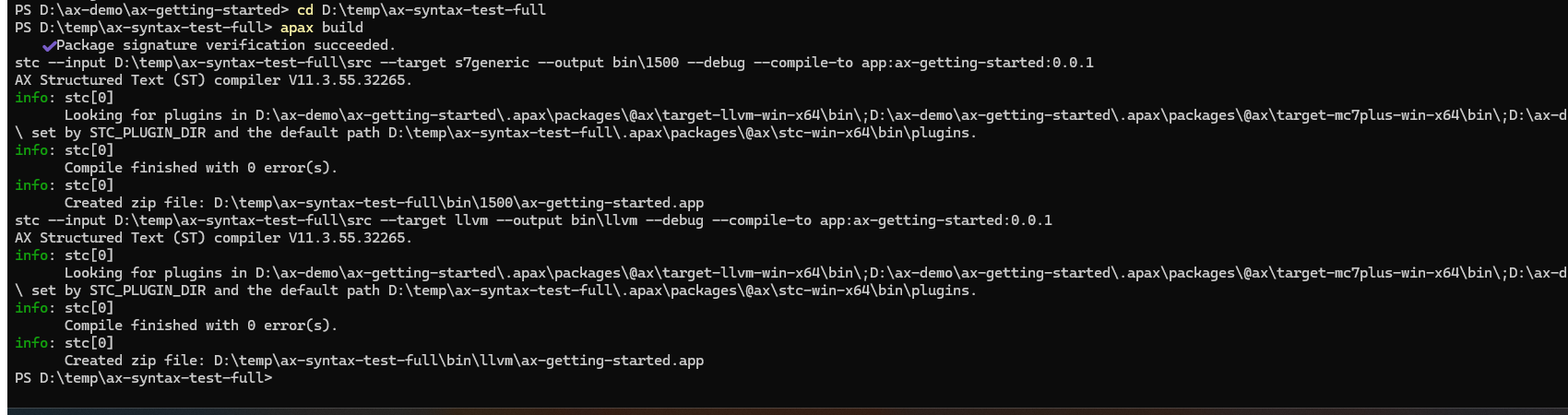
Use Interval := ... Priority := ... because that is the order you will see in every reference. If you reverse it the build does not break — I confirmed this — but there is no reason to deviate from the established convention.
Priorities and Interrupts
This is where TIA Portal experience transfers directly — and where the text-first approach makes the behavior more visible.
IEC 61131-3 defines that higher-priority tasks can interrupt lower-priority ones. SIMATIC AX follows this standard. If a Fast task at priority 1 becomes due while a Slow task at priority 2 is executing, the runtime suspends the Slow task, executes the Fast task to completion, then resumes the Slow task where it left off.
The TIA Portal equivalent: if OB35 (cyclic interrupt, priority 12) fires during an OB1 scan (priority 1), OB35 interrupts OB1. OB1 pauses, OB35 runs completely, OB1 resumes from where it stopped.
In AX, the same interruption happens — but the priority numbers work in the opposite direction from TIA Portal. Lower number = higher priority in AX, which is the reverse of TIA Portal. In TIA Portal, higher numbers mean higher priority (OB35 priority 12 beats OB1 priority 1). In AX, Priority := 1 is the highest priority. This is worth knowing before you set up a multi-task project.
| Concept | TIA Portal | SIMATIC AX |
|---|---|---|
| Highest priority | Highest number (e.g., 26 for time-error OBs) | Lowest number (Priority := 1) |
| Interruption | Higher-priority OB interrupts lower-priority OB | Lower Priority number interrupts higher Priority number |
| Equal priority | FIFO (first-in, first-out) scheduling | FIFO scheduling |
Equal-priority tasks do not interrupt each other. If two tasks have the same priority number, they run in FIFO (first-in, first-out) order — whichever one was scheduled first gets to complete before the other starts. If you want a fast task to be able to interrupt a slow task, they must have different priority numbers.
PROGRAM — The Code Bound to a TASK
A PROGRAM declaration creates an instance of a program type and binds it to a specific task:
PROGRAM P1 WITH Main : MainProgram;
The three parts: P1 is the instance name (unique within the project, arbitrary string), Main is the task name declared above, and MainProgram is the program type — a PROGRAM block defined in one of the .st files in src/.
The binding is declarative. In TIA Portal, you call blocks from inside OB1. If you want MyFunctionBlock to run every scan, you put a call to it inside OB1’s code. The coupling is inside OB1’s body. In AX, the coupling is in the CONFIGURATION block. MainProgram runs in Main because the configuration says so — not because MainProgram calls itself or gets called by anything else.
This separation is useful. The MainProgram type has no knowledge of which task it runs in. You could reassign it to a different task by changing one line in configuration.st. The program itself does not change.
One task, one PROGRAM type binding (per IEC 61131-3). AX follows the IEC 61131-3 constraint that a PROGRAM type can only be bound to one task at a time. You can create multiple instances of the same PROGRAM type — PROGRAM P1 WITH Main : ControlProgram; and PROGRAM P2 WITH Slow : ControlProgram; — but those are separate instances with separate internal variable states, running in different tasks.
One task can have multiple programs. A single task can run multiple program instances sequentially within each scan:
TASK Main(Priority := 1);
PROGRAM P1 WITH Main : ControlProgram;
PROGRAM P2 WITH Main : DiagnosticsProgram;
Both P1 and P2 run in the Main task on every scan, in declaration order.
VAR_GLOBAL and VAR_EXTERNAL — The Shared Data Contract
Global variables in SIMATIC AX are declared inside CONFIGURATION using VAR_GLOBAL. Any program that wants to use them must explicitly declare them using VAR_EXTERNAL.
Article 13 covered this pattern in detail. For this article, the key point is what it means in a multi-task context.
From the ax-getting-started demo project, configuration.st has two VAR_GLOBAL blocks:
USING Otomakeit.Demo.TempControl;
USING Otomakeit.Demo.Safety;

{OpcUa.NodeGenerator.IdType = SymbolName}
CONFIGURATION MyConfiguration
    TASK Main(Priority := 1);

    PROGRAM P1 WITH Main: MainProgram;

    VAR_GLOBAL
        gTempController    : TempController;
        gOverheatProtect   : OverheatProtection;
    END_VAR

    {S7.extern = ReadWrite}
    {OpcUa.AccessLevel = ReadWrite}
    VAR_GLOBAL
        g_rActualTemp  : REAL;
        g_rSetpoint    : REAL;
        g_xHeating     : BOOL;
        g_xFault       : BOOL;
    END_VAR
END_CONFIGURATION
And MainProgram.st redeclares the ones it uses:
PROGRAM MainProgram

    VAR_EXTERNAL
        gTempController    : TempController;
        gOverheatProtect   : OverheatProtection;
        g_rActualTemp      : REAL;
        g_rSetpoint        : REAL;
        g_xHeating         : BOOL;
        g_xFault           : BOOL;
    END_VAR

    // ... program body

END_PROGRAM
The VAR_EXTERNAL declaration is a contract. The compiler checks that the name and type match exactly. If you declare g_rSetpoint : INT in VAR_EXTERNAL but the configuration has it as REAL, the build fails. This is stricter than TIA Portal’s global DB access, which is address-based and has no explicit contract check at compile time.
In a multi-task project, VAR_GLOBAL is how data flows between tasks. Task A writes to a global; Task B reads it. There is no direct call from one task to another — the global variable is the shared handoff point.
Multi-Task Patterns — When One Scan Loop Is Not Enough
The ax-getting-started demo has a single task and a single program. That covers many applications. But real projects often need more than one execution rate.
A typical pattern from my TIA Portal experience: temperature control in a furnace zone runs every 100 ms. Data logging to a historian runs every second. These two do not belong in the same scan loop. The logging code would add jitter to the control cycle. The control code would run ten times more often than the logger needs.
In TIA Portal, you’d put temperature control in OB35 (100 ms) and logging in OB30 (1 s). In AX, you declare two tasks:
CONFIGURATION FurnaceConfig

    TASK Main(Priority := 1);
    TASK Slow(Interval := T#1000ms, Priority := 2);

    PROGRAM P1 WITH Main : ControlProgram;
    PROGRAM P2 WITH Slow : DiagnosticsProgram;

    VAR_GLOBAL
        // Zone controller instances — Main writes, Slow reads
        // Naming follows: inst<FBName>_<tag> (Otomakeit SOP)
        instTempCtrl_TC101 : TempController;
        instTempCtrl_TC102 : TempController;

        // HMI-visible data — Slow writes, HMI reads via OPC UA
        {S7.extern = ReadWrite}
        {OpcUa.AccessLevel = ReadWrite}
        g_rActualTemp_Z1 : REAL;
        g_rSetpoint_Z1   : REAL;
        g_xHeating_Z1    : BOOL;
        g_xFault_Z1      : BOOL;
    END_VAR

END_CONFIGURATION
A note on naming: the demo project uses gTempController and gOverheatProtect — a g prefix style that predates the formal Otomakeit convention. For new projects, the Otomakeit SOP is inst<FBName>_<tag> for FB instances (e.g., instTempCtrl_TC101), where the tag maps to the instrument tag database. The g_r and g_x prefix pattern for scalar globals follows the signal-type prefix convention (r for REAL, x for BOOL). Both patterns are in use; the demo project reflects an earlier style.
ControlProgram runs in the Main free-running task. It runs as fast as the program can execute. It calls the temperature controllers, reads sensors, drives outputs.
DiagnosticsProgram runs in the Slow task. It fires every 1 second. It reads the controller status from VAR_GLOBAL and writes summaries for the HMI.
The flow: ControlProgram writes to instTempCtrl_TC101, instTempCtrl_TC102, g_xHeating_Z1, and g_xFault_Z1 every scan. DiagnosticsProgram reads from those same globals every second and mirrors the values into the OPC UA-visible scalars. The HMI sees the diagnostic output at 1 Hz — appropriate for a display — without the control loop doing the HMI update work on every scan.
Data Sharing Between Tasks — How It Works and What to Watch
In the multi-task configuration above, ControlProgram writes to shared globals and DiagnosticsProgram reads them. The communication happens through VAR_GLOBAL — shared memory.
For simple scalar types — BOOL, INT, REAL — reads and writes of a single variable are atomic on the S7-1500 family. A read of a REAL value sees either the value before the write or after it, not a partial state.
For larger structures (STRUCT types, function block instances), a more careful approach is needed. If ControlProgram is partway through updating a multi-field struct and the Slow task fires and reads that struct, DiagnosticsProgram could see an inconsistent snapshot — some fields from before the update, some after. The AX runtime documentation I have accessed does not specify atomicity guarantees at the byte level for struct reads across tasks on S7-1500.
I tested this directly in the demo project. I added a ZoneSnapshot struct with three mathematically linked fields — Counter, CounterPlus1 = Counter + 1, and CounterTimes2 = Counter * 2 — written field-by-field by MainProgram on every fast scan, and read by DiagnosticsProgram on every 1-second Slow scan. The DiagnosticsProgram checks whether both invariants hold on each read, incrementing g_diConsistentReadCount or g_diPartialReadCount accordingly.
I ran this on PLCSIM Advanced V8.0 (apax CLI v4.2.0, stc V11.3.55.32265, PLC_1 at 192.168.0.1) and let it run for approximately 3.5 minutes. After 212 seconds, I read the counters via apax mon:
g_diConsistentReadCount  DINT  301
g_diPartialReadCount     DINT  1
302 total slow-task read cycles. 301 consistent. 1 partial read.
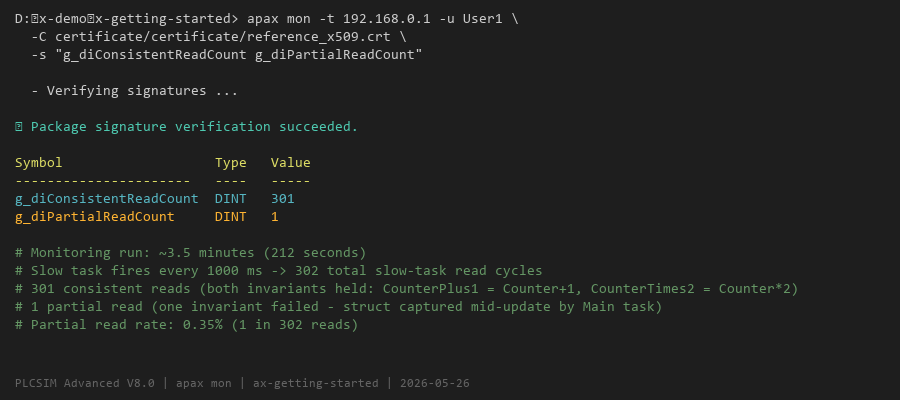
One read in 302 — about 0.35% — captured fields from two different write passes. DiagnosticsProgram saw a snapshot where Counter, CounterPlus1, and CounterTimes2 did not satisfy both invariants simultaneously. The Main task had partially updated the struct when the Slow task fired and read it.
This is a real result on PLCSIM Advanced V8.0. I did not observe it in a documentation clause — I measured it. Struct writes across three fields, written sequentially in three separate assignments, are not atomic with respect to interruption by a higher-priority task. One in every ~302 reads over 3.5 minutes saw an inconsistent snapshot.
The read-copy-use pattern I described earlier is the correct response to this. It does not eliminate the risk that the struct assignment itself is interrupted — if Main interrupts Slow between the moment Slow begins reading the struct and the moment the assignment completes, the local copy may itself be inconsistent. What the pattern does guarantee is that once the assignment completes, the local copy does not change mid-scan. The local snapshot gives consistent field relationships within a single read — the partial read risk is bounded to the single assignment statement, not spread across the entire program body.
PROGRAM DiagnosticsProgram

    VAR_EXTERNAL
        g_stZoneSnapshot : ZoneSnapshot;
        // ... other globals
    END_VAR

    VAR
        _stLocalSnapshot : ZoneSnapshot;   // local copy
    END_VAR

    // Read-copy-use: capture the struct in one assignment
    _stLocalSnapshot := g_stZoneSnapshot;

    // Work from the local copy, not the global
    // ...

END_PROGRAM
The struct assignment _stLocalSnapshot := g_stZoneSnapshot may itself be interrupted if Main interrupts Slow partway through the copy — this is what produces a partial read in the measurement above. What is guaranteed is that once the assignment completes, the local copy does not change mid-scan. Working from _stLocalSnapshot for the rest of the program body is safe: the copy is stable even while Main continues writing to g_stZoneSnapshot.
What the Scan Cycle Looks Like in Practice
Walking through a complete scan for the two-task configuration above:
Main task (free-running, Priority 1):
ControlProgramstarts execution.- It reads
VAR_EXTERNALvalues — the globals it declared. - It runs the temperature controller FBs, reads sensor inputs, drives heater outputs.
- It updates
instTempCtrl_TC101,instTempCtrl_TC102,g_xHeating_Z1,g_xFault_Z1. - Execution completes. The runtime immediately starts the next scan.
Slow task (1 s cyclic, Priority 2):
- Every 1 second, the
Slowtask becomes due. - Since
Mainhas priority 1 (higher than Slow’s priority 2), ifSlowis running andMain’s next free-running scan starts,MaininterruptsSlow.Slowpauses,Mainruns to completion,Slowresumes. - In practice, for a
Slowtask at 1 second and aMaintask with a sub-10 ms scan time, the interruptions are brief.DiagnosticsProgramwill take slightly longer than its own execution time — it may be paused by one or moreMainscans during its execution — but it will complete.
This is exactly how OB35 (high-priority cyclic interrupt) behaves relative to OB1 (cyclic program) in TIA Portal. The hierarchy in AX is the same principle — just expressed with text declarations instead of hardware property dialogs.
The configuration.st in the Demo Project
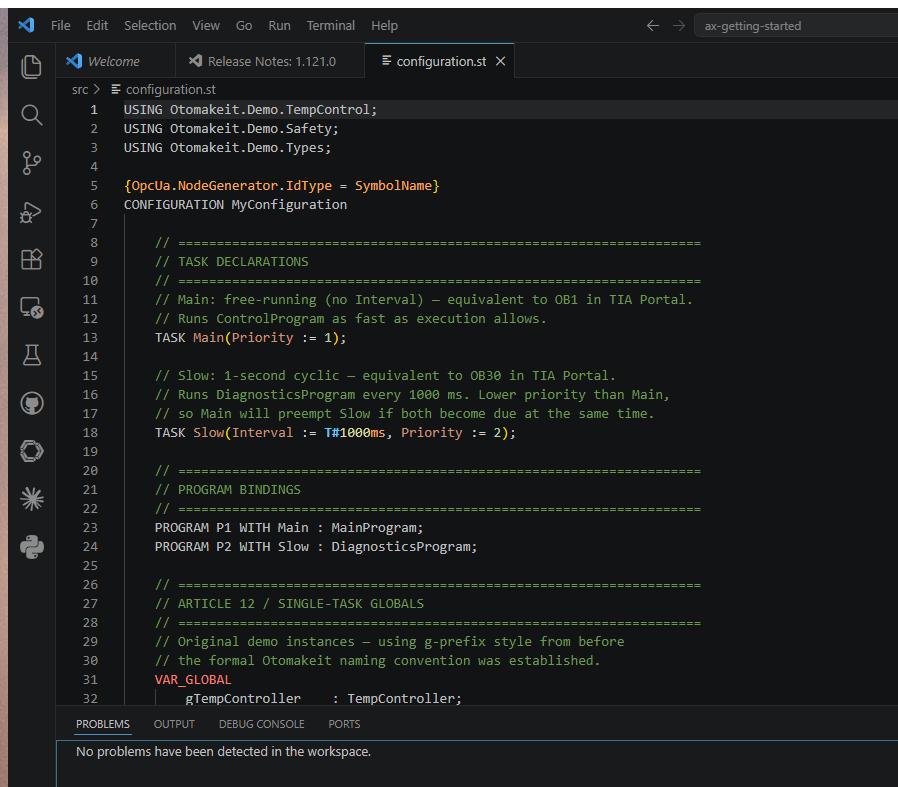
The ax-getting-started demo project has been extended from the Article 12 single-task baseline to support a second task and the multi-task data sharing pattern described above. Here is the full src/configuration.st from the working project:
USING Otomakeit.Demo.TempControl;
USING Otomakeit.Demo.Safety;
USING Otomakeit.Demo.Types;

{OpcUa.NodeGenerator.IdType = SymbolName}
CONFIGURATION MyConfiguration

    // Main: free-running — equivalent to OB1 in TIA Portal
    TASK Main(Priority := 1);

    // Slow: 1-second cyclic — equivalent to OB30 in TIA Portal
    TASK Slow(Interval := T#1000ms, Priority := 2);

    PROGRAM P1 WITH Main : MainProgram;
    PROGRAM P2 WITH Slow : DiagnosticsProgram;

    // Article 12 / single-task globals (g-prefix style, predates Otomakeit naming SOP)
    VAR_GLOBAL
        gTempController    : TempController;
        gOverheatProtect   : OverheatProtection;
    END_VAR

    {S7.extern = ReadWrite}
    {OpcUa.AccessLevel = ReadWrite}
    VAR_GLOBAL
        g_rActualTemp  : REAL;
        g_rSetpoint    : REAL;
        g_xHeating     : BOOL;
        g_xFault       : BOOL;
    END_VAR

    // Article 15 / multi-task globals
    VAR_GLOBAL
        instTempCtrl_TC101 : TempController;
        instTempCtrl_TC102 : TempController;
    END_VAR

    // Atomicity test struct — not OPC UA exposed; observable output via scalar counters
    VAR_GLOBAL
        g_stZoneSnapshot : ZoneSnapshot;
    END_VAR

    {S7.extern = ReadWrite}
    {OpcUa.AccessLevel = ReadWrite}
    VAR_GLOBAL
        g_diConsistentReadCount : DINT;
        g_diPartialReadCount    : DINT;
    END_VAR

END_CONFIGURATION
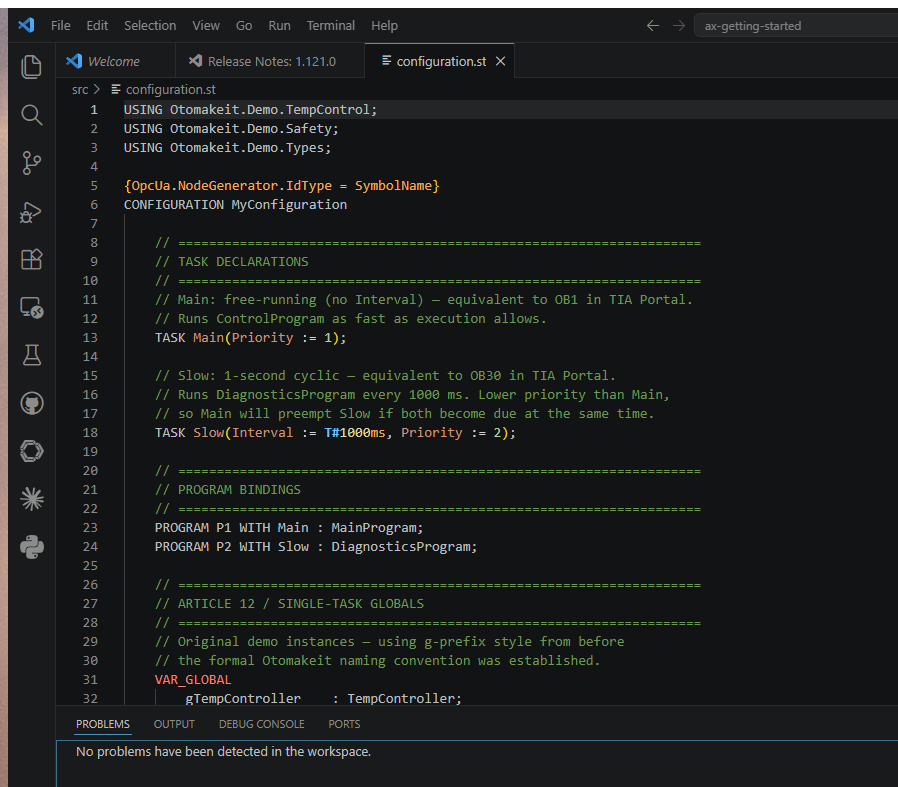
The {OpcUa.NodeGenerator.IdType = SymbolName} pragma before CONFIGURATION makes OPC UA node IDs use variable names instead of numeric indexes. The {S7.extern = ReadWrite} and {OpcUa.AccessLevel = ReadWrite} pragmas on VAR_GLOBAL blocks control external visibility — without them, the OPC UA server does not expose those variables.
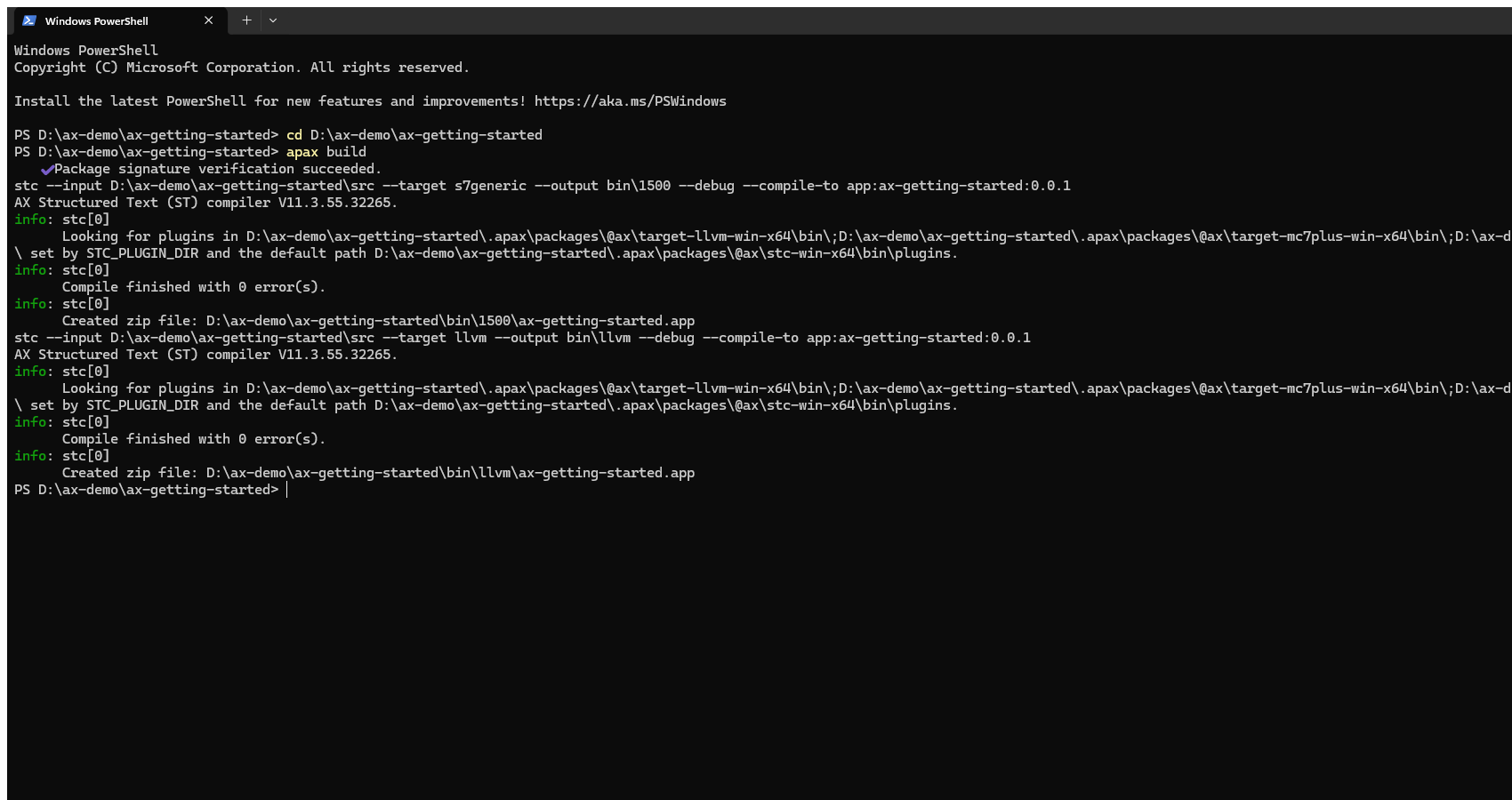
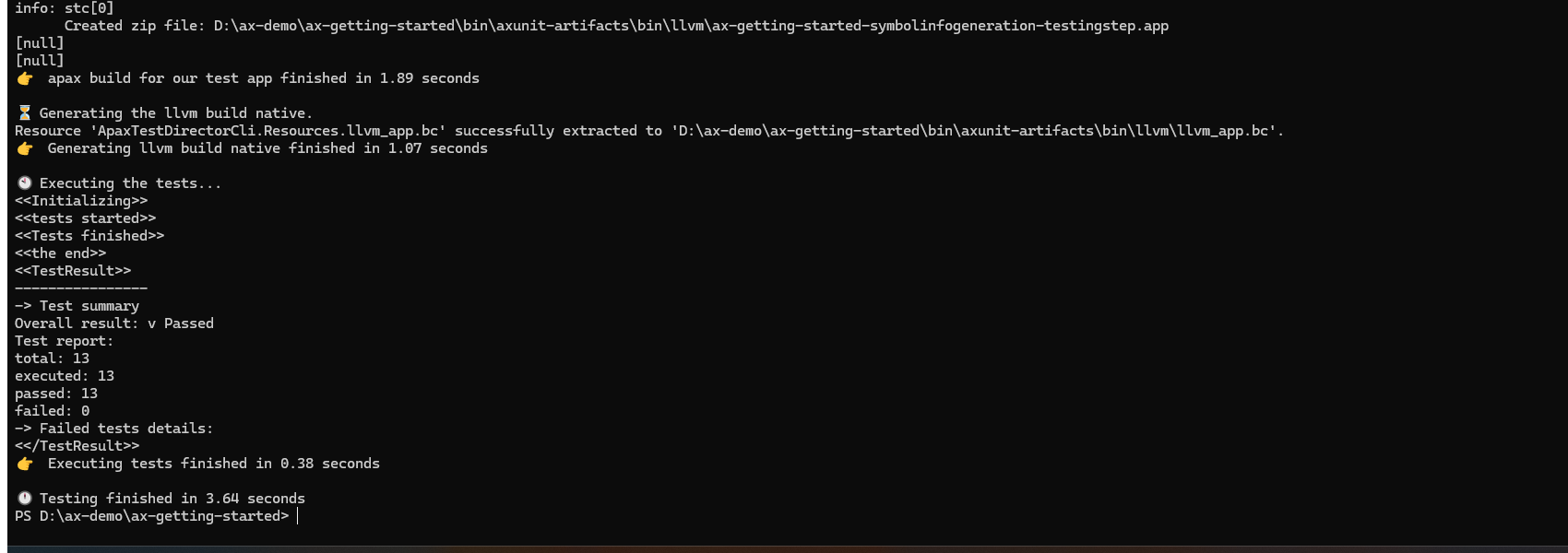
This file builds clean with apax build using apax CLI v4.2.0 and catalog @ax/simatic-ax ^2510.0.0. The 13 existing AxUnit unit tests from Article 12 still pass after the multi-task extension.
Mapping Back to TIA Portal — The Complete Picture
Here is the full mapping after working through the demo project:
| TIA Portal concept | SIMATIC AX equivalent |
|---|---|
| OB1 (free-running cyclic program) | Free-running TASK (no Interval) + PROGRAM binding = ProgramCycle at the LCE level |
| OB100 (startup, runs once at PLC startup) | Startup Task at the LCE level — Article 17 goes deeper |
| OB35 (100 ms cyclic interrupt) | TASK Fast(Interval := T#100ms, Priority := 1); |
| OB30 (1 s cyclic interrupt) | TASK Slow(Interval := T#1000ms, Priority := 2); |
| “Calling a block in OB1” | PROGRAM P1 WITH Main : MainProgram; — binding is declarative, not a call |
| Priority (higher number = higher priority in TIA) | Priority parameter (lower number = higher priority in AX — opposite of TIA) |
| OB interruption (higher priority OB interrupts lower) | Task interruption (lower Priority number interrupts higher Priority number) |
| Global DB | VAR_GLOBAL in CONFIGURATION |
| Accessing a Global DB from an OB | VAR_EXTERNAL inside PROGRAM |
| Hardware configuration dialog (OB timing) | TASK declarations in configuration.st |
The mental shift: in TIA Portal, the execution model is configured through dialogs and baked into project metadata. In AX, the execution model is code. You can read it, review it in a pull request, track it in git history, and see exactly what changed when the cycle time was adjusted.
Where This Breaks Down
The mapping is clean, but it is not complete.
Startup Task is different. The OB100 equivalent in AX — the Startup Task in LCE terms — is a separate concept, not simply a TASK with a one-shot interval. Article 7 in this series addressed this directly: the OB100 mapping is more nuanced than it first appears. Article 17 will go deeper on initialization patterns. I am intentionally leaving this out of this article — Article 7’s correction history is a reminder that initialization patterns are easy to get wrong.
Event-driven tasks are not covered here. SIMATIC AX supports event-driven tasks triggered by hardware signals — similar to TIA Portal’s hardware interrupt OBs (OB40). I have not tested them in the demo project; the SIMATIC AX learning path at simatic-ax/axlp_introduction_to_st lists them as a supported task type. A future article will cover hardware interrupt tasks once I have hands-on validation.
Watchdog and cycle time monitoring. In TIA Portal, the maximum cycle time before the CPU goes to STOP is configured in the hardware properties dialog (the S7-1500 Cycle and Response Times function manual covers the default and configurable limits). In AX, this is part of the hardware configuration (hwc/) rather than configuration.st. The CONFIGURATION block in software does not control the watchdog. A future article on hardware configuration will cover this.
Data consistency for shared structures. The measurement in the multi-task section is direct: 1 partial read in 302 slow-task read cycles over ~3.5 minutes on PLCSIM Advanced V8.0. Struct reads across tasks are not atomic when the writer task has higher priority and can interrupt the reader mid-copy. The read-copy-use pattern is the correct practice — use a local VAR copy at the start of DiagnosticsProgram, then work from the copy for the rest of the scan.
What This Looks Like in Practice
Starting from a fresh project, the sequence is:
apax create app my-project— the scaffold includes asrc/configuration.stwith a single free-running task and a single program binding.- Open
configuration.st. It is already runnable with the template’s sample code. - Add a second task if the application needs two execution rates:
TASK Slow(Interval := T#1000ms, Priority := 2);and a secondPROGRAMbinding. - Add
VAR_GLOBALdeclarations for data shared between programs or exposed to an HMI. - In each
PROGRAMfile, addVAR_EXTERNALdeclarations for the globals that program uses. apax build. The compiler flags anyVAR_EXTERNALdeclaration that does not match aVAR_GLOBAL— name or type mismatch is caught at build time.
The workflow is the same for a single-task or multi-task project. The configuration file grows — more tasks, more programs, more globals — but the structure stays the same.
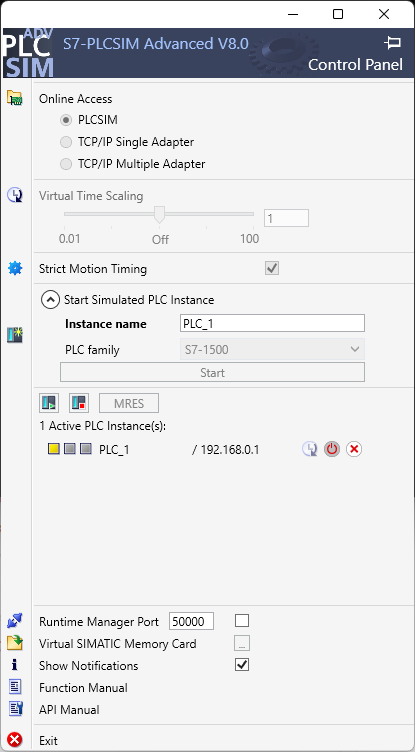
I ran this two-task project on PLCSIM Advanced V8.0 (apax CLI v4.2.0, catalog @ax/simatic-ax ^2510.0.0). The build passes, the tests pass, and the hardware configuration loads successfully to a simulated S7-1500 CPU at 192.168.0.1.
What Is Next
Article 16 will go into error handling — TRY/CATCH in SIMATIC AX, where it works, where it does not, and how to handle faults in a PLC runtime that cannot let exceptions stop the scan cycle.
Article 17 will come back to initialization — the Startup Task and ProgramCycle concepts at the LCE level, with the depth they deserve.
The data consistency test I described above returned a clear result: 1 partial read in 302 slow-task cycles over ~3.5 minutes on PLCSIM Advanced V8.0. Struct reads across tasks with different priorities are not atomic on this setup. If you have observed different behavior — either a higher partial read rate or zero partial reads across a much longer run — I want to hear what your setup looks like.
Working on something similar?
I am Yuriy Mosiyenko — I design and program industrial control systems, mostly Siemens, as a one-person practice based in Bedford, Nova Scotia, working with customers across Canada. If you have a controls project you cannot staff internally, tell me what you are building.
