
June 24, 2026 · simatic-axsiemensplc-programmingsystem-timerapaxstructured-textindustrial-automationcontrol-systems
One of the easiest traps when moving from TIA Portal to SIMATIC AX is assuming the familiar PLC blocks are just sitting in the language.
In TIA Portal SCL, it is natural to reach for TON, TOF, or TP and think of them as part of the everyday programming surface. In AX, the practical habit is different: verify the package, add the dependency, import the namespace, then write the code.
For timers, the current Siemens documentation I checked uses:
- package:
@ax/system-timer - namespace:
System.Timer - function blocks:
OnDelay,OffDelay,Pulse, andTimeAccumulator - common interface terms:
signal,duration,output, andelapsedTime - time type at the timer interface:
LTIME
Small but important nuance: elapsedTime is documented for OnDelay, OffDelay, and Pulse. TimeAccumulator uses accumulatedTime, so I would not blur those together.
That last detail matters. This is not the same public surface as writing TON(IN := ..., PT := ...) and reading Q / ET.
The Package Boundary
The source example makes the package boundary visible in apax.yml:
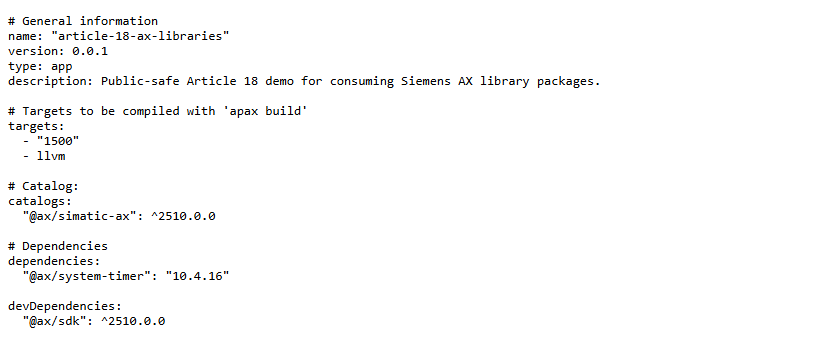
For a new project, Siemens documents the package install as:
apax add @ax/system-timer
In a real project, the catalog and lock file decide the exact version that lands in the build. In this source example, the manifest pins the timer package version from the inspected 2510 catalog evidence. The more important publishing point is the package name and namespace, not memorizing one version number.
The ST Code Changes Too
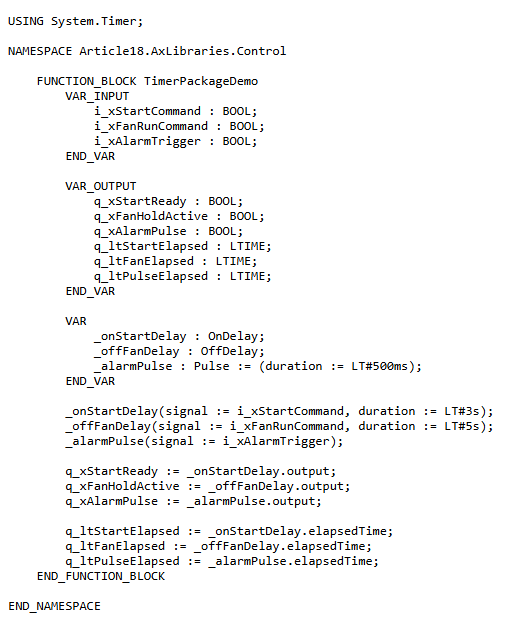
The source starts with the namespace import:
USING System.Timer;
Then the timer function blocks are declared like normal AX variables:
VAR
    _onStartDelay : OnDelay;
    _offFanDelay : OffDelay;
    _alarmPulse : Pulse := (duration := LT#500ms);
END_VAR
And the calls use Siemens’ documented parameter names:
_onStartDelay(signal := i_xStartCommand, duration := LT#3s);
_offFanDelay(signal := i_xFanRunCommand, duration := LT#5s);
_alarmPulse(signal := i_xAlarmTrigger);

q_xStartReady := _onStartDelay.output;
q_xFanHoldActive := _offFanDelay.output;
q_xAlarmPulse := _alarmPulse.output;
The demo source:

The mental mapping from TIA Portal is still useful, but it is only a starting point:
| TIA Portal habit | AX timer library habit |
|---|---|
TON | OnDelay |
TOF | OffDelay |
TP | Pulse |
IN | signal |
PT | duration |
Q | output |
ET | elapsedTime |
The practical lesson is simple: do not type a TIA-flavored timer from memory and expect AX to resolve it. Check the package documentation first.
The AxUnit Timer Trap
This is also where unit testing needs judgment.
A normal AxUnit test can call a function block. That does not automatically prove elapsed timer behavior, because ordinary unit-test calls do not create meaningful PLC scan time. If a test toggles signal and immediately asserts that elapsedTime advanced like a running PLC task, the test is probably proving the test writer’s assumption, not the runtime behavior.
For timer-based code, I would separate the concerns:
- Unit test the logic around the timer where possible.
- Keep timer package usage small and visible.
- Prove elapsed-time behavior in a runtime or integration setup where task execution time is real.
- Do not publish an AxUnit test as timer timing proof unless the test setup genuinely controls or simulates time.
This is a useful difference from many pure software tests: the PLC cycle is part of the behavior.
The Working Habit
The broader lesson is not just “use this timer package.” It is the workflow:
- Find the official Siemens package documentation.
- Add the package with
apax. - Import the documented namespace.
- Use the documented function block names and parameter names.
- Let the catalog and lock file make the version explicit.
- Build before turning a code sample into a reusable pattern.
This is one of the reasons AX feels different from traditional TIA Portal. Libraries, versions, namespaces, and build evidence become part of normal PLC engineering.
For me, that is the point of the code-first workflow: the dependency is no longer hidden behind a project tree. It is in the manifest, in source control, and in the review.
Sources Used
- Siemens Industrial Operations X, System.Timer getting started
- Siemens Industrial Operations X, OnDelay example
- Siemens Industrial Operations X, OffDelay example
- Siemens Industrial Operations X, Hardware Engineering - I/O addresses
- Siemens Industrial Operations X, ST I/O address reference
Working on something similar?
I am Yuriy Mosiyenko — I design and program industrial control systems, mostly Siemens, as a one-person practice based in Bedford, Nova Scotia, working with customers across Canada. If you have a controls project you cannot staff internally, tell me what you are building.
