
March 17, 2026 · simatic-axtia-portalplc-programmingsiemensiec-61131-3
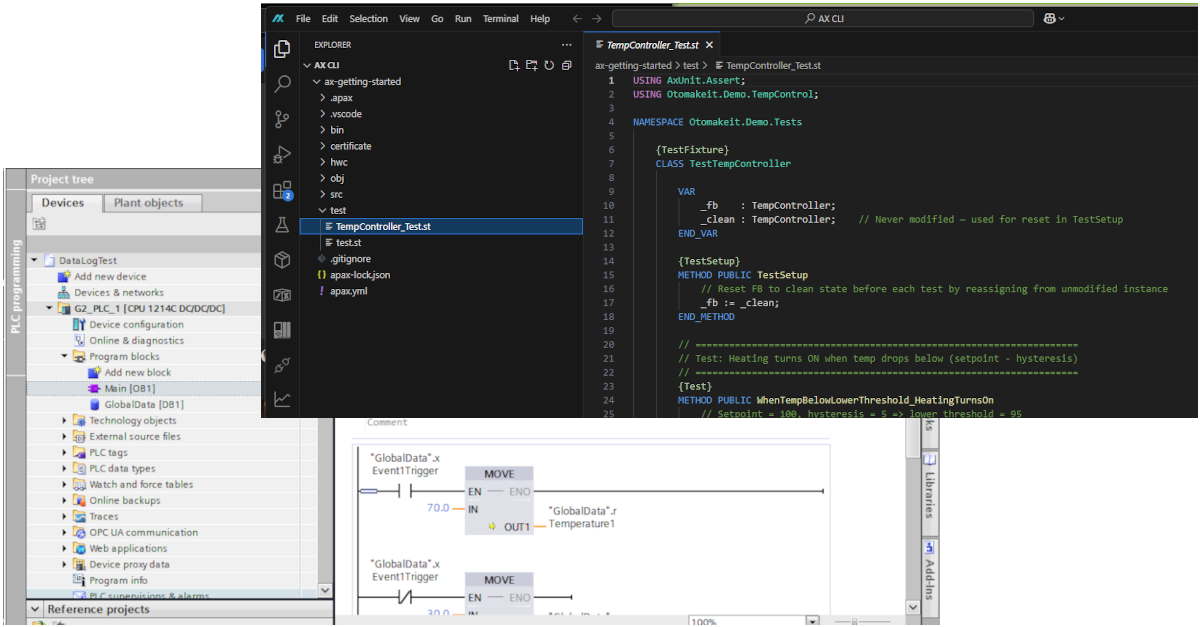
If you know TIA Portal, you already know 90% of what SIMATIC AX does. Same concepts — different packaging.
TIA Portal uses a graphical project tree with OBs, FBs, FCs, and DBs as separate visual objects. AX uses text files following IEC 61131-3 more closely. Every TIA Portal concept has a direct equivalent in AX. I put together this guide to map them one-to-one.
Who this is for: PLC programmers and automation engineers who work in TIA Portal and want to understand how AX projects are organized. No prior AX experience needed — but you should be comfortable with basic TIA Portal project structure (OBs, FBs, FCs, DBs, tag tables).
This is the third post in my SIMATIC AX series. If you are new to AX, start with You Don’t Need AX Code IDE — SIMATIC AX Runs From Any VS Code Workspace and Two Types of SIMATIC AX Projects: Full AX vs TIA Portal Hybrid.
Correction note: After publication, Christof Ochs pointed out a few details about Startup Task, ProgramCycle, and FUNCTION_BLOCK OOP support in SIMATIC AX. The article has been updated to reflect those corrections.
1. CONFIGURATION — The PLC Project
In TIA Portal, you open a project and see a tree of blocks. In AX, the configuration.st file IS that project definition:
CONFIGURATION MyConfiguration
    TASK Main(Priority := 1, Interval := T#1000ms);
    PROGRAM P1 WITH Main : MainProgram;
    VAR_GLOBAL
        sr : Shiftregister;
    END_VAR
END_CONFIGURATION
This single file declares three things that are separate in TIA Portal:
- TASKs — equivalent to OBs
- PROGRAM bindings — which code runs in which OB
- VAR_GLOBAL — equivalent to Global DBs
2. TASK — The OB Equivalent
| TIA Portal | SIMATIC AX |
|---|---|
| OB1 (free-running cyclic) | ProgramCycle — the main cyclic program execution |
| OB35 (100ms cyclic interrupt) | TASK Fast(Priority := 1, Interval := T#100ms); |
| OB30 (1s cyclic interrupt) | TASK Slow(Priority := 2, Interval := T#1000ms); |
| OB100 (startup) | Startup Task in SIMATIC AX LCE |
Strictly speaking, OB1 maps to ProgramCycle in SIMATIC AX. In the practical project structure, you still declare TASKs with different intervals and priorities, similar to having OB1 + OB35 + OB30 in TIA Portal. Higher priority tasks preempt lower ones.
3. PROGRAM — The Code That Runs in a TASK
PROGRAM P1 WITH Main : MainProgram;
This means: “Create an instance P1 of type MainProgram and execute it in Task Main.”
The TIA Portal equivalent would be OB1 / ProgramCycle calling MainProgram. The difference is that AX makes this binding declarative — you declare it in CONFIGURATION instead of writing a call statement inside OB1.
4. FBs and FCs — Same Thing, Text Files
Function Blocks and Functions live as text blocks inside .st files in the src/ folder.
Function Block (FB equivalent):
NAMESPACE Siemens.AX.Quickstart
    FUNCTION_BLOCK Shiftregister
        VAR_INPUT
            DirectionRight : BOOL := FALSE;
        END_VAR
        VAR_OUTPUT
            Q0 : BOOL;
        END_VAR
        VAR PRIVATE
            _initialized : BOOL;
            _shiftRegister : BYTE;
        END_VAR
        // logic here
    END_FUNCTION_BLOCK
END_NAMESPACE
Same concept as a TIA Portal FB. The difference:
- TIA Portal: FB is a visual object in the project tree
- AX: FB is a text block inside a
.stfile, wrapped in a NAMESPACE
Just simple like that.
Function (FC equivalent):
FUNCTION MyFunction : INT
    VAR_INPUT
        x : INT;
    END_VAR
    MyFunction := x * 2;
END_FUNCTION
5. Data Blocks — No Separate DB Files
There are no separate DB files in AX. Data lives in two places:
| TIA Portal | SIMATIC AX |
|---|---|
| Global DB | VAR_GLOBAL section in CONFIGURATION |
| Instance DB | Automatic — declaring sr : Shiftregister; in VAR_GLOBAL creates the instance data |
To access globals from a PROGRAM, use VAR_EXTERNAL:
PROGRAM MainProgram
    VAR_EXTERNAL
        sr : Shiftregister;
    END_VAR
    sr(DirectionRight := TRUE);
END_PROGRAM
I/O Address Mapping (Replaces the PLC Tag Table)
CONFIGURATION IoAddresses
    VAR_GLOBAL
        et200sp1_device_di8_InputAddress AT %IB3 : BYTE;
        et200sp1_device_dq8_OutputAddress AT %QB3 : BYTE;
    END_VAR
END_CONFIGURATION
When using HWC (hardware configuration), hwc compile auto-generates these mappings into SystemConstants/.
6. NAMESPACE — The Big Addition
TIA Portal has a flat namespace — all blocks share one global scope. AX adds NAMESPACE, similar to C# namespaces or Java packages:
NAMESPACE MyCompany.TemperatureControl
    FUNCTION_BLOCK TempController
        // ...
    END_FUNCTION_BLOCK
END_NAMESPACE
Import with USING MyCompany.TemperatureControl; at the top of any file that needs it.
7. OOP — CLASS vs FUNCTION_BLOCK
This is where it gets interesting. In AX, FUNCTION_BLOCK is more powerful than you might expect coming from TIA Portal because it supports methods. That gives it some OOP-style features, but it does not mean FUNCTION_BLOCK has the full OOP model.
| Feature | FUNCTION_BLOCK | CLASS |
|---|---|---|
| VAR_INPUT / VAR_OUTPUT | Yes | No — use methods instead |
| Methods | Yes | Yes |
| Inheritance (EXTENDS) | No | Yes |
| Interfaces (IMPLEMENTS) | No | Yes |
| Access modifiers | No | PUBLIC / PRIVATE / PROTECTED |
So what is the real difference? FUNCTION_BLOCK gives you the traditional PLC-style interface with VAR_INPUT/VAR_OUTPUT plus methods. CLASS is where the full OOP behavior belongs: inheritance, interfaces, access modifiers, ABSTRACT, OVERRIDE, and NULL checking.
Both are useful, but they are not the same model.
8. Hardware Configuration (hwc/)
Instead of TIA Portal’s graphical hardware catalog, AX uses YAML text files:
hwc/
├── Device_PLC_1.hwl.yml     <- PLC device definition
├── templates/                <- Generated from order numbers
├── iosystem.hwl.yml         <- Controller-device connections
└── topology.hwl.yml         <- Physical port-to-port wiring
Key workflow:
- Generate templates from order numbers:
apax hwc generate-template-file --order-number "6ES7 516-3AP03-0AB0" --version "V4.0" - Define devices referencing templates (with IP addresses and device names)
- Define the IO system and topology
- Compile:
apax hw_compile— generates I/O address mappings - Load:
apax hw_load— downloads to PLC
9. apax.yml — The Project Manifest
Every AX project has an apax.yml file at its root. Think of it as the project configuration hub:
| Section | Purpose |
|---|---|
name, version, type | Package identity — app for executable, lib for library |
targets | "1500" compiles for S7-1500, llvm compiles for PC testing |
catalogs | Pins all @ax packages to a release version |
devDependencies | Build tools (SDK, compiler) |
dependencies | Runtime libraries included in the PLC program |
variables | Project settings (IP addresses, passwords, paths) |
scripts | Custom commands: hw_compile, dlplc, etc. |
10. Unit Testing with AxUnit
AX includes a built-in test framework. Tests compile to LLVM and run on your PC — no PLC hardware needed:
USING AxUnit.Assert;

NAMESPACE Test
    {TestFixture}
    CLASS MyTestFixture
        {Test}
        METHOD PUBLIC MyTestMethod
            Equal(actual := TRUE, expected := TRUE);
        END_METHOD
    END_CLASS
END_NAMESPACE
Run with: apax test
This is a big deal, I should say. In TIA Portal, you basically test on the PLC or not at all. Here you can run tests on your PC during development.
11. Full Project File Structure
Here is what a complete AX project with hardware configuration looks like:
project-root/
├── apax.yml                  <- Project manifest
├── src/                      <- Application source code
│   ├── configuration.st      <- CONFIGURATION (tasks, programs, globals)
│   ├── MainProgram.st        <- PROGRAM (main cyclic logic)
│   └── [YourBlocks].st       <- FBs, FCs, CLASSes
├── hwc/                      <- Hardware configuration (YAML)
├── test/                     <- Unit test files (.st)
├── certificate/              <- TLS certificates
├── SystemConstants/          <- Auto-generated IO mappings
├── bin/                      <- Compiled SW output
├── hwbin/                    <- Compiled HW output
└── .vscode/                  <- Debug settings
12. The Mental Model Shift
Here is how I think about it after going through all of this:
| TIA Portal | SIMATIC AX |
|---|---|
| Project tree (GUI) | apax.yml + src/ folder (text files) |
| Hardware catalog (drag & drop) | hwc/*.hwl.yml (YAML) + template generation |
| OB1, OB35, OB100 | ProgramCycle, cyclic TASKs, and LCE Startup Task |
| FB / FC in project tree | FUNCTION_BLOCK / FUNCTION in src/*.st |
| Global DB | VAR_GLOBAL in CONFIGURATION |
| Instance DB | Variable declaration of FB type |
| PLC Tag Table | SystemConstants/ (auto-generated from hwc) |
| Download to PLC (GUI) | apax build + apax load (CLI) |
| Flat namespace | NAMESPACE + USING (like C# / Java) |
| No OOP | CLASS for full OOP; FUNCTION_BLOCK supports methods |
| No unit tests | AxUnit (runs on PC, no PLC needed) |
| Binary project files | Pure text, git-trackable, CI/CD-friendly |
Everything that is a graphical object in TIA Portal becomes a text declaration in AX. The PLC still runs the same way — cyclic tasks calling programs that call function blocks. But the project is pure text, you can track it with git, and you can plug it into CI/CD pipelines. For someone coming from TIA Portal, I think this is the biggest mindset change.
Continue the Series
This is part of my ongoing SIMATIC AX exploration. Catch up on the earlier posts:
- You Don’t Need AX Code IDE — SIMATIC AX Runs From Any VS Code Workspace
- Two Types of SIMATIC AX Projects: Full AX vs TIA Portal Hybrid
Have questions about SIMATIC AX or thinking about how it fits into your automation workflow? Get in touch — I am happy to share what I have learned so far.
