
July 10, 2026 · simatic-axsiemenss7-1200-g2tia-selection-toolplc-programminghardware-configurationindustrial-automationcontrol-systems
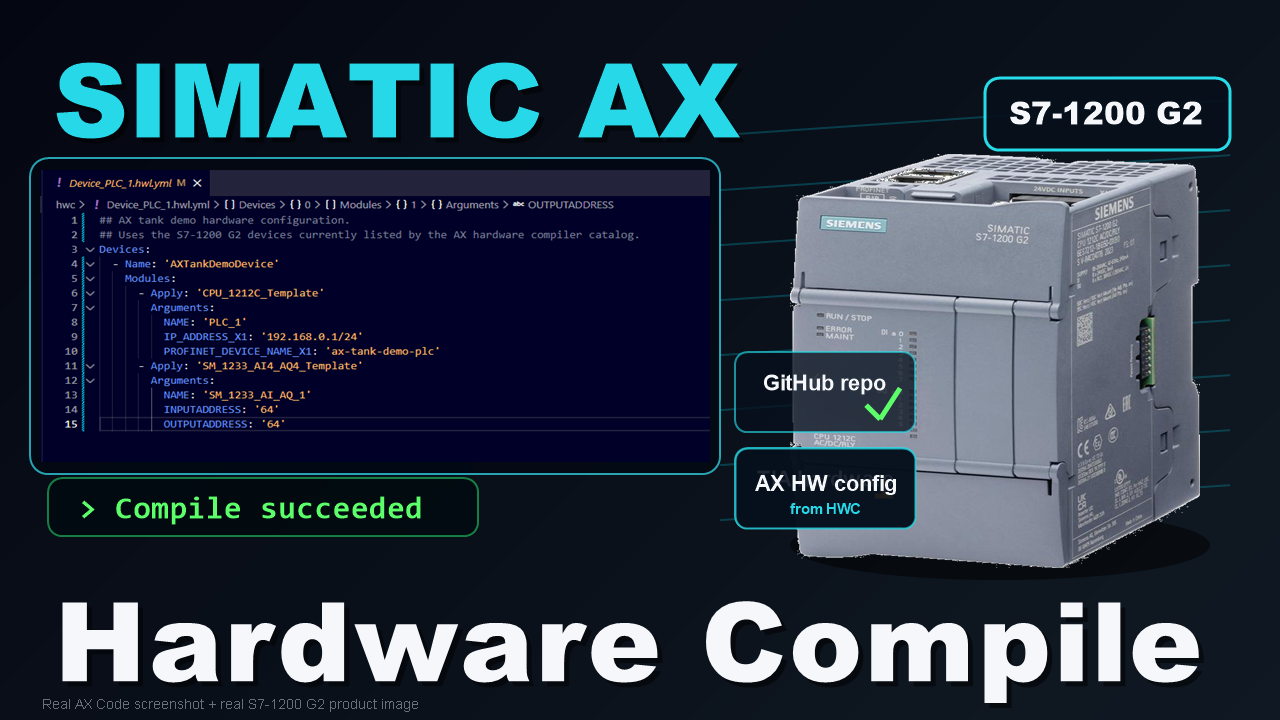
In the previous article, I started the tank-control demo from the engineering side.
That meant process review, requirements, operating modes, safety philosophy, and the first I/O baseline before any SIMATIC AX project files existed.
That is normal for a real automation project. Before I write code, I need to know what the machine is, what signals exist, what hardware family I am targeting, and what the first build should include.
This article moves the demo into project setup and hardware configuration.
Small warning: the written article is the cleaned-up version.
If you would rather watch me ramble for about 30 minutes through the details of the struggle, the YouTube walkthrough is here:
The work has three practical parts:
- create the public GitHub project home for
AXtankDemoProject; - select the first S7-1200 G2 hardware baseline in Siemens TIA Selection Tool;
- create the SIMATIC AX hardware project and compile a hardware configuration that matches the supported devices.
The result is useful, but not in the clean brochure way.
I started with one hardware selection, checked it against the SIMATIC AX hardware compiler, found a catalog limitation, and used the AX-supported hardware subset that the current package could actually compile.
That is the kind of step I want to show in this series. A practical workflow should show not only the happy path, but also the checks that decide whether the happy path is real.
Why I Started With GitHub
Before creating the SIMATIC AX project files, I created a public GitHub repository:
This is not meant to be a GitHub tutorial.
The important point is that the demo now has a public, version-controlled home. I do not want the project to appear later as a finished folder with no history. The repository lets the requirements baseline, process diagram, hardware notes, SIMATIC AX files, screenshots, and later HMI or simulation artifacts grow step by step.
The first repository state captured the Article 19 baseline and project structure. After the hardware configuration work, I also added the repeatable command guide:
Article 20 repeatable hardware workflow
That guide records the commands that worked, the errors that appeared, and the fixes used for package setup, template generation, security prerequisites, certificate setup, compile, and I/O mapping inspection.
The Article 20 hardware project commit is:
0108dad - Add Article 20 SIMATIC AX hardware project
Hardware Selection Comes First
Article 19 gave the first physical I/O baseline for the tank demo.
The digital inputs include:
| Signal | Purpose |
|---|---|
i_xLevelHighHighOk | High-high level OK input |
i_xLevelLowLowOk | Low-low level OK input |
i_xSafetyChainOk | Safety-chain healthy monitor |
i_xPumpRunningFb | Pump/VFD running feedback |
i_xPumpVfdFault | VFD fault feedback |
The digital outputs include:
| Signal | Purpose |
|---|---|
q_xLiquidSourceValveOpenCmd | Source valve open command |
q_xPumpVfdEnable | VFD enable command |
q_xPumpVfdRun | VFD run command |
q_xHeaterEnable | Heater enable command |
q_xOutletValveOpenCmd | Outlet valve open command |
The analog signals are:
| Signal | Purpose | Electrical signal |
|---|---|---|
i_iTankLevelRaw | Tank level raw input | 4-20 mA |
i_iTankTemperatureRaw | Tank temperature raw input | 4-20 mA |
q_iPumpSpeedCommandRaw | VFD speed reference | 0-10 V |
The safety decision from Article 19 stays unchanged.
Certified safety remains outside standard PLC logic. The E-stop and safety relay chain remain a hardwired safety system. A standard PLC program may monitor i_xSafetyChainOk only as a status/permissive for control and HMI behavior, but that signal is not the safety function itself.
With that baseline, I used TIA Selection Tool to choose the first S7-1200 G2 hardware.
The first hardware set I selected was valid Siemens hardware:
| Selected device | TIA Selection Tool article number |
|---|---|
| CPU 1214C, DC/DC/RLY, 14DI/10DO | 6ES7214-1HH50-0XB0 |
| SM 1231 Analog Input, 8AI | 6ES7231-4HF50-0XB0 |
| SM 1232 Analog Output, 8AQ | 6ES7232-4HF50-0XB0 |
That selection made sense from the I/O list. The CPU had enough digital I/O, and the separate analog input and output modules covered the level, temperature, and VFD speed reference.
But hardware selection in TIA Selection Tool is only one side of the workflow. The next check is what the SIMATIC AX hardware compiler can actually compile today.
The AX Hardware Catalog Check
After creating the generated SIMATIC AX hwc-app project, I checked the active hardware packages.
The generated project did not immediately have the S7-1200 G2 hardware support package active. I searched for the Siemens hardware packages and added:
apax add @ax/hw-s7-1200g2
apax install
Then I checked the supported devices:
apax hwc get-supported-devices --format json
This is where the important finding appeared.
The precise finding was this:
The current AX HWC catalog/package used in this project did not expose the original CPU 1214C / SM 1231 / SM 1232 selection.
That does not mean SIMATIC AX has no S7-1200 G2 support.
It does. The S7-1200 G2 hardware support package exists, and the hardware compiler listed S7-1200 G2 devices. The supported subset I could compile in this project was CPU 1212C plus SM 1233 AI4/AQ4.
That distinction matters.
TIA Selection Tool uses the broader Siemens hardware catalog. SIMATIC AX Hardware Engineering uses the devices exposed by the installed AX hardware support packages. Today, those two catalogs are not the same.
The fair lesson is:
SIMATIC AX Hardware Engineering is useful, but the current hardware compiler catalog is still limited compared with the full TIA Portal hardware catalog.
That became the hardware baseline for this Article 20 demo.
The Hardware Used For This Demo
For Article 20, I rebuilt the hardware baseline around devices that the current AX package could compile:
| Component | Article number | Role in the demo |
|---|---|---|
| CPU 1212C, DC/DC/DC, 8DI/6DQ | 6ES7212-1AG50-0XB0 | Main S7-1200 G2 controller; built-in digital I/O covers the first DI/DO baseline |
| SM 1233 Analog I/O, 4AI/4AQ | 6ES7233-4HF50-0XB0 | Analog input/output module for tank level, tank temperature, and VFD speed reference |
The AX hardware compiler uses the Siemens order-number format with spaces in the generated templates:
- CPU 1212C:
6ES7 212-1AG50-0XB0, versionV4.1 - SM 1233 AI4/AQ4:
6ES7 233-4HF50-0XB0, versionV1.0
The CPU has enough built-in digital inputs and outputs for the first demo. The SM 1233 gives more analog channels than this first build needs, but it gives both analog inputs and analog outputs in one module, and it is available in the current AX S7-1200 G2 hardware compiler catalog used here.
That keeps the project moving inside SIMATIC AX while still showing the real limitation.
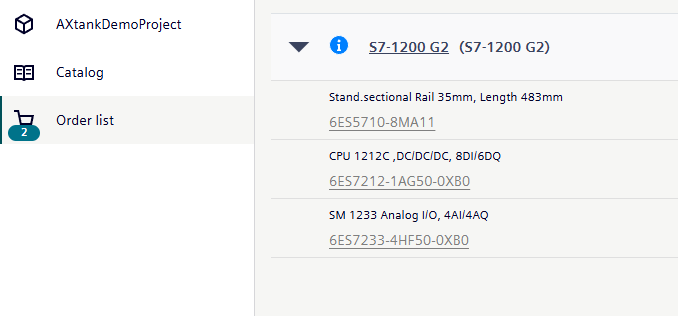
Figure 1. The adjusted S7-1200 G2 order list in TIA Selection Tool: CPU 1212C DC/DC/DC and SM 1233 AI4/AQ4.
Creating The SIMATIC AX Hardware Project
The public project and GitHub repository are called:
AXtankDemoProject
The SIMATIC AX package/folder name is:
ax-tank-demo-project
That is not only a style choice. apax package names have package-manager rules. Uppercase letters are rejected, so the local package name has to be lowercase.
The hardware project was created as an hwc-app project:
apax create hwc-app ax-tank-demo-project
apax install
After package install, the generated project exposed hardware compiler commands. The generated hardware declaration file was:
hwc/Device_PLC_1.hwl.yml
The generated apax.yml also included a hardware compile script. The direct compile command used in this step was:
apax hwc compile --input hwc --output ./hwbin
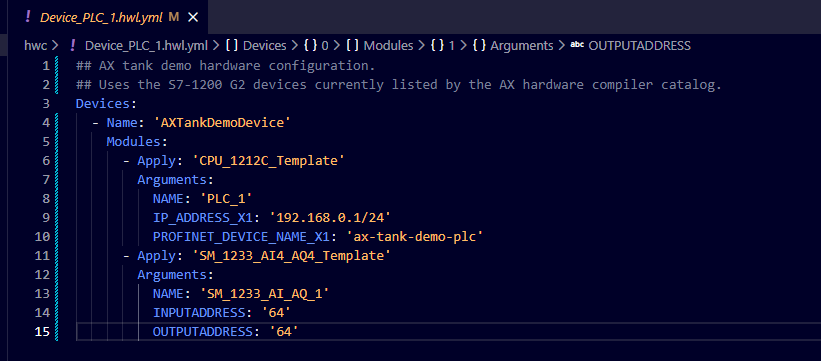
Figure 2. SIMATIC AX hardware declaration using generated templates for CPU 1212C and SM 1233, with the analog module start addresses set to byte 64.
Generated Templates And Address Arguments
SIMATIC AX hardware declaration uses generated templates.
For the CPU and analog module, I generated templates from the supported order numbers:
apax hwc generate-template-file --order-number "6ES7 212-1AG50-0XB0" --version "V4.1" --output "hwc/templates/CPU_1212C_Template.hwl.yml" --template-name "CPU_1212C_Template"

apax hwc generate-template-file --order-number "6ES7 233-4HF50-0XB0" --version "V1.0" --output "hwc/templates/SM_1233_AI4_AQ4_Template.hwl.yml" --template-name "SM_1233_AI4_AQ4_Template"
Then I applied those templates in the device file.
The SM 1233 template exposes INPUTADDRESS and OUTPUTADDRESS, so the analog module start addresses are set in the top-level device file:
INPUTADDRESS: '64'
OUTPUTADDRESS: '64'
The CPU template exposes the PLC name, IP address, and Profinet device name. It includes the built-in DI/DQ submodule, but it does not expose input/output address placeholders for that onboard I/O.
So I did not invent CPU address arguments.
I let the hardware compiler assign the onboard CPU digital I/O and then checked the generated mapping after compile.
Security And Certificate Files
The hardware compile also required the normal AX hardware security prerequisites:
- secure communication setup;
- local demo certificate generation;
- certificate import for TLS;
- a demo password for the generated
User1account.
The generated .p12, generated .crt, and PLC_1.SecurityConfiguration.json are intentionally not in GitHub.
I left those files out because they are local generated security artifacts. The public repository includes the helper script and repeatable instructions so readers can regenerate their own local demo files instead of reusing mine.
For a real project, passwords and certificate material should be handled as project secrets, not copied from a public article or repository.
Hardware Compile And I/O Mapping
The hardware compile succeeded.
The compiler produced warnings about services such as OPC UA Server, Web Server, Syslog, and disabled IDevice service. For this article, those warnings are not blockers because the first hardware configuration does not use those services.
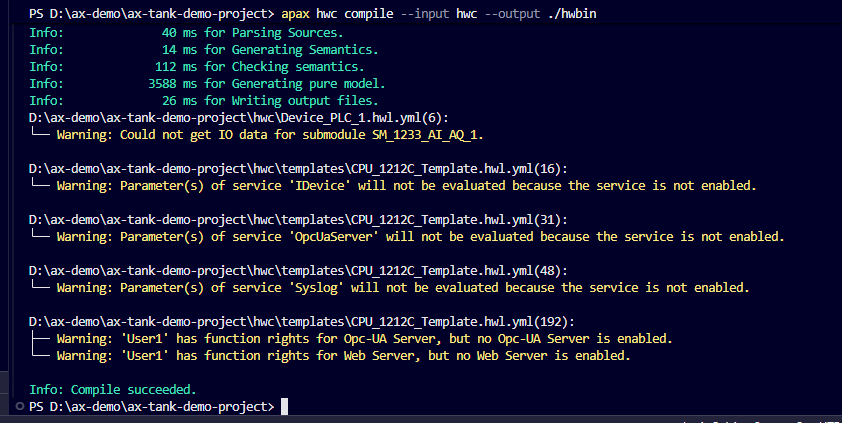
Figure 3. SIMATIC AX hardware compile completed successfully, with non-blocking service warnings before Compile succeeded.
The generated I/O mapping file is:
SystemConstants/PLC_1_IoAddresses.st
That file answers the practical address question:
| Hardware | Generated input mapping | Generated output mapping |
|---|---|---|
| CPU onboard DI/DQ | %IB0, channels %I0.0..%I0.7 | %QB0, channels %Q0.0..%Q0.5 |
| SM 1233 AI/AQ | %IB64 | %QB64 |
So the hardware compiler auto-assigned the CPU built-in digital I/O to byte 0, while the analog module used the manually configured byte 64 start addresses.
That is the point of doing this step before writing control code.
Now the later PLC logic can be built against a real compiled hardware baseline instead of guessed addresses.
What We Have Now
Article 20 is about the project home, hardware selection, and the first compiled SIMATIC AX hardware baseline.
The public GitHub repository now exists. The Article 19 requirements and I/O baseline have a real project home. The SIMATIC AX hwc-app project exists, the S7-1200 G2 hardware support package is installed, templates were generated, local security prerequisites were handled, the hardware configuration compiled, and generated I/O addresses are available for the next engineering step.
Unfortunately, the finding was not good news: the SIMATIC AX/HWC catalog available in this project is still very limited. The current AX HWC catalog/package used here did not expose the original CPU 1214C / SM 1231 / SM 1232 selection, so the compiled demo uses an AX-supported S7-1200 G2 subset: CPU 1212C plus SM 1233.
That real hardware check is part of the engineering work now.
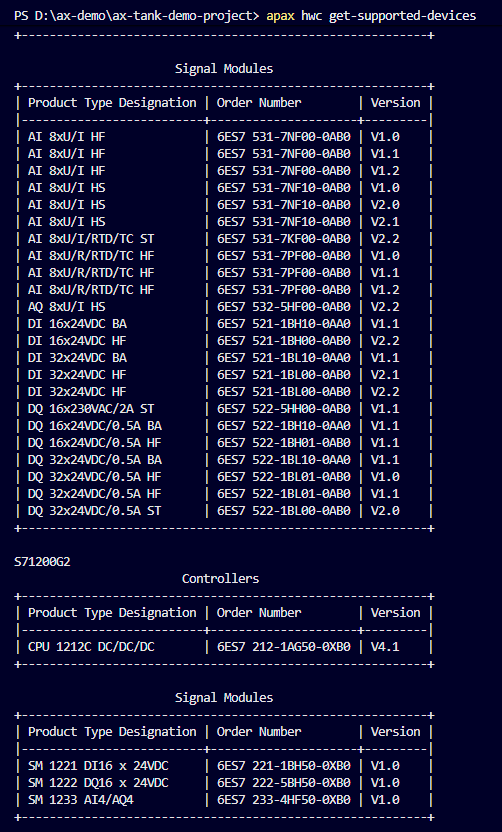
Figure 4. Supported-device output showing the S7-1200 G2 subset used in this project, including CPU 1212C and SM 1233 AI4/AQ4.
A Note About AI-Assisted Engineering
One more practical point is worth saying clearly.
If you come from an electrical engineering background and the command-line part looks confusing, I understand that. This workflow has package commands, hardware package searches, generated templates, compiler messages, certificates, generated users, and text-based hardware declarations.
The lesson is not that every electrical engineer must memorize all of that syntax.
The lesson is that SIMATIC AX is well suited to AI-agent-assisted engineering because so much of the project is text-based and repeatable.
The engineer still has to understand the target result. I still have to know which hardware I want, which files should exist, which generated artifacts are safe to publish, and where to verify the final I/O mapping.
But the routine setup work can move faster. An engineering assistant can search packages, generate templates, run compile attempts, collect errors, update the command guide, and point me to the files I need to verify.
The responsibility stays with the engineer.
The command line becomes less of a stopper and more of another engineering tool.
Next Step
The tank demo now has a clean foundation:
- requirements and I/O baseline;
- public repository;
- S7-1200 G2 hardware selection;
- SIMATIC AX hardware project;
- compiled hardware configuration;
- generated I/O mapping.
The next article can finally move from hardware into the functional description and first function block interfaces.
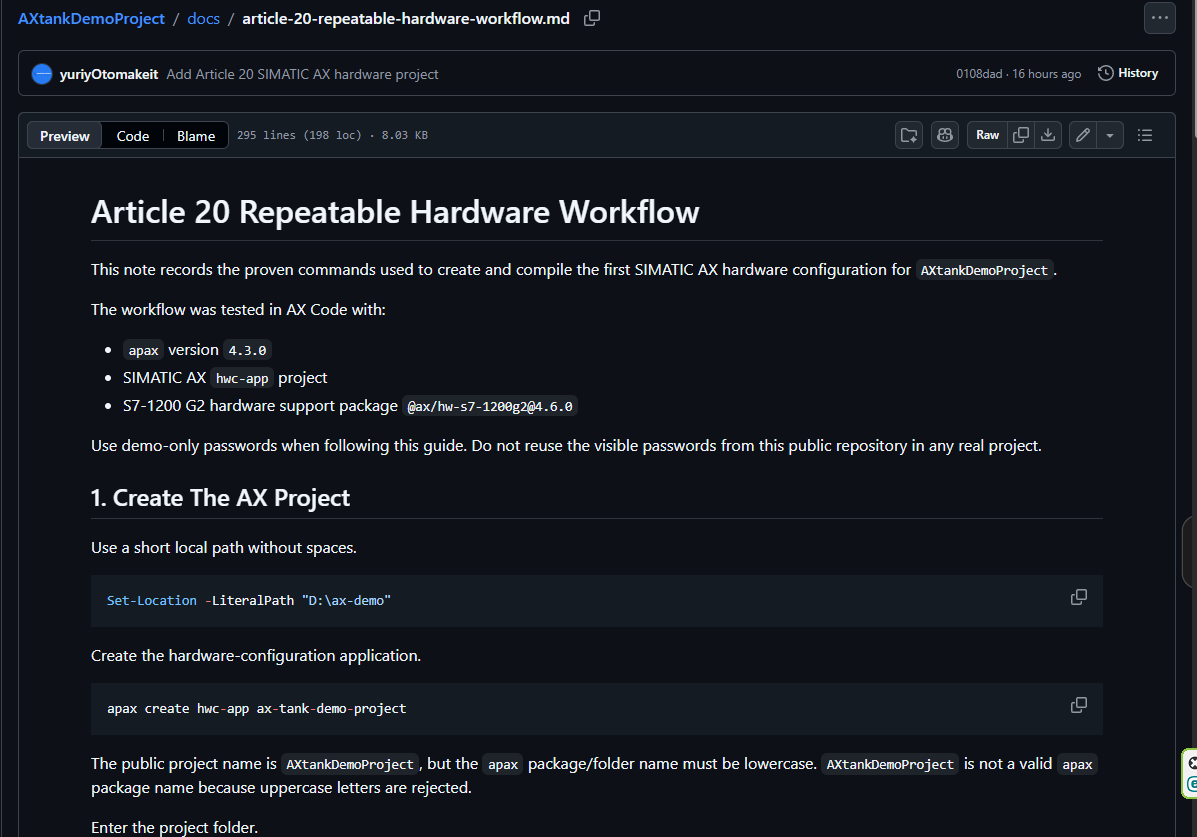
Figure 5. The public GitHub guide records the repeatable hardware workflow and the exact command path that worked.
Discussion on LinkedIn: Hardware configuration in SIMATIC AX and TIA Portal.
Working on something similar?
I am Yuriy Mosiyenko — I design and program industrial control systems, mostly Siemens, as a one-person practice based in Bedford, Nova Scotia, working with customers across Canada. If you have a controls project you cannot staff internally, tell me what you are building.
