
June 1, 2026 · tia-portalsiemensplc-programmingdata-blocksinstance-data-blocksindustrial-automationcontrol-systems
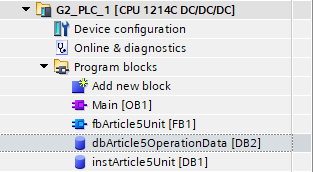
In TIA Portal, data is not just something hidden behind the code. It is a visible engineering object.
The Step After Instance DBs
In the last article I wrote about Function Blocks, Functions, and the instance. That naturally introduced the instance data block, because in TIA Portal an FB needs somewhere to keep its memory.
Now I want to step back from that one case and look at data blocks directly.
This is one of the Siemens choices that seems normal after you have worked in TIA Portal for a while. You open the Program blocks folder, and there they are: FBs, FCs, OBs, and DBs sitting beside each other as project objects.
But this is not the only possible model. TIA Portal makes data blocks visible, nameable, downloadable, monitorable objects. That choice affects commissioning, diagnostics, HMI integration, retention, online changes, and team readability.
It is not just “where the variables are stored.” It is part of the architecture.
![Figure 1. TIA Portal V21 Program blocks tree showing Main [OB1], classArticle5Unit [FB1], the global DB dbArticle5OperationData [DB2], and the instance DB instArticle5Unit [DB1].](figures/article-5/fig-01-tia-v21-program-blocks-dbs.png)
What a Data Block Is
A data block is not code. It does not execute. It does not make decisions. It stores program data.
Siemens describes global DBs very directly in the STEP 7 documentation: data blocks store program data, and global data blocks store data that can be used by all other blocks.
In practice, I think about two main categories.
Global data blocks are shared data areas. OBs, FBs, and FCs can read from them or write to them. A global DB might hold machine settings, HMI commands, alarm words, IO mapping structures, or a complete system interface.
Instance data blocks belong to Function Block instances. When I create one FB definition and call it as instPump_P01, TIA needs a place to store that pump instance’s state. If I call the same FB again as instPump_P02, that second instance gets its own memory. Same code, separate data.
That is the basic distinction. Global DBs are shared by design. Instance DBs are owned by FB instances.
The problem starts when I forget that ownership difference.
Why Visible DBs Are Useful
The visibility of DBs is one of the reasons I still like the TIA Portal model, even with all the things that sometimes frustrate me in TIA.
During commissioning, I can go online and open a DB. I can see machine settings, operator commands, feedback values, alarm flags, state numbers, and diagnostic bits in one structured place. If a pressure controller refuses to start, I can often look at the command, interlock, process value, setpoint, and fault status in the DB before opening the FB.
That matters when the plant is running and someone is standing beside you waiting for an answer.
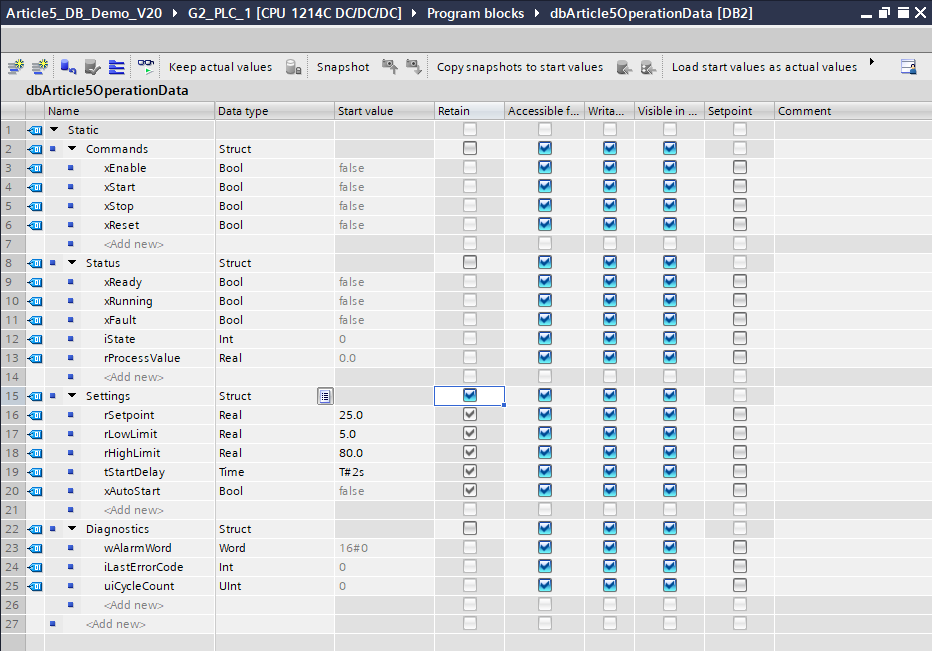
Visible DBs are also useful for snapshots and start values. If I tune parameters during commissioning, those values exist online as actual values. If I later change the DB structure and download carelessly, I may lose the tuned values and fall back to old start values.
My habit for important settings DBs is simple: after tuning, take a snapshot of actual values and copy the snapshot to start values. Siemens documents both actions in TIA Portal: creating a snapshot of actual values and copying that snapshot to start values. Then if the DB is initialized later, the start values are not old defaults.
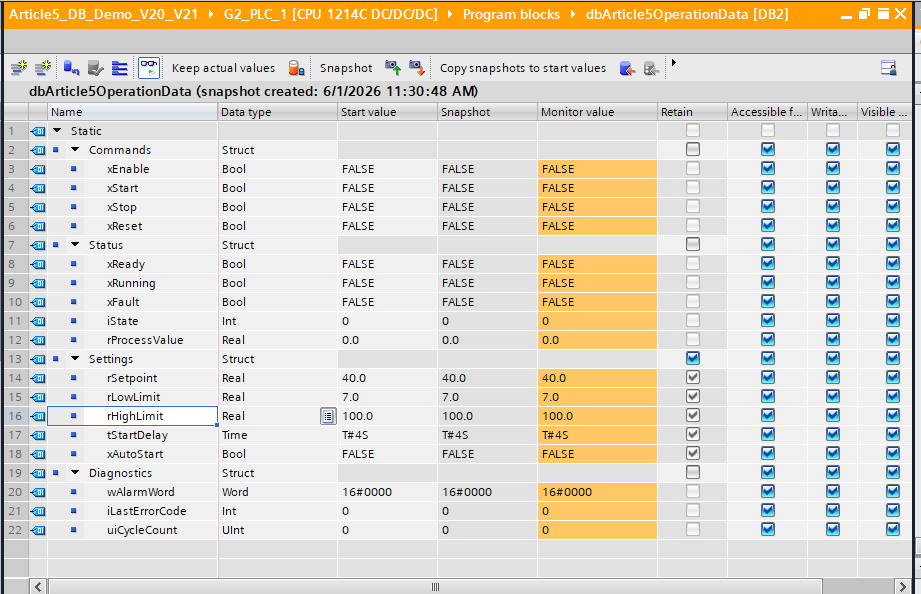
I also prefer to keep important retained settings in their own DB or clearly separated section. Not because TIA requires that structure, but because it makes the responsibility obvious. If the DB is called MachineSettings, I treat it differently before a download than a temporary diagnostic DB.
Another reason DBs matter is external access. HMI screens, OPC UA clients, logging tools, and test utilities often need a clean boundary into the PLC. Siemens documents DB-level OPC UA access settings, including the ability to make a complete DB accessible or hidden for OPC UA clients in TIA Portal through DB attributes. I can expose a deliberate communication DB instead of letting every internal variable become part of the outside interface.
For team readability, visible DBs make the data model browseable. A new engineer can open the project and see where shared data lives.
Global DBs: Powerful and Dangerous
Global DBs are powerful because they give you a single source of truth.
In a pump station, I might have one structured DB that contains the pump commands from HMI, the pump statuses back to HMI, the raw IO mapping, and common system diagnostics. A pump FB can receive its section of that structure through an InOut parameter.
That pattern can be clean. I have used variations of it because it makes the system data visible and reduces long parameter lists. Instead of passing twenty separate tags into a block, I pass a structured interface.
But a global DB is also dangerous because it is easy to turn it into a dumping ground.
The bad version looks like this: every block can write anything, nobody owns a section, and the only way to understand a value is to search the whole project. The program still compiles, but ownership is gone.
The rule I use is not “avoid global DBs.” I do not believe that.
The rule is: decide ownership.
If a section is called Commands, the HMI or operator interface owns the write side. If a section is called Status, the equipment FB owns the write side. If a section is called Inputs, the IO mapping layer writes it. If a section is called Outputs, the control logic writes it and the IO mapping layer sends it to hardware.
There can be exceptions, but they should be deliberate. A DB without ownership is just global memory with better names.
This is also why I avoid using Merker bits as the main internal architecture in modern TIA projects. M memory is global and absolute. DB tags give me structure, type information, and a place to attach ownership.
Instance DBs: Block-Owned State
Instance DBs solve a different problem.
A Function Block is code with memory. Siemens describes FBs as blocks with memory because their parameters are stored permanently in instance data blocks and remain available after the block has executed. The official FB documentation also states that each FB instance requires instance-specific values.
That is why I like the mental model from the last article: the FB is the definition, the instance is the object, and the instance DB is the object’s memory.
For a pump controller, the instance DB might contain the running latch, fault latch, timers, command edge detection, accumulated runtime, and internal state. The global DB may contain the command and status interface, but the instance DB contains the private memory the FB needs to do its job.
This distinction helps avoid a common design smell: using a global DB to store all internal state for every FB. If a variable only exists so the FB can remember something between scans, it probably belongs in the FB’s Static section and therefore in the instance DB.
Multi-instances take this one step further. When a parent FB contains child FBs as Static variables, the child instance data can live inside the parent’s instance DB. A tank system FB can own its valve controller, level controller, and alarm handler instances inside one parent instance DB instead of scattering separate DBs through the project tree.
Retention, Start Values, and Download Reality
DBs become very real during online changes.
There are two values I care about during commissioning: the actual value in the running PLC and the start value stored in the project/load memory. Retain adds another layer because some values survive power loss.
The trap is thinking that retain means “safe from every download.” It does not.
If a DB or FB interface changes in a way that forces reinitialization, TIA can reset values back to start values. If the start values are current, reinitialization hurts less. If the start values are old defaults, you just lost commissioning work.
Siemens provides mechanisms to reduce this risk, but they have conditions.
The older mechanism is Download without reinitialization using memory reserve. Siemens documents it for S7-1200 V4 and higher and S7-1500, with optimized access blocks, and explains that future interface additions can be stored in a reserved area so existing loaded tag values are not affected during download. The catch is that the reserve must be active before you need it, and it is mainly about extensions within the reserve.
TIA Portal V21 added a newer Keep actual values action in the Load preview dialog. Siemens describes it as allowing structural changes to data blocks without reinitializing the actual values of all tags. But the requirements and restrictions matter: it is for TIA Portal V21, S7-1500 firmware V4.1, and optimized access DBs. It is not offered for array dimension changes, string length changes, data type changes, or retentivity changes. Memory reserve must be disabled. Siemens also lists further restrictions, including references or parameter types and tags with retentivity set in the IDB. For tag-name changes, Siemens states that actual values cannot be retained when loading.
So my practical conclusion is conservative: use the Siemens features when the project and CPU support them, but do not build your commissioning discipline around hope. Before changing DB structures with important values, check what TIA is going to do, snapshot what matters, and make sure start values are not stale.
AX Shows the Choice Is Not Universal
The SIMATIC AX contrast is useful here because it proves TIA Portal’s DB model is a design choice, not a law of PLC programming.
In the AX article I wrote earlier, the mapping is straightforward: a TIA global DB becomes a VAR_GLOBAL section in the AX CONFIGURATION; FB instance data is created by declaring a variable of an FB type. There are no separate DB objects or DB files in the AX project structure.
That is not wrong. It fits a text-based workflow better. TIA Portal goes the other direction. It makes DBs explicit project objects. You can open them, monitor them, set start values, configure retention, configure OPC UA access, and treat them as visible parts of the engineering model.
Neither model is automatically better. AX gives you a cleaner text-first representation. TIA gives you a very practical commissioning object.
For the kind of field work I do, I still see why TIA made this choice. When you are online with a machine, a well-structured DB is one of the fastest windows into the program.
My Practical Rule
Every DB, and every major section inside a DB, should have an owner.
If it is a global DB, decide who writes each section and who reads it. If it is an instance DB, keep it as block-owned state unless there is a real reason to expose that value elsewhere. If it is a settings DB, treat it like commissioning data, not disposable scratch memory. If it is an HMI or OPC UA boundary, make it deliberate and keep internal implementation details out of it.
DBs are not a trash bin for variables I did not know where to put. They are part of the program architecture.
That is the real reason I think TIA treats data blocks as first-class objects. Data in an industrial control system is not passive. It is how the PLC remembers, how the HMI talks to the program, how commissioning survives downloads, how diagnostics become readable, and how another engineer understands the system later.
If you structure DBs deliberately, they make the project easier to commission and easier to maintain.
If you do not, they become global memory with a nicer editor.
I have made both versions. The deliberate version is the one I want to keep building.
Discussion on LinkedIn: Data Blocks are visible engineering objects.
Working on something similar?
I am Yuriy Mosiyenko — I design and program industrial control systems, mostly Siemens, as a one-person practice based in Bedford, Nova Scotia, working with customers across Canada. If you have a controls project you cannot staff internally, tell me what you are building.
