July 2, 2026 · tia-portalsiemensplc-programmingfunction-blockssclindustrial-automationcontrol-systems
The useful question is not only “can I add this variable?” The useful question is “should other code depend on it?”
A function block usually starts simple.
Start command. Stop command. Run feedback. Fault feedback. A few status bits. Maybe one setpoint.
Then the real project starts to push on it. The HMI needs a fault word. The parent sequence needs to know whether the device is ready. Commissioning needs to see the last error. Reset behavior changes. A debounce timer gets added. A private latch becomes a small state machine.
At that moment, the design question is not only whether TIA Portal lets me add another variable. It usually does. The real question is where that variable belongs.
Should the caller see it?
Should the HMI read it?
Should a parent FB be allowed to make decisions from it?
Or is it just part of how this block gets the job done?
That boundary is what I mean by FB encapsulation in TIA Portal. A function block has a visible surface, and it has private implementation memory. Good PLC code keeps that boundary intentional.
The Siemens Terms Matter
TIA Portal already gives us the vocabulary.
Siemens describes the block interface as the declarations used inside the block, split into block parameters and local data. The block parameters form the call interface. Local data is for intermediate results. For function blocks, the interface also defines the structure of the instances assigned to that FB. Source: Siemens STEP 7 V21 - Overview of the block interface.
That maps to the practical split I use:
Input,Output, andInOutare the visible surface of the block.Staticis persistent memory owned by the FB instance.Tempis scratch memory for one execution of the block.- A structured UDT passed through
InOutcan carry a larger interface shape when that is clearer than a long list of separate parameters.
Siemens’ general block-interface rules are also useful here: input parameters are read by the block, output parameters are written by the block, and in/out parameters are both read and written. Source: Siemens STEP 7 V21 - General rules for declaring the block interface.
That sounds basic, but many messy blocks violate the spirit of it. A command gets stored as if it were proof. A status bit gets reused as an internal latch. A private step number leaks into parent logic because it was convenient during commissioning. The project still compiles, but the block boundary becomes harder to reason about.
Inputs Are Requests and Parameters
I use Input for values the caller supplies to the block.
That can be a request:
xEnable
xReset
It can also be a parameter for this call:
rSpeedSetpoint
tFeedbackTimeout
The important part is ownership. The caller owns the value before the block runs. The block reads it and makes decisions from it.
I try not to put internal results in Input, even if the name sounds convenient. If a parent sequence asks a motor to start, that is an input or a command. If the motor actually accepted the command and became ready, that is status.
This is the same split from the UDT article, just applied at the FB boundary. Requests go in. Caller-visible facts come out.
Outputs Are Caller-Visible Facts
Output is for information the caller can use after the block executes.
Examples:
xHealthy
iVisibleState
xReady
xRunning
xFaulted
wAlarmWord
I do not expose every internal value just because it might be interesting. But I also do not hide useful information for purity.
If the HMI needs to show the active mode, expose it.
If a parent FB needs to know that a child block is ready, expose it.
If commissioning needs a fault word, warning word, remaining time, or last error, expose it deliberately.
The phrase I use with myself is:
Private by default, visible when someone outside the FB has a real reason to read it.
That keeps the interface useful without turning it into a dump of every local variable.
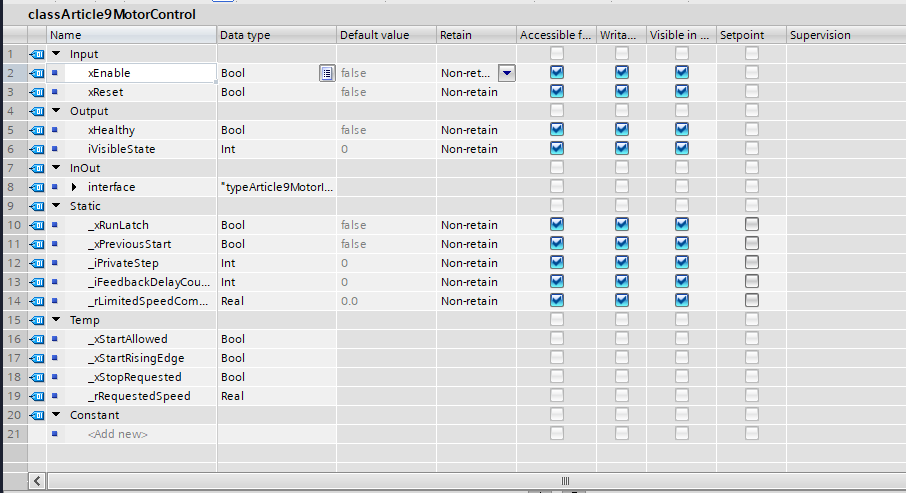
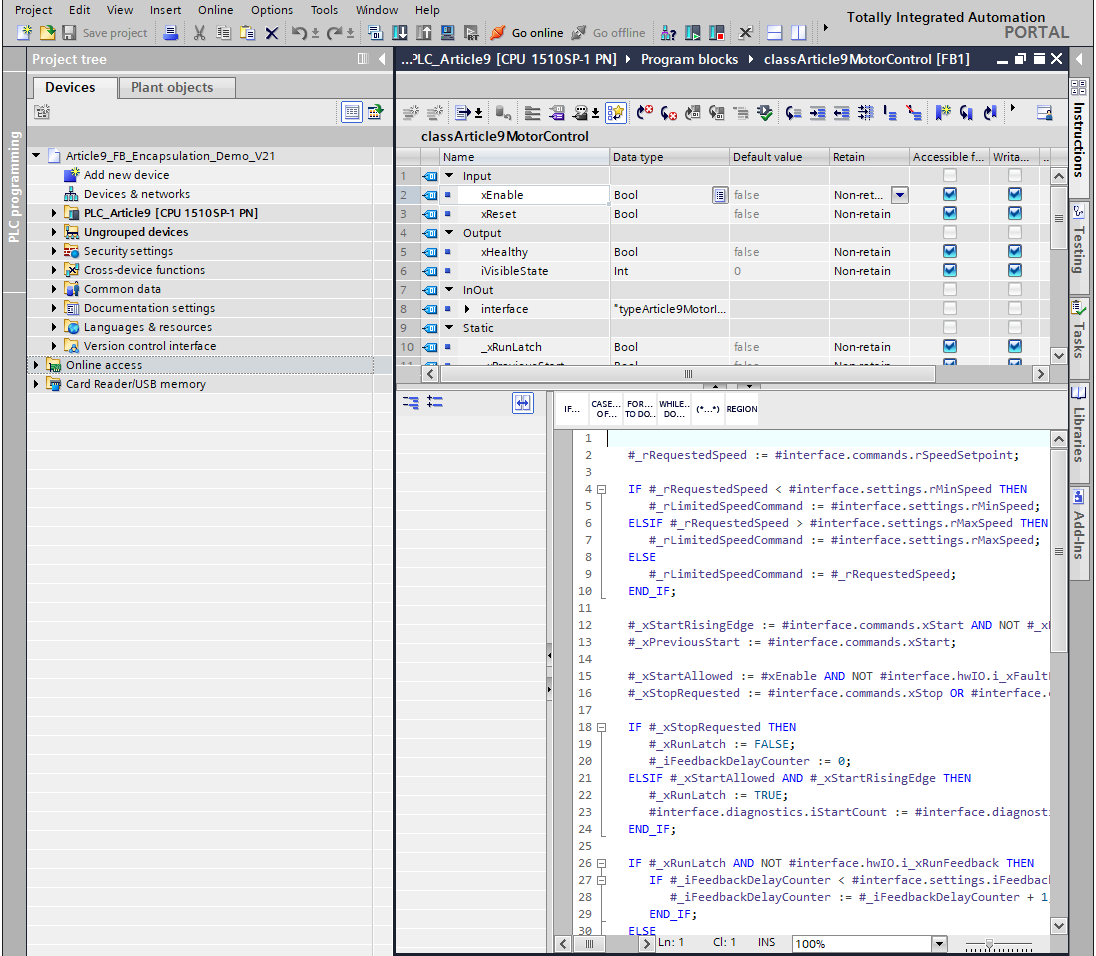
Figure 1. A TIA Portal V21 demo FB showing the visible call interface and the private Static section in one editor view.
InOut Is Useful When the Shape Is Larger Than One Parameter
Sometimes the call surface is small:
xEnable
xReset
xHealthy
Other times a device interface is naturally larger. A motor, pump, valve, winch, or tank controller may need commands, status, settings, hardware I/O, and diagnostics.
For that shape I often use an InOut UDT:
VAR_IN_OUT
   interface : "typeArticle9MotorInterface";
END_VAR
The UDT has predictable sections:
commands
status
settings
hwIO
diagnostics
Siemens documents PLC data types as user-defined structures that can be reused in the program, and notes that a PLC data type can be passed as a complete structure for a block call. Source: Siemens STEP 7 V21 - Using PLC data types (UDT).
That is the practical reason I like this pattern. The caller does not need twenty separate wires for one device. The block receives one structured shape, and the sections tell me what each value is for.
The important caution: when I pass a UDT through InOut, I am making that shape visible to both sides. If I rename status.xReady, move commands.xStart, or change the meaning of diagnostics.iLastError, caller code may need to change. So I try to keep the UDT stable and intentional.
Static Is the FB’s Persistent Private Memory
This is where function blocks are different from functions.
Siemens describes an FB as a code block that uses an instance DB for parameters and static data. The instance DB keeps values after the FB finishes, so those values are available to later calls. Source: Siemens S7-1200 manual - Function block (FB).
That persistent memory is exactly why we use an FB for a motor controller instead of an FC.
The FB may need:
- a run latch,
- an edge-detection memory bit,
- a private step number,
- a feedback-delay counter,
- an accepted speed value,
- an internal timer or child FB instance,
- a helper latch for reset behavior.
In the Article 9 demo block, these stay in Static:
_xRunLatch
_xPreviousStart
_iPrivateStep
_iFeedbackDelayCounter
_rLimitedSpeedCommand
They are not there for the parent sequence to read directly. They are there because the FB needs memory between scans.
Yes, an instance DB is visible in TIA Portal. Siemens notes that any code block can access data in an instance DB, even though that DB stores data for a specific FB. Source: Siemens S7-1200 manual - Data block (DB).
That does not mean I want parent logic reaching into private Static variables. I treat direct access to another FB’s Static memory as a maintenance smell unless there is a very deliberate reason.
If outside code needs a value, promote the right value to Output or to interface.status or interface.diagnostics. If outside code does not need it, keep it private.
Temp Is Scratch Space for This Call
Temp is even more private.
Siemens describes Temp tags as temporary tags used during execution of the code block. In the block-interface overview, Siemens notes that temporary local data is retained for only one cycle and is not shown in instance data blocks. Sources: Siemens STEP 7 V21 - Overview of the block interface and Siemens SCL program editor.
I use Temp for intermediate calculations:
_xStartAllowed
_xStartRisingEdge
_xStopRequested
_rRequestedSpeed
These values help the scan execute cleanly. They do not belong in status. They do not belong in diagnostics. They do not need to survive the call.
The discipline with Temp is simple: write it before reading it in the same execution. Do not assume it remembers anything useful from the last scan.
What the Demo Shows
For this article I created a small TIA Portal V21 demo project:
Article9_FB_Encapsulation_Demo_V21
The demo has a motor interface type, a motor-control FB, a parent line-section FB, and a small demo DB. It is intentionally plain, with generic article/demo objects.
The motor FB has visible inputs and outputs:
VAR_INPUT
   xEnable : Bool;
   xReset : Bool;
END_VAR

VAR_OUTPUT
   xHealthy : Bool;
   iVisibleState : Int;
END_VAR
It also has a structured InOut interface:
VAR_IN_OUT
   interface : "typeArticle9MotorInterface";
END_VAR
Inside the block, the private values do the work:
#_xStartAllowed := #xEnable AND NOT #interface.hwIO.i_xFaultFeedback;
#_xStopRequested := #interface.commands.xStop OR #interface.commands.xReset OR #xReset;
Later, only selected facts cross the boundary:
#interface.status.xReady := #_xStartAllowed;
#interface.status.xRunning := #_xRunLatch AND #interface.hwIO.i_xRunFeedback;
#interface.status.iState := #_iPrivateStep;
That last line is intentional. I may keep _iPrivateStep private as the real decision state, while publishing status.iState as the simplified state that HMI, parent logic, or commissioning can read.
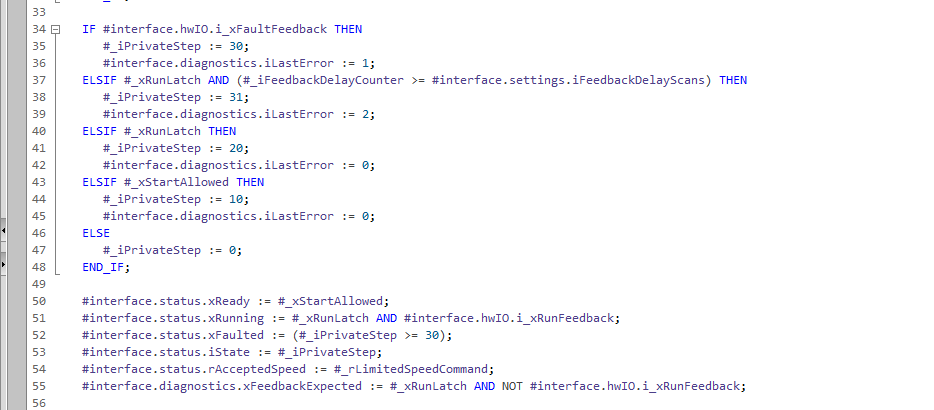
Figure 2. Private implementation values such as _iPrivateStep and _xRunLatch are used inside the FB, while selected results are written to interface.status and interface.diagnostics.
The parent block does not reach into the motor FB’s Static variables. It writes commands, calls the motor FB, and reads status:
#motor.commands.xStart := #xOperatorStart AND #xLineEnable;
#motor.commands.xStop := #xOperatorStop OR NOT #xLineEnable;

#_instMotor(
   xEnable := #xLineEnable,
   xReset := #xFaultReset,
   interface := #motor,
   xHealthy => #_xMotorHealthy,
   iVisibleState => #_iMotorState);

#xLineRunning := #motor.status.xRunning;
#xLineFaulted := #motor.status.xFaulted;
That is the caller relationship I want. The parent block asks for behavior and reads results. It does not know how the motor FB debounces feedback, counts delay scans, or latches the run command.
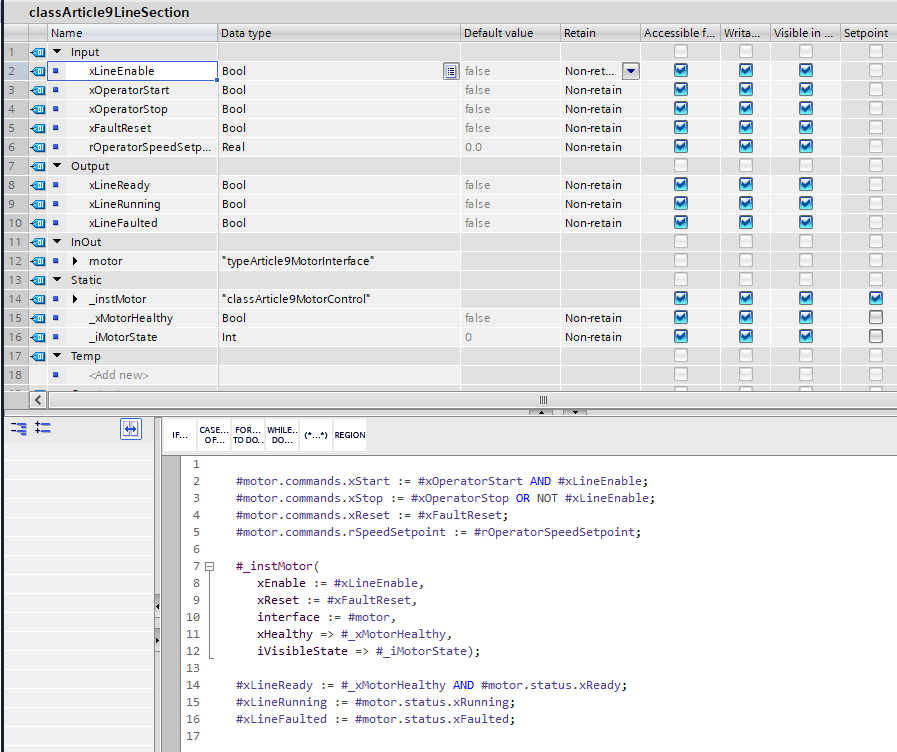
Figure 3. The parent caller writes command fields, calls the child FB, and reads status fields instead of depending on the child FB’s private memory.
Changes That Should Stay Inside the FB
A clear boundary makes later change less expensive.
These changes should usually stay inside the FB:
| Change inside the FB | Why callers should not care |
|---|---|
| Replace a feedback counter with an IEC timer | The visible ready/running/fault status can stay the same. |
| Replace a latch with a private state value | The public command/status meaning does not need to change. |
| Add an internal one-shot for start detection | The caller still sends commands.xStart. |
| Refactor speed limiting calculations | The caller still provides a setpoint and reads accepted speed. |
| Add a private helper variable | No external code should depend on it. |
This is the main payoff. If I need to improve debounce behavior after commissioning, the parent sequence should not need to be rewritten. If I change the internal fault-detection method, the HMI should still read the same fault word and status bits.
Changes That Do Affect Callers
Other changes cross the boundary and deserve more care:
| Change at the visible boundary | Why it matters |
|---|---|
Rename commands.xStart | Every caller that writes the start command must be updated. |
Change the meaning of status.xReady | Parent logic or HMI display may behave differently without a compile error. |
| Move a field inside the interface UDT | Source references, HMI tags, and parent FB code may need updates. |
| Remove a diagnostic field | Maintenance or commissioning screens may lose useful evidence. |
Change an InOut UDT shape | All tags based on that type may adapt, but the engineering meaning still has to be reviewed. |
This is why I do not casually rename public fields. Even if TIA Portal helps update references, I still treat the meaning as part of the design surface.
Where I Land
For FB encapsulation in TIA Portal, my current rule is:
The FB interface is for values other code should depend on.
Static and Temp are for how the FB gets the job done.
If a value crosses that boundary, it should be intentional.
I do not think this is the only way to structure every TIA Portal project. Some engineers prefer more scalar parameters and fewer structured interfaces. Some expose more diagnostics than I do. Some hide state more aggressively. All of those choices can be reasonable in the right system.
What I try to avoid is accidental visibility.
If the caller needs the value, give it a clear name and put it in the visible interface.
If the value is just implementation memory, keep it private and let the FB change internally without pulling the rest of the project along with it.
If you draw this FB boundary differently in your own projects, especially around diagnostics, parent-child interfaces, or instance DB access, I want to hear your approach. I would rather improve my model than defend one that only works in my own habits.
Discussion on LinkedIn: Function Block Encapsulation in TIA Portal.
Working on something similar?
I am Yuriy Mosiyenko — I design and program industrial control systems, mostly Siemens, as a one-person practice based in Bedford, Nova Scotia, working with customers across Canada. If you have a controls project you cannot staff internally, tell me what you are building.
