
May 25, 2026 · tia-portalsiemensplc-programmingfunction-blocksinstance-data-blocksindustrial-automationcontrol-systems
A function block remembers. A function forgets. That difference turns out to matter a lot.
The Question That Comes Up Early
Early in a TIA Portal project, before the real complexity arrives, there is a decision you make almost without noticing it: will this block be a Function Block or a Function?
In small programs it barely matters. Pick one, write the code, move on. But on a project with thirty or forty blocks — conveyor drives, pump controllers, valve sequences, pressure regulators — the wrong habit compounds. You end up with FBs that have no business being FBs, or FCs carrying state in a global DB because someone forgot the FC has no memory of its own.
Understanding the distinction cleanly, once, is worth the time. The instance concept that comes with FBs is especially worth understanding early, because it determines how your data block structure grows as the project grows.
Functions — Stateless by Design
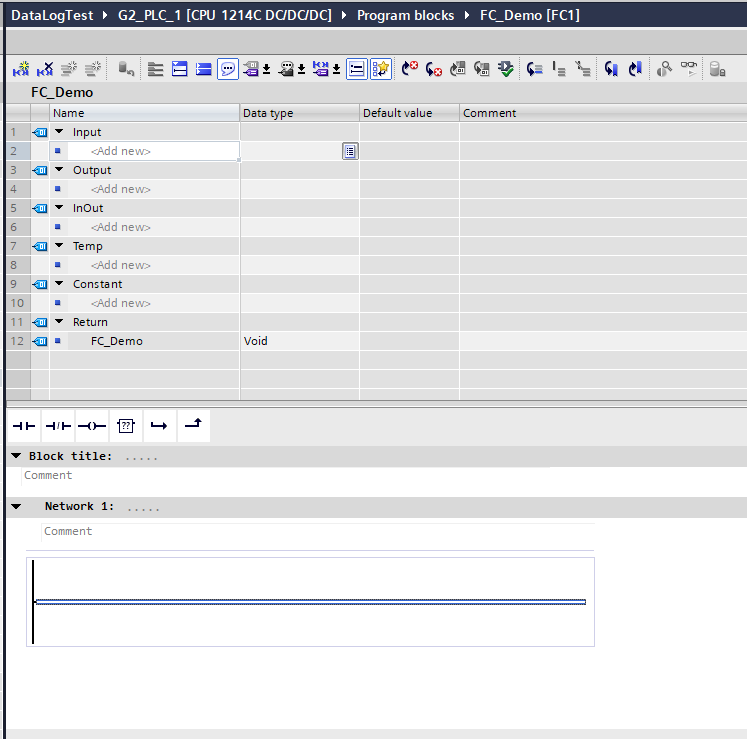
A Function (FC) is a block that executes, produces a result, and leaves nothing behind. When the scan cycle calls it, TIA allocates temporary memory for its TEMP variables, runs the logic, and discards everything when the function returns. The next call starts fresh, with no memory of the previous one.
That is not a limitation — it is the entire point. Call an FC from ten different places in your program and each call is independent. The FC has no identity, no history, no side effects that persist. For a pure computation — converting a raw analog value from 0–27648 to engineering units, calculating a flow rate from differential pressure, checking whether a pressure reading is within a configured band — the FC is exactly the right tool. The algorithm takes inputs, produces outputs, and you do not want it accumulating anything between calls.
This “stateless” property is also what makes FCs easy to test. Feed in known inputs. Check the output. No setup required, no prior state to account for.
The Siemens documentation for the S7-1500 is direct about this: a Function has no associated instance data block. What you see in the FC interface is Input, Output, InOut, Temp, Constant, and Return. The Temp section is where local working variables live — they are created at the start of the call and gone at the end. The Return section is the FC’s return value: by default it is typed as Void, and the FC is called as a statement. Give Return a real data type and the FC can be called as an expression — result := Scale_AI(raw); — the way a function returns a value in any other language. Constant is the section for compile-time named constants visible to callers.
Function Blocks — Memory Across Calls
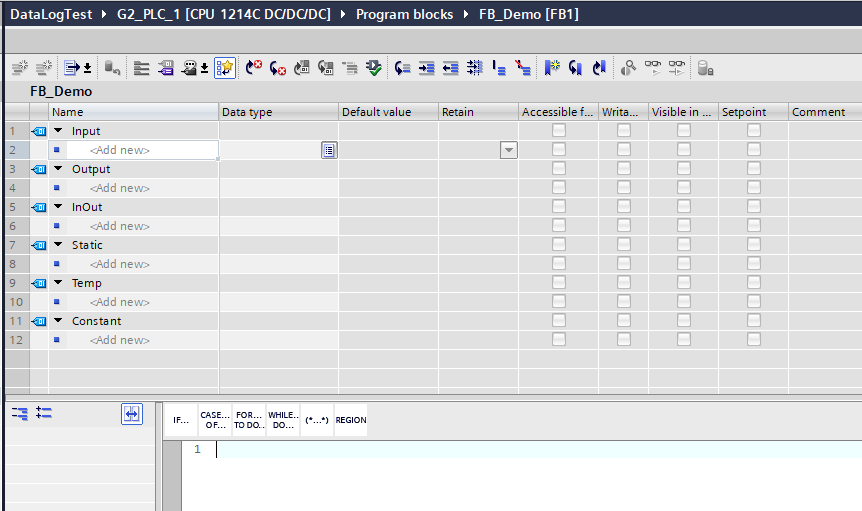
A Function Block (FB) has the same Input, Output, InOut, Temp, and Constant sections as an FC. Where the FC has a Return section, the FB has a Static section instead.
Static variables are the memory that persists between scans. A timer accumulating elapsed time. A fault latch that stays set until an operator resets it. A mode flag that the block flipped to AUTO three scans ago and needs to still be AUTO this scan. All of that lives in Static.
The runtime needs somewhere to store those Static variables between calls. That storage is the instance data block — the instance DB. Every time you call an FB in TIA Portal, there is an instance DB attached to it, holding that particular call’s static data. Two calls to the same FB, two instance DBs, two independent sets of static data.
The Siemens documentation describes it clearly: when a function block is called, its instance data can be stored in its own instance data block — and the same FB definition, called multiple times, each gets its own.
If you have worked through the article on Organization Blocks, the FB/instance-DB pair shows up there in a different context: when OB1 calls an FB, TIA needs to know which instance DB to use. That is why when you drop an FB call into OB1 in TIA Portal, it immediately asks you for an instance name. The instance name becomes the instance DB name.
The Instance Concept — One Definition, Many Objects
Here is the part worth slowing down on.
An FB definition is code. It describes what the block does — the logic, the inputs, the outputs, the static variables. The FB definition itself holds no data. It is a template.
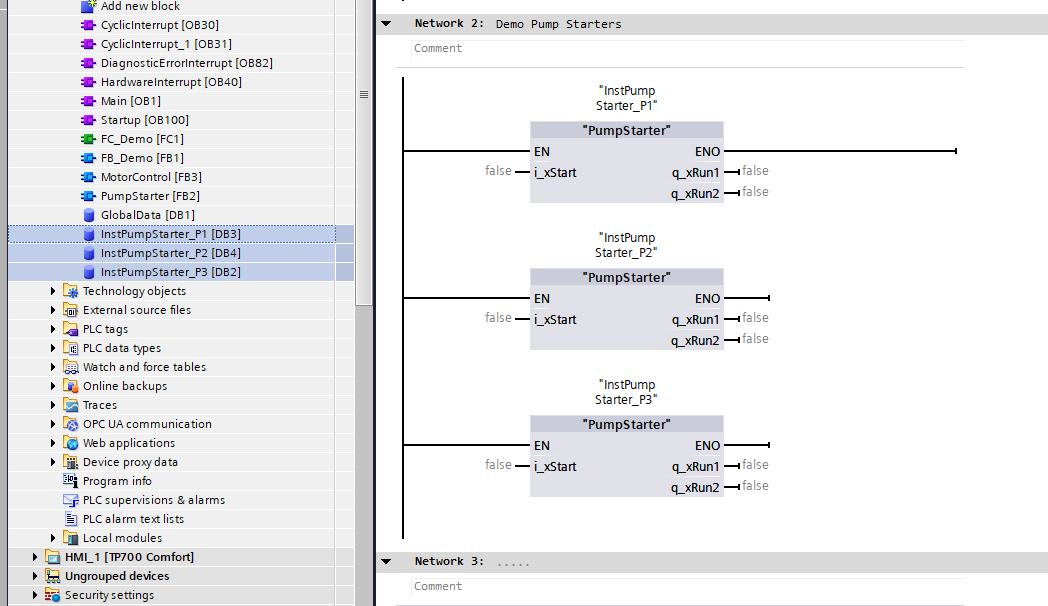
When you call that FB and give it an instance name — instPumpStarter_P01, instPumpStarter_P02, instPumpStarter_P03 — TIA creates an instance DB for each one. instPumpStarter_P01 tracks its own fault state, its own run-hours counter, its own interlock status. instPumpStarter_P02 does the same, independently, in its own instance DB. The logic is identical. The data is separate.
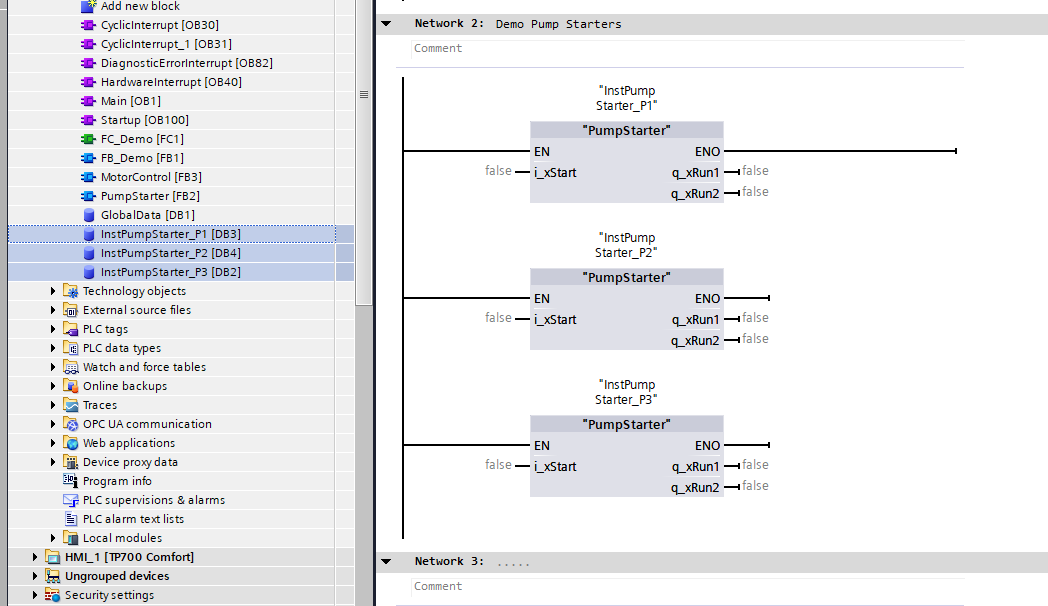
This is the same pump-starter FB, three times. You write it once. You use it three times. Each pump gets its own state.
The practical payoff: when a customer adds a fourth pump six months after commissioning, you instantiate the same FB, wire in the new I/O, and you are done. No new logic to write. No new data block to structure from scratch. The pattern scales with the hardware.
The analogy that I find helpful: the FB is the class, the instance is the object. If you have worked in any object-oriented language this is immediately recognizable. TIA Portal got there by a different path — the IEC 61131-3 standard, not C++ — but the structural result is the same. One definition, many independent instances, each carrying its own state.
Instance DB Lifecycle — What Gets Created, What Survives, What Doesn’t
TIA Portal can create the instance DB for you automatically when you type the CALL and provide an instance name. For most simple cases, that automatic creation is fine. You name the instance, TIA names the DB the same way, and the DB shows up in the Program Blocks folder.
For a single-instance FB — one FB, one dedicated DB — the lifecycle is straightforward: create the FB, call it, name the instance, TIA makes the DB, and that DB lives with the FB as long as the project does.
Multi-instance is the more interesting case. A function block can contain another function block inside it — declared as a Static variable in the parent FB’s interface. When you do this, the child FB’s data is stored inside the parent’s instance DB, not in a separate DB of its own. TIA Portal calls this a multi-instance.
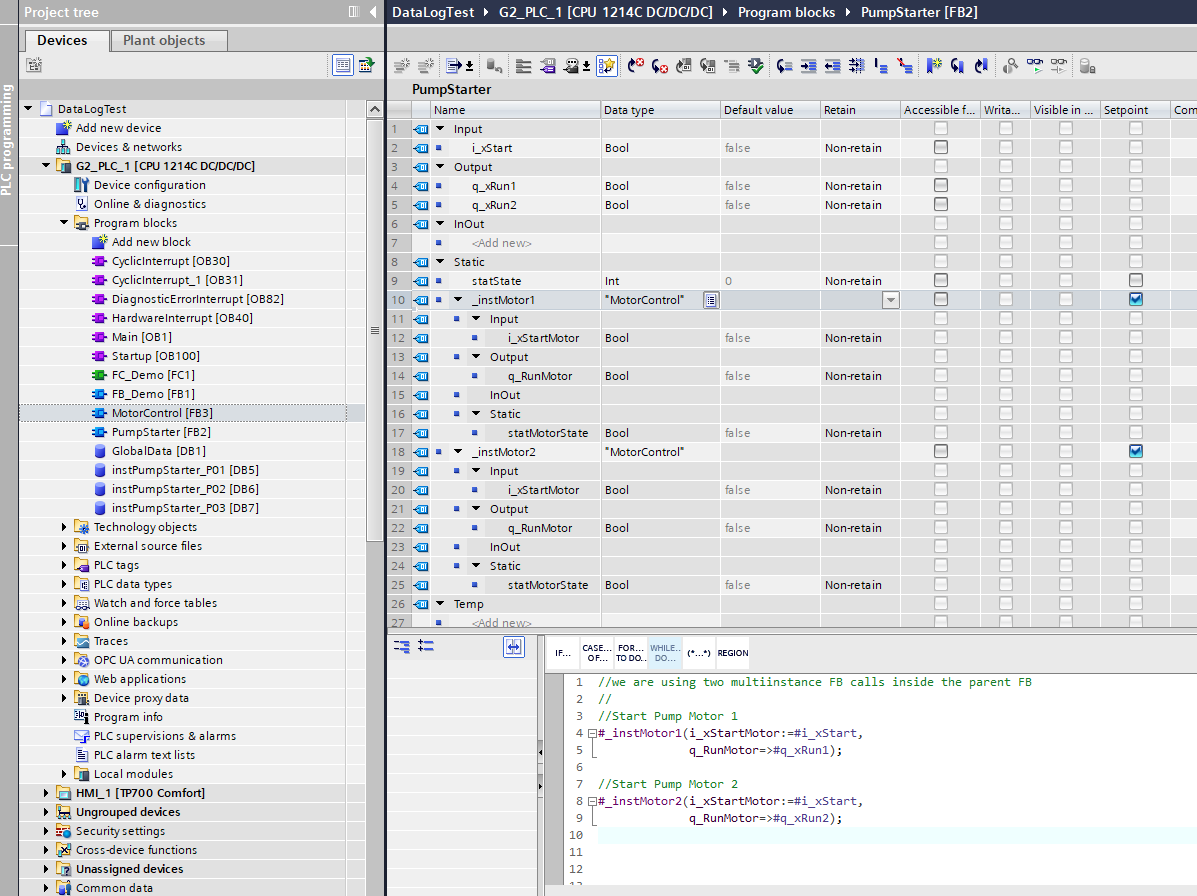
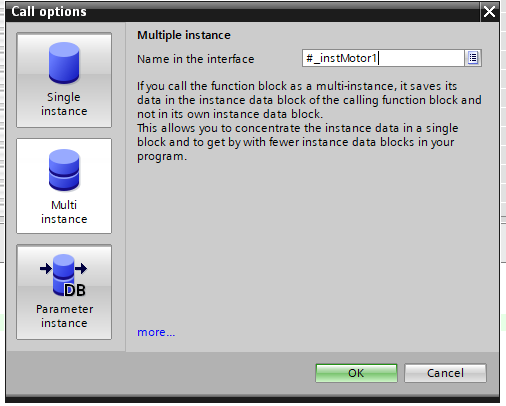
The Siemens documentation on multi-instances describes it directly: “When a function block calls another FB, its instance data can also be stored in the instance DB of the calling FB. This type of block call is referred to as a multi-instance.”
The practical consequence: a parent FB that contains two pump motors as multi-instances — _instMotor1 and _instMotor2, each declared as a Static variable of the same motor FB type — does not create separate DBs for the two motors. Both motors’ state lives inside the parent FB’s instance DB. One DB, all the state. Fewer DBs to manage, cleaner project tree.
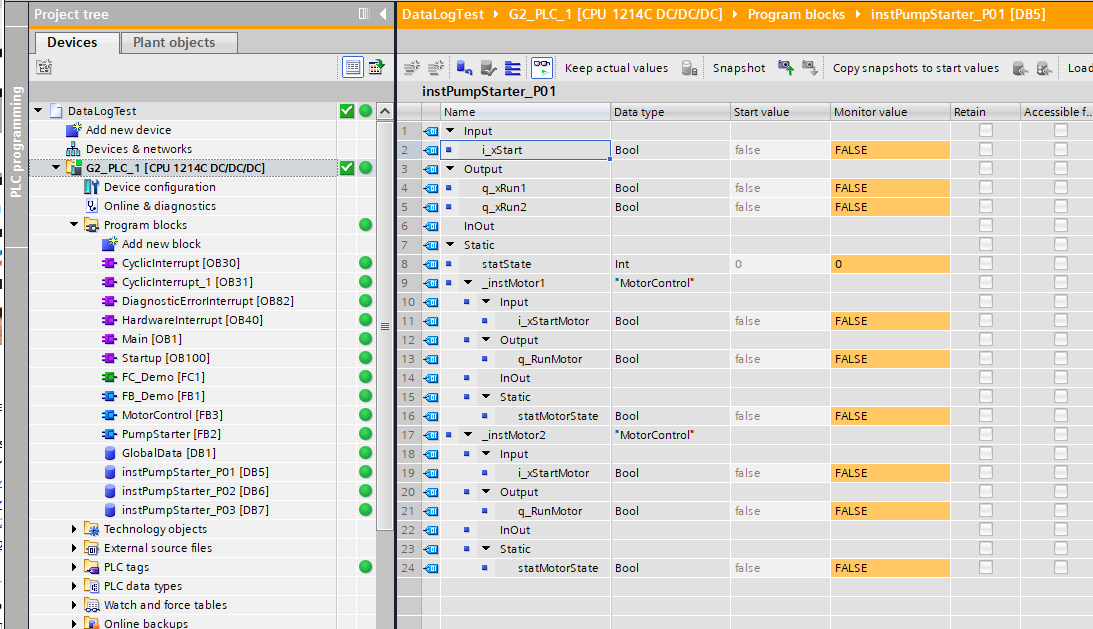
One thing to know about downloading and instance DBs: when you change an FB’s interface — add a new Static variable, remove one, change a type — TIA regenerates the instance DB structure. When that happens, every instance DB for that FB gets reset to start values. All of them. RETAIN variables included. This is the default behavior, well-known in the Siemens world, and it catches engineers during commissioning more than once.
There is an older, per-DB mechanism that softens this for the specific case of adding new tags. In DB Properties → “Download without reinitialization,” you set a Memory reserve (the default is 100 bytes of non-retentive space), and separately enable “Download without reinitialization for retentive tags” with its own Retentive memory reserve if you need to protect retentive values. When that reserve is active and you add a new Static variable to the FB, the new tag lands in the reserved space and existing tag values survive the download intact. The constraint is strict: you can only add tags within the reserved size. Rename an existing tag, change its data type, or exceed the reserved space, and the DB reinitializes. The block must have optimized access enabled. This mechanism works on S7-1200 (V4 firmware or higher), S7-1500, and S7-1200 G2 — I have observed it on both V19 with a 1215FC and V21 with an S7-1200 G2. Siemens documents the format requirement at TIA Portal V12 or higher, so this has been around for a long time.
TIA Portal V21 added a separate mechanism that handles broader structural changes: “Download without reinitialization of the actual values - even with structural changes to data blocks.” In the Load preview dialog you see a “Keep actual values” action. This one is S7-1500 only (firmware V4.1 required) — no equivalent for S7-1200 at the time of writing. It does not apply to data type changes, array dimension changes, string length changes, or retentivity changes — so if a Static variable’s UDT gains a new field, the option is not offered and values reset. It also requires memory reserve to be disabled on the DB. The two mechanisms occupy different layers: the memory-reserve approach is a per-DB property you configure in advance; the V21 “Keep actual values” is a one-shot action at download time and does not need the reserve pre-set.
In practice, before any FB interface change that touches important retentive state, the safe habit is to go online, capture a snapshot of the instance DB, and copy actual values to start values first. That works regardless of which mechanism is enabled.
My own rule is to use multi-instances wherever possible rather than single instances — one DB per FB tree rather than a DB per call. This reduces the number of data blocks and creates a cleaner containment model where each FB “owns” the state of the sub-blocks it uses.
Is This FB/FC Split Universal?
Roughly, yes — with platform-specific surface differences.
TIA Portal (Siemens): FB with instance DB, FC stateless. Covered above. Every FB call requires an instance name. The instance DB is a visible, monitorable object in the project tree.
Beckhoff TwinCAT 3 (IEC 61131-3): The split is structurally identical to IEC 61131-3. An FB in TwinCAT retains state across calls — the Beckhoff infosys documentation states it directly: “The values of the output variables and the internal variables are retained until the next execution.” A Function returns and loses all local data. “A function block is always called via an instance, which is a copy of the function block.” No separate visible DB file — instance data is embedded in the calling task’s memory, but the conceptual split is the same as TIA.
Codesys (IEC 61131-3): Same as Beckhoff at the language level — both follow the standard closely. The Codesys documentation: “The values of the output variables and the internal variables remain unchanged after execution until the next execution… It always calls a function block by means of an instance that is a copy of the function block.” Functions are stateless. Runtimes built on Codesys — WAGO, Eaton, ABB AC500, Bosch Rexroth — all inherit this behavior.
SIMATIC AX (Siemens): AX uses FUNCTION_BLOCK and FUNCTION keywords from the IEC standard. A FUNCTION_BLOCK in AX retains state across calls and must be instantiated before use — the AX documentation states: “It is also similar to a class in that it can have multiple instances, each of which preserves its own state. Function blocks also support methods.” A FUNCTION in AX is stateless — the AX documentation states directly: “A function is a POU that does not store its state, i.e. inputs, internals and outputs/results.” AX also adds a CLASS construct that goes further — fully object-oriented, with access modifiers and no VAR_INPUT/VAR_OUTPUT convention. For engineers coming from TIA Portal, the key takeaway is that AX FUNCTION_BLOCK maps cleanly to TIA FB — the state model is the same, the surface is just text-based rather than project-tree-based.
The pattern across platforms: every mature PLC environment distinguishes between code that remembers and code that doesn’t. The surface syntax differs. The concept is stable.
The Decision Rule
If the block needs to remember anything between calls — a timer, a counter, a latched fault, a mode, an accumulated value — use an FB.
If the block is a pure transformation of inputs to outputs — a calculation, a unit conversion, a bounds check — use an FC.
When in doubt, use an FB. Adding state later to an FC requires converting it to an FB and creating instance DBs, which is more disruptive than starting with an FB that turns out not to need Static variables. The cost of an unnecessary FB is a slightly larger project tree. The cost of discovering mid-project that your FC needs memory is a refactor.
One thing this article has not covered: how to design the FB’s interface well — what goes in Input versus InOut versus Static, how to structure the interface so another engineer can understand it later, what the V18 changes to InOut semantics mean in practice. That design-pattern layer is its own territory, which a future article on FB encapsulation and interface design will go into directly.
The instance DB story also has a bigger sibling: data blocks as first-class objects in a TIA Portal project, global DB design, and how that compares to how AX handles global data through VAR_GLOBAL. That is the next article.
What I Would Do Differently If Starting Now
For most projects I would set a default: function blocks for anything that represents a device or a control loop, functions for pure conversion or calculation utilities. The dividing line holds in practice. An analog input scaling function — FC. A pump controller with start/stop logic, runtime hours, and fault detection — FB, always.
The habit I picked up late is naming instances deliberately from the start. Instance names become instance DB names in the project tree. instPumpStarter_P01 versus DB47 is the difference between a project another engineer can navigate later and one that requires a scavenger hunt. TIA Portal will generate a default name — take the five seconds to override it.
If you have a different rule of thumb for when FCs actually earn their place over FBs — or a case where you deliberately reached for an FC where most people would have used an FB and it worked better — I want to hear it. The decision rule above is where I have landed; I am not certain it is the best answer for every situation.
Working on something similar?
I am Yuriy Mosiyenko — I design and program industrial control systems, mostly Siemens, as a one-person practice based in Bedford, Nova Scotia, working with customers across Canada. If you have a controls project you cannot staff internally, tell me what you are building.
