June 22, 2026 · tia-portalsiemensplc-programmingudtindustrial-automationcontrol-systems
The difficult part is not creating the UDT. The difficult part is deciding which values deserve to become part of that shared shape.
The previous article in this TIA Portal series covered the type system itself: elementary types, STRUCT, UDTs, DB fields, FB interfaces, structured tags, and the way a typed shape can move through a project.
This article starts one step later.
I already know I need a UDT. Now I have to decide what belongs inside it.
That decision matters more after the first version of the machine starts changing. New HMI fields appear. A parent sequence needs more feedback from a child block. A device needs another manual command. A commissioning value must survive a download.
If I treat a UDT as just a container, the structure grows by accident. If I treat every value as equal, the caller cannot tell the difference between a command, a status bit, raw hardware, communication data, and private implementation memory.
So my useful question is simple:
Where should this value live so the next change is easier to understand?
Name the Reusable Shape, Not the First Instance
I use a type prefix, then PascalCase, then a name that describes the reusable pattern:
typePumpInterface
typeWinchDriveStatus
typeTankLevelControllerInterface
typeConveyorSectionData
I try to avoid names that describe the first place where I happened to create the type:
typeProjectA_Pump01_Data
typeLine2_Header_Valve3
typeTemporaryPumpStructure
Those names may be accurate on the day I create them, but they age badly. If a pump FB and its interface type are reused on another project, typePumpInterface still makes sense. A type named after Pump01 or a project shorthand carries information that no longer helps.
This is not because TIA Portal cannot adapt UDT usage when the type changes. Siemens documents that PLC data types can be used repeatedly, and that tags based on a PLC data type are adapted when the PLC data type changes. Source: Siemens STEP 7 V21 - Using PLC data types (UDT).
The naming problem is not only compile behavior. It is readability and reuse.
The type name should tell me what shape of data I am looking at, not where the shape was first invented.
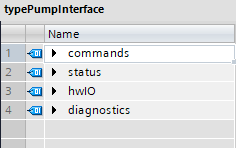
Figure 1. A TIA Portal V21 UDT editor view showing a block interface shape with predictable top-level sections.
Classify the Field Before You Add It
When a UDT changes, I do not start with the data type column. I start with ownership.
Who is allowed to write this value?
Who is expected to read it?
Is it a request, a result, a raw edge, a nested child interface, a protocol map, or private memory?
That usually decides the location before I argue about the exact name.
| If the value is… | I usually put it in… | Typical examples | Check before adding it |
|---|---|---|---|
| A request coming from the caller | commands | xEnable, xReset, rSpeedSetpoint, iModeRequest | Is this something the caller asks the block to do? |
| Information produced by the block for callers, HMI, diagnostics, or parent logic | status | xReady, xRunning, xFaulted, iState, wAlarmWord, rActualPressure | Would outside logic or an HMI rely on this value? |
| Raw or near-raw physical I/O at the device boundary | hwIO | i_xRunFeedback, i_rPressureRaw, q_xRunCommand | Is this still tied to a physical input or output? |
| A child block interface owned by a parent block | interfaces | interfaces.pump01, interfaces.pressureHeader, interfaces.inletValve | Does the parent coordinate this child as part of its structure? |
| Communication or protocol-facing data | commsIO or a protocol-specific section | mapped words, handshake bits, external command/status areas | Is this shaped by an external protocol rather than the block’s internal model? |
| Scratch state used only by the FB implementation | private FB Static or Temp, not the interface UDT | latches, one-shot memory, internal timers, private step helpers | Can I change this without any caller needing to know? |
The table is not a law. It is a way to prevent the UDT from becoming a drawer full of unrelated values. The point is that the same kind of value should land in the same kind of place.
Commands Are Requests, Not Evidence
commands is for intent coming into the block.
That sounds obvious until a project gets messy. A field called xStart is clearly a command. A field called xAutoStartRequest is also a command. A setpoint is a command too, even if it is a Real instead of a Bool, because it tells the block what target to use.
But feedback does not belong there.
If a drive is running, that should not be stored in commands.xRunning. If an operator selected auto mode, the request can live in commands.iModeRequest, but the accepted mode belongs in status.iActiveMode. The command tells the block what the outside world asked for. The status tells the outside world what the block accepted or what is actually true.
That split becomes useful during troubleshooting.
If commands.xStart is true but status.xRunning is false, I know the request exists and I can look for interlocks, faults, permissives, or hardware feedback. If I blur both ideas into one flag, the interface no longer tells me where the problem is.
Status Is Caller-Visible Truth
I used to be more cautious about exposing state machine values, counters, and alarm words in interface types. I still do not want every private scratch variable leaking out of a block.
But I do not use a blanket rule that says state must stay out of a UDT.
If the caller needs the state, it belongs in status.
An HMI may need to show whether a unit is off, starting, running, holding, or faulted. A parent FB may need to know whether a child device is ready before starting a sequence. Maintenance may need a remaining time, current step, diagnostic word, or alarm summary.
Those values are no longer private implementation details. They are caller-visible information.
The split I use is this:
interface.status.iState       // visible to the caller
_iState                       // private FB decision state
The first one is part of the UDT because outside code may read it. The second one stays inside the FB because the FB owns it.
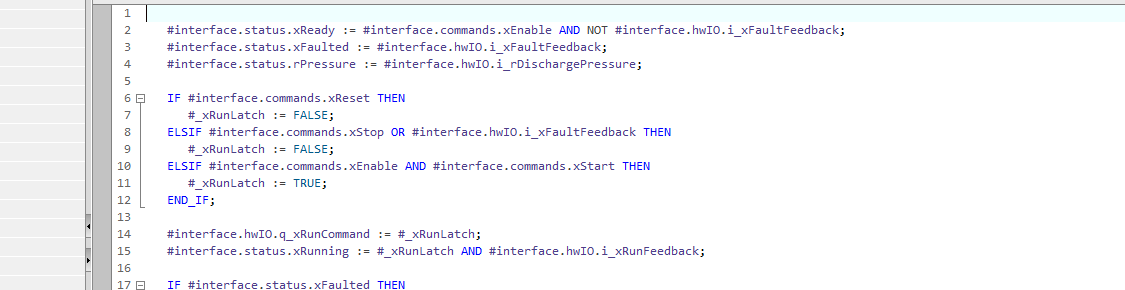
Figure 2. The interface UDT is used through #interface.commands, #interface.status, and #interface.hwIO, while private Static variables stay inside the FB.
Sometimes the two values are closely related. That is not automatically a mistake. The difference is ownership.
Outside code reads interface.status. The FB may reorganize its private implementation later.
Keep Hardware and Communication Edges Separate
For device-level blocks, I normally keep physical inputs and outputs under hwIO.
hwIO.i_xRunFeedback
hwIO.i_rPressureRaw
hwIO.q_xRunCommand
The exact prefix style is less important than the boundary being visible. I want to know when a value is still tied to a physical input, a physical output, or a raw signal that has not yet become an engineering decision.
That is a different problem from communication data.
If a device is driven through a protocol or an external controller, I may use commsIO or a protocol-specific name. The reason is the same: protocol-shaped data should not quietly mix with block status or internal logic state.
This keeps the interface honest. status.rPressure can be the pressure value that callers should reason about. hwIO.i_rPressureRaw or a communication input word can remain the edge where the value entered the block.
Use Nested Interfaces When the Parent Owns Children
A parent block has a different kind of UDT problem.
At the device level, I often care about commands, status, hardware, and diagnostics for one unit. At the parent level, I may care about the interfaces of child blocks:
interfaces.pump01.commands.xEnable
interfaces.pump01.status.xReady
interfaces.pressureHeader.status.rPressure
This is useful when the parent is responsible for orchestration. A tank system may own inlet valve, outlet valve, level controller, and alarm handler interfaces. A conveyor section may own several drive interfaces.
I do not nest interfaces just because nesting looks organized. I nest them when the parent block actually coordinates those children and the structure mirrors the equipment relationship.
Before Changing a UDT, Classify the Change
Not all UDT edits carry the same kind of risk.
Adding a status field is different from adding a command field. Renaming a field is different from adding a new one. Changing a type is different from changing a default value.
Before I change a UDT, I want to know what kind of change I am making:
| Change | What it usually means | What I check |
|---|---|---|
Add a status field | The block exposes more information | Is the default safe? Does the HMI or parent logic need it now? |
Add a commands field | The caller gets a new way to influence the block | Who writes it? What is the safe default? What happens if old logic leaves it false or zero? |
| Rename a field | Existing references must move to the new name | Compile results, HMI references, external access, source search, comments, alarms, and documentation |
| Remove a field | A caller may still depend on it | All locations of use, HMI tags, OPC UA or external clients, test code, and archived logic |
| Move a field between sections | Ownership changed | Is this really a command, status, hardware edge, or private value? |
| Change a data type | Meaning, range, memory layout, or external representation may change | Conversion logic, default/start values, HMI display, external consumers, and download impact |
This is where the design value of the UDT shows up. A new field under status tells me the block is reporting something new. A new field under commands tells me some caller can now ask the block to do something new.
Those are not the same engineering change.
Treat Structure Edits as Download Work
On a running machine, I do not treat a UDT structure edit as a casual text change.
Even when the edit is small, it can affect DB layout, start values, actual values, HMI access, and download behavior. The exact behavior depends on TIA Portal version, CPU, optimized access, DB settings, and what kind of structural change was made.
My conservative checklist looks like this:
- Identify every DB, FB interface, HMI tag, and external access point that uses the type.
- Decide whether the change is additive, a rename, a removal, a move, or a data type change.
- If the affected DB contains commissioning values, create a snapshot of actual values before the change.
- Copy important actual values to start values when that is the right maintenance path for the machine.
- Compile and read the messages instead of assuming the adaptation is clean.
- Read the load preview before downloading.
- If relying on “Keep actual values,” verify that the project version, CPU firmware, optimized access setting, and DB conditions actually support it.
Siemens documents the snapshot workflow and the workflow for copying snapshot values to start values. Sources: Creating a snapshot of the actual values and Copying the snapshot to the start values.
TIA Portal V21 also adds a “Keep actual values” action for structural changes to data blocks, but I do not treat that as universal protection. Siemens lists requirements and restrictions, including S7-1500 firmware V4.1, optimized access, no memory reserve, and limitations such as tag-name changes not retaining actual values. Source: Siemens STEP 7 V21 - SIMATIC STEP 7 what’s new.
So the practical rule stays conservative:
Structure changes deserve a maintenance mindset. The fact that the project compiles is not the same as knowing what will happen to useful values during a download.
Use Source Diffs to See the Real Change
For V21 projects, SIMATIC Source Documents are useful because they make engineering objects reviewable as text. Siemens describes SIMATIC SD as a text format for TIA engineering objects that can be edited in text editors and managed in version control systems. Source: Exporting and importing blocks in SIMATIC SD format.
The diff does not make the engineering decision. It makes the change visible.
This kind of change says the block reports one more fact:
 status:
   xRunning : Bool
+  xReadyForAuto : Bool
This kind of change says the caller can now request one more behavior:
 commands:
   xReset : Bool
+  xAutoStartRequest : Bool
This kind of change says existing references may break or change meaning:
-status.xFaulted
+status.xInFault
Those are simple examples, not a replacement for reviewing the actual exported source. The useful habit is to read the change by ownership. Did I add information? Did I add authority? Did I rename meaning? Did I move a value across a boundary?
That is a much better review than trying to remember what the UDT looked like last week.
Where I Land
The previous article was about understanding the TIA Portal type system. This article is about using that understanding when the design starts moving.
For UDTs, my current rules are:
Name the type for the reusable shape, not the first instance.
Put caller requests in commands.
Put caller-visible truth in status.
Keep physical and communication edges visible.
Use nested interfaces when a parent really owns child blocks.
Keep private FB implementation memory private.
Classify UDT edits before downloading, because a new status field, a new command, a rename, and a type change are different engineering events.
That is the value I want from a UDT. Not a prettier list of variables, but a structure that makes ownership, responsibility, and change risk easier to see.
If you structure TIA Portal UDTs differently, especially around parent-child interfaces, HMI access, or online changes, I want to hear the pattern. I would rather improve my model than defend one that only works in my own projects.
Discussion on LinkedIn: How I decide what belongs in a TIA Portal UDT.
Working on something similar?
I am Yuriy Mosiyenko — I design and program industrial control systems, mostly Siemens, as a one-person practice based in Bedford, Nova Scotia, working with customers across Canada. If you have a controls project you cannot staff internally, tell me what you are building.
