
March 25, 2026 · simatic-axtia-portalplc-programmingsiemensunit-testingaxunits7-1500
In TIA Portal, testing a function block means downloading to a PLC, opening a watch table, and manually checking values. In SIMATIC AX, you write automated tests that verify your code in seconds — on your PC, no hardware needed. This is unit testing, and for PLC programmers, it changes everything.
This article explains unit testing from the ground up — what it is, why TIA Portal does not have it, and how SIMATIC AX makes it part of your normal workflow. All examples come from a real temperature controller built as a learning exercise.
Who this is for: PLC programmers and automation engineers who work in TIA Portal and are exploring SIMATIC AX. No prior unit testing experience needed — but you should understand basic function block concepts (inputs, outputs, calling FBs).
This is the fifth post in my SIMATIC AX series. Previous posts: You Don’t Need AX Code IDE, Two Types of SIMATIC AX Projects, SIMATIC AX Project Structure Explained, and Namespaces in SIMATIC AX Explained.
The Problem Every TIA Portal Engineer Knows
You have written a function block. Maybe it is a temperature controller, a motor starter, or a valve sequencer. Now you need to check if it works.
In TIA Portal, the process looks like this:
- Download the project to a PLC or PLCSIM
- Open a watch table
- Manually type in input values
- Check if the outputs look right
- Change the inputs to test a different scenario
- Check again
- Repeat for every scenario you can think of
- Hope you did not forget an edge case
This is slow. It is manual. And worst of all — you only do it once. Two months later, you change something in the function block. Do you go through all those scenarios again? Honestly? Probably not. You test the thing you changed and hope the rest still works.
This is how every PLC programmer I know operates. Because TIA Portal gives you no other option.
What Unit Testing Actually Is
Unit testing is a simple idea that comes from the IT world. Instead of manually checking your code, you write a small program that checks it for you. Automatically. Every time.
A unit test says: “Give this function block these specific inputs, call it, and verify the outputs are exactly what I expect.”
That is it. No magic. Just automated checking.
The word “unit” means you test one small piece of code at a time — one function block, one function. Not the whole system. Just the unit.
What SIMATIC AX Brings to the Table
SIMATIC AX includes a built-in testing framework called AxUnit. It is part of the standard toolchain — you do not install anything extra.
Here is what makes it different from the TIA Portal experience:
Tests run on your PC. No PLC needed. No PLCSIM needed. The apax test command compiles your tests to run natively on your computer.
Tests run in seconds. Not minutes of downloading, configuring watch tables, and clicking through scenarios. Seconds.
Tests are repeatable. Run them once, run them a hundred times — same result every time. Change your code, run the tests again, instantly know if you broke something.
Tests are documented scenarios. Each test has a name that describes exactly what it checks. Your test file becomes a living specification of how your function block is supposed to behave.
A Real Example — Temperature Controller
I recently built a simple ON/OFF temperature controller in SIMATIC AX as a learning exercise. The function block has:
- An actual temperature input (from a sensor)
- A setpoint
- A hysteresis band (to prevent rapid switching near the setpoint)
- An enable signal
- Outputs: heating on/off, fault flag, error value
Standard industrial control logic. Nothing exotic.
After writing the function block, I wrote tests. Not because someone asked me to — but because in SIMATIC AX, this is the natural way to verify your work.
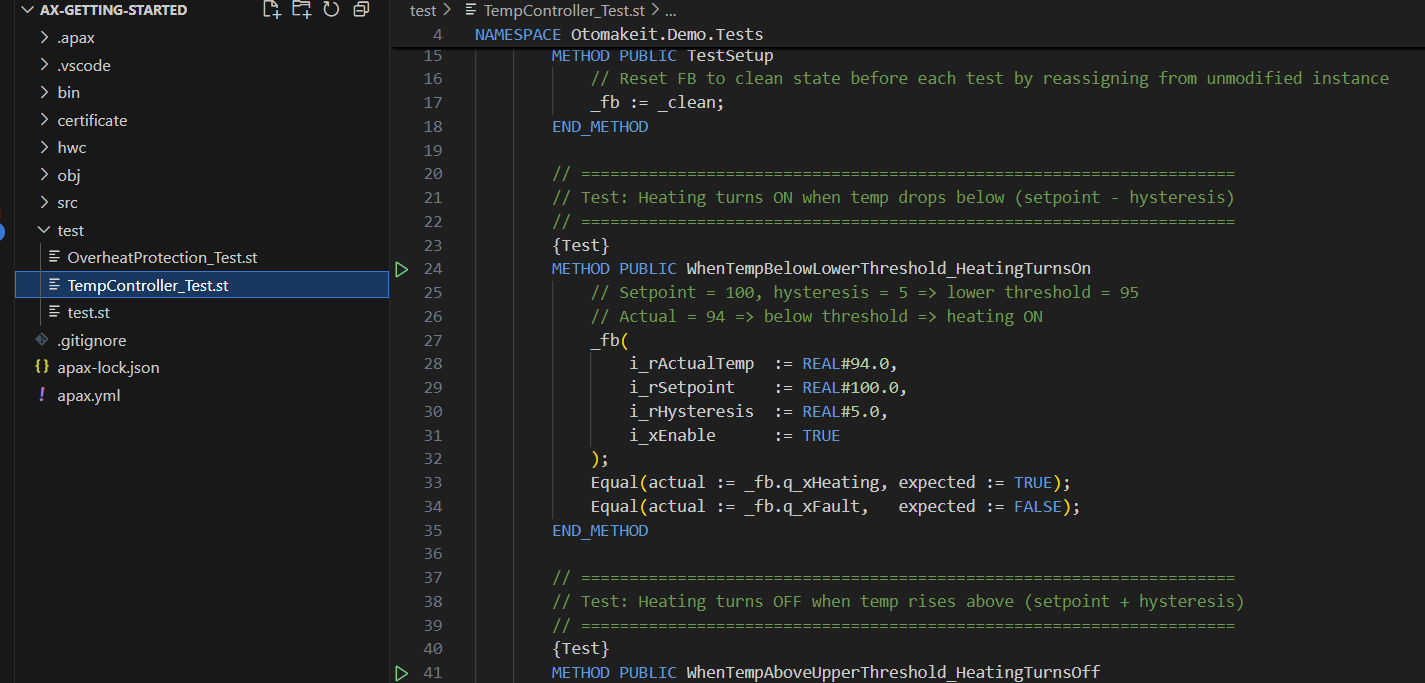
Here is what one test looks like:
{Test}
METHOD PUBLIC WhenTempBelowLowerThreshold_HeatingTurnsOn
    _fb(
        i_rActualTemp  := REAL#94.0,
        i_rSetpoint    := REAL#100.0,
        i_rHysteresis  := REAL#5.0,
        i_xEnable      := TRUE
    );
    Equal(actual := _fb.q_xHeating, expected := TRUE);
    Equal(actual := _fb.q_xFault,   expected := FALSE);
END_METHOD
Read this out loud and it almost explains itself:
“When the temperature (94) is below the lower threshold (setpoint 100 minus hysteresis 5 = 95), call the function block, and check that heating turns ON and there is no fault.”
That is one test. I wrote eight of them:
| Test | What it proves |
|---|---|
| Temperature below lower threshold | Heating turns ON |
| Temperature above upper threshold | Heating turns OFF |
| Temperature inside hysteresis band | Heating state does not change |
| Controller disabled | Heating is OFF regardless of temperature |
| Sensor reads above 500 degrees | Fault flag is set, heating OFF |
| Sensor reads below -50 degrees | Fault flag is set, heating OFF |
| Setpoint 100, actual 80 | Error equals +20 |
| Setpoint 100, actual 120 | Error equals -20 |
Eight scenarios. Eight things that must be true for my function block to work correctly. Each one runs automatically.
The Moment of Truth
Running the tests:
apax test
Result:
Test Results: 9 passed, 0 failed
Nine tests passed (eight for the temperature controller, plus one default test from the project template). Zero failures.
The entire process — compile the tests, run all nine scenarios, report results — took a few seconds. On my PC. No PLC involved.
Why This Changes Everything
Think about what just happened.
I proved that my temperature controller handles eight different scenarios correctly. Not by watching values in a table and saying “yeah, that looks right.” By writing explicit checks that a computer verified for me.
Now imagine I need to change the function block next month. Maybe the customer wants a different fault range, or I need to add a new feature. After the change, I run the same eight tests. If they all still pass, I know I did not break anything. If one fails, I know exactly which scenario broke and why.
This is the real power of unit testing — confidence during change. Not just verifying that new code works, but proving that existing code still works after you touched it.
What This Means for TIA Portal Engineers
If you are working exclusively in TIA Portal today, you do not have this capability. There is no AxUnit equivalent in TIA. There is no apax test command. The only testing available is manual — download, watch table, visual inspection.
SIMATIC AX is the first Siemens tool that brings automated testing to PLC programming. For teams managing large S7-1500 codebases, this means fewer regression bugs reaching commissioning — where every hour of troubleshooting costs real money. For engineers who work on S7-1500 projects, this alone might be reason enough to explore it.
I am still learning SIMATIC AX myself. Coming from years of TIA Portal work, unit testing is the feature that surprised me the most. Not the VS Code environment, not the CLI, not the namespaces — but the ability to prove my code works before it ever touches a PLC.
What is Next
This is the first article in a series on unit testing in SIMATIC AX. In the next article, I will walk through how to actually write unit tests — the structure of a test file, the testing patterns, and what to test versus what to leave for commissioning on real hardware.
If you are exploring SIMATIC AX or thinking about it for your next S7-1500 project, I would be happy to compare notes. Connect with me on LinkedIn.
Working on something similar?
I am Yuriy Mosiyenko — I design and program industrial control systems, mostly Siemens, as a one-person practice based in Bedford, Nova Scotia, working with customers across Canada. If you have a controls project you cannot staff internally, tell me what you are building.
